As I’ve been slowly working on getting the PIC file format code into a releasable state, another title popped up. Well not so much another title, but a rare, and nearly forgotten, version of a title. In this case it’s a 16 colour EGA specific release, while the version we’ve previously looked at was targeted for 256 colour VGA. The title in question? “Gunship 2000” (GS2K) from 1991. The title is interesting in the fact that, like “F117A”, it relies on the original PIC format and not the later ones MicroProse was already using with other titles at the time. Likely due to being based on older game engine code. As such, I didn’t expect much, why would it be any different than the version we already looked at? Guess someone at MicroProse didn’t get the memo. 🤣
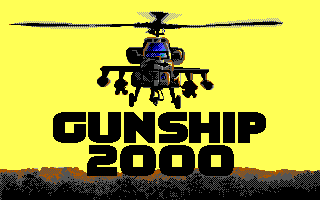
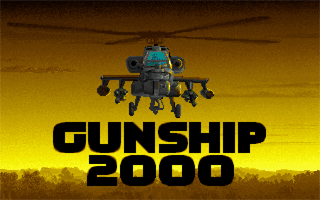
Just like the VGA version, the EGA version of GS2K only exposes a small number of PIC assets in the install directory, the rest are contained within a CAT file. The exposed assets mostly appear to be cockpit overlay images.
-rw-rw-rw-  6733   20 Jan  1992 APA_CPIT.PIC
-rw-rw-rw-  5218    6 Nov  1991 BLK_CPIT.PIC
-rw-rw-rw-  5845    6 Nov  1991 COB_CPIT.PIC
-rw-rw-rw-  5633    6 Nov  1991 COM_CPIT.PIC
-rw-rw-rw-  4405   20 Jan  1992 DEF_CPIT.PIC
-rw-rw-rw-  5458    6 Nov  1991 KIA_CPIT.PIC
-rw-rw-rw-  2733    4 Nov  1991 REPLAY.PIC
-rw-rw-rw-  424172 15 Nov  1991 GS2000.CAT
The astute among you might have noticed the two assets with 1992 dates, despite me saying this was a 1991 release. The game had a patch released in early 1992 that appears to have updated a few of the assets. With that said, we’ll start with the images in the open before extracting anything from the CAT file.
First Look
We’ve spent a fair amount of time developing code for the PIC format, we might as well dive right in and send it to see what we get. It’s not like we’re expecting anything new at this point… right?
% pic2png APA_CPIT.PIC

MicroProse PIC to PNG File Converter
Opening: 'APA_CPIT.PIC' (6733 bytes)
Attempting to determine size of PicV1 image
Unable to determine size of PicV1 image, Please include size in command line
Well that was unexpected, we’ve developed code to determine the decompressed size and use that to set the image dimensions for PicV1 images, as they don’t include dimension data. We’ve always seen the PicV1 images be full-screen images, so it should have found a fit. Maybe they’re using a non-standard size here? Let’s try forcing it.
% pic2png APA_CPIT.PIC -r320x200

MicroProse PIC to PNG File Converter
Opening: 'APA_CPIT.PIC' (6733 bytes)
Image is: 320x200
Decompressing image
Error: PIC failure 04
done
That’s very strange! What’s going on here? An error code of 04 indicates that the image buffer ran out of space before the compressed stream ended. So the image is more that 320×200? We know the game itself runs at 320×200, maybe there is some extra data appended to the end of the image. The program won’t complain if the image buffer has extra space, only if there’s not enough. Let’s try double height.
% pic2png APA_CPIT.PIC -r320x400

MicroProse PIC to PNG File Converter
Opening: 'APA_CPIT.PIC' (6733 bytes)
Image is: 320x400
Decompressing image
256 Colour image
done
Now that seems to have done the trick. Though odd it is being determined to be 256 colour. The code range-checks the colours, as this is EGA it should only be 16 colour, but maybe that’s in the extra data. With that said, let’s see what we got, as we have an image now.
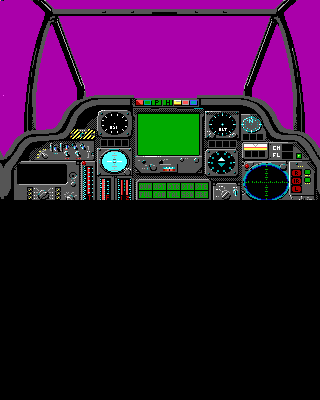
It appears the encoding is as we expect for PicV1, but odd that our sizing code failed as we don’t see anything below the image and the image is clearly 320×200. Maybe I have a bug, though it has worked fine for all the other images I’ve passed in. Let’s try with 201 lines, maybe there is a one-off error somewhere?
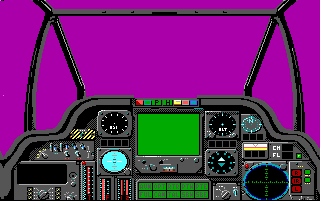
Well that is certainly better at first glance. Though there is the black line at the bottom, to allow for the “extra data”, but we don’t see anything there. There is also the bright magenta pixel about halfway down, not sure what that’s about.
After looking at it more, I noticed some more weird pixels at the top left corner, and the image on the left edge seems off, there’s a weird warp near the bottom, almost like everything is shifted over a few pixels. More investigation is needed I think.
Digging Deeper
After adding a few debug prints to the code, and running a few of the images through it, it appears we are always getting exactly 4 extra bytes than we expect for a 320×200 image. Time to dig into the hex of the decoded data to see what’s there. Initially I was thinking the extra data was appended to the end of the image, but given we are seeing what looks like a shift in the image data, and we have several garbage pixels in the top left, it looks like we may have prefixed data in this case.
          00 01 02 03 04 05 06 07  08 09 0A 0B 0C 0D 0E 0F
00000000  40 01 C8 00 05 05 05 05  05 05 05 05 05 05 05 05  @...............
00000010  05 05 05 05 05 05 05 05  05 05 05 05 05 05 05 08  ................
00000020  08 00 00 00 00 00 08 00  00 00 00 00 07 07 05 05  ................
00000030  05 05 05 05 05 05 05 05  05 05 05 05 05 05 05 05  ................
00000040  05 05 05 05 05 05 05 05  05 05 05 05 05 05 05 05  ................
00000050  05 05 05 05 05 05 05 05  05 05 05 05 05 05 05 05  ................
00000060  05 05 05 05 05 05 05 05  05 05 05 05 05 05 05 05  ................
We know we have 4 extra bytes, and if we ignore those 4, the rest of the data looks to be what we would expect for a 16 colour image. As for the four bytes, those values look strikingly familiar!
          00 01 02 03 04 05 06 07  08 09 0A 0B 0C 0D 0E 0F
00000000  40 01 C8 00 05 05 05 05  05 05 05 05 05 05 05 05  @...............
00000010  05 05 05 05 05 05 05 05  05 05 05 05 05 05 05 08  ................
00000020  08 00 00 00 00 00 08 00  00 00 00 00 07 07 05 05  ................
00000030  05 05 05 05 05 05 05 05  05 05 05 05 05 05 05 05  ................
00000040  05 05 05 05 05 05 05 05  05 05 05 05 05 05 05 05  ................
00000050  05 05 05 05 05 05 05 05  05 05 05 05 05 05 05 05  ................
00000060  05 05 05 05 05 05 05 05  05 05 05 05 05 05 05 05  ................

40 01: 0x0140 (320) Image Width
C8 00: 0x00c8 (200) Image Height
If we take those four bytes and split them into two 16 bit values, we can see that we get the image dimensions. That’s new! We’ve not seen MicroProse put the header inside of the compressed stream before, at least not with PIC images. It looks like we have a new sub-variant of PicV1 here. I guess we’ll call it PicV1.5 as it is clearly a PicV1 based image, we don’t see any of the other artifacts we see with other versions of the format. We’ll need to somehow account for this in our code now, as we have extra data within the compressed stream itself, not something I had anticipated. We’ve accounted for all four bytes of extra data we’re seeing, so this should be the only hurdle left for this variant.
Adapt and Overcome
The first challenge here is that the format is indistinguishable from a normal PicV1 file, until the data has been decompressed. Now one of the things that I had been working on with my code was to make the code able to determine the image size (of a PicV1 image) without the user having to provide it. To do this I would run the decompression engine, discarding the output, only tracking the number of bytes decompressed. I then compared the size to the expected sizes for standard full-screen resolutions. This always worked, as the images were always full-screen. Now we potentially have some prefix data, so with a simple modification we can preserve the first four decompressed bytes, and then look at those if the size is not of a standard full-screen image. We can then calculate the expected size based on the dimension data and compare that to the actual decompressed size. If it matches we are PicV1.5, otherwise we are still unknown.
// NULL destination stream writer, that only counts bytes
// will capture up to the specified size of bytes, and just count after
int null_putc(int val, memstream_buf_t *buf) {
    if(buf->pos < buf->len) buf->data[buf->pos] = val;
    buf->pos++;
    return 0;
}
A single line added above manages our partial capture in the null_putc()routine. Now in our actual size calculation code we need a small buffer and add that into our null stream.
    // allocate our image buffer for counting only, and potential dimension data
    uint16_t dims[2];
    memstream_buf_t dst = {sizeof(dims), 0, (uint8_t *)dims};
Next is to adjust our sizing code to use the data, if it’s there, and change the type if necessary.
// apply dimensions here based on calculated size
    rval = set_dims_from_size(dst.pos, pic);
    if((PIC_NOERROR == rval) || (PICV1 != pic->version)) {
        return rval;
    }
    // try to see if we might be a V1.5
    size_t expect = dims[0] * dims[1] + 4; // calculate the size plus the "header"
    if(expect != dst.pos) { // not a match, then this must not be PicV1.5
        return rval;
    }
    // otherwise if we got here it looks to be PicV1.5
    pic->width  = dims[0]; // 1st 16 bit value is the width
    pic->height = dims[1]; // 2nd 16 bit value is the height
    pic->version = PICV15; // update the version to 1.5
    return PIC_NOERROR;
The next challenge is in the actual decompression. Currently the code expects that the image is the only thing in the compression unit, and as such just uses the image buffer as-is. The problem now is the image buffer is not large enough on its own. We could try making some sort of special case to ignore the first four bytes, but that feels like too much of a hack. Instead I think it’s better to adjust our underlying image buffer to allow for extra metadata. Should be a pretty simple change. The other option would be to use an extra intermediary buffer, which I’d rather not do.
/// @brief neutral container for storing paletted images
/// default arrangement is [pixel data][extra data][palette data]
/// pointers may be re-ordered if desired
/// code should use the pointers and not assume any arrangement in
typedef struct {
    unsigned width;       // width of image in pixels
    unsigned height;      // height of image in pixels
    unsigned colours;     // number of palette entries
    int      transparent; // index of transparent colour, -1 if not used
    size_t   image_size;  // size of image in bytes.
    size_t   extra_size;  // size of additional data allocation space
    img_pal_entry_t  *pal;// pointer to the palette RGB data in buf[]
    uint8_t  *extra;      // pointer to the extra data in buf[]
    uint8_t  *pixels;     // pointer to the pixel data in buf[]
    uint8_t  buf[];       // our allocated data buffer
} pal_image_t;
Originally we had the pixel data as the buffer itself, and the palette would just be tacked onto the end. Now we’ve set up a separate buffer var, and then have pointers into it for each of the data sections, this allows for the flexibility of re-ordering things as necessary, instead of having to move the data around. This changed required a few minimal changes to any code using the pal_image_t type, mainly for allocation, to allow for the extra parameter for the extra data amount. With that done, let’s see if it works.
% pic2png APA_CPIT.PIC

MicroProse PIC to PNG File Converter
Opening: 'APA_CPIT.PIC' (6733 bytes)
Attempting to determine size of PicV1 image
File appears to be PicV1.5
Image is: 320x200
Decompressing image
16 Colour image
done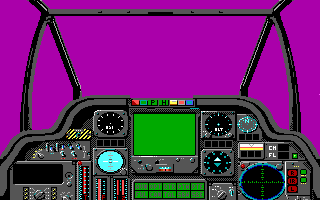
Well that seems to have worked, we have the correct type identification, number of colours, and size, and the decode looks good now too, the shift is gone. We still have that one bright magenta pixel (now on the right), though that looks to be in the data itself. All the cockpit images seem to have that dot around the halfway mark. It looks to define the parting line of the canopy section of the image, and the lower cockpit panels section.
Can you see the difference?
Now that we have it decoding correctly, let’s take a look at the differences between the patched and unpatched versions of the two cockpits that changed. I’ll render using transparency set to 5 (the magenta fill we see)

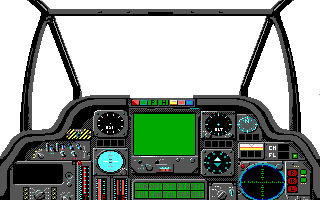
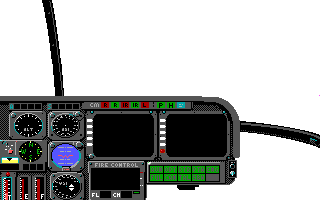
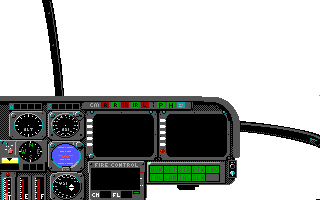
I don’t see any obvious changes in any of the corresponding images, so whatever it is it must be pretty subtle. Might as well look at the remaining ones while we’re at it.
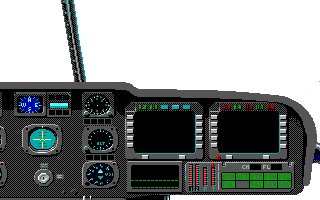
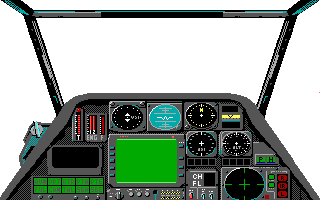
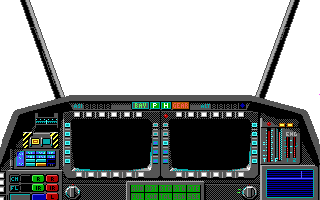
Update: Our friend PixelWings has confirmed the suspicion that the magenta dot signifies the break between the canopy and the panel areas. Pressing [ALT]+S switches between rendering modes, and in one of those modes, the canopy is not rendered in. There is also a performance setting that will render only the top portion of the 3D scene, which also stops at the break point. BTW if you want to see the EGA version in action, check out his YouTube video playthrough with it.
Checking under the bed
Now the question is are there any more surprises hiding in the PIC assets inside the CAT file? Good thing we have already decoded the CAT format, so checking is pretty easy, and it looks like the CAT file is not some new variant here.
Opening: 'GS2000.CAT'	File Size: 424172 bytes
Catalogue contains 70 items
 1:      ADS.PIC   8633  15 Nov 1991  08:34:12 [@00000692]
 2:     BASE.PIC   7247  15 Nov 1991  08:34:18 [@0000284b]
 3:  BASE_AN.PIC  11650  15 Nov 1991  08:34:22 [@0000449a]
 4: BASE_AN1.PIC   8410  15 Nov 1991  08:34:28 [@0000721c]
 5: BASE_AN2.PIC   5279  15 Nov 1991  08:34:32 [@000092f6]
 6: BPATCHES.PIC  12842  15 Nov 1991  08:34:38 [@0000a795]
 7: COMMISSN.PIC   8302  15 Nov 1991  08:34:42 [@0000d9bf]
 8:  COMM_AN.PIC   4346  15 Nov 1991  08:34:46 [@0000fa2d]
 9: COMMANDR.PIC   6989  15 Nov 1991  08:34:50 [@00010b27]
10: COMMAND2.PIC   6302  15 Nov 1991  08:34:56 [@00012674]
11: EURO6MAP.PIC   4537  15 Nov 1991  08:35:00 [@00013f12]
12: EURO7MAP.PIC   4920  15 Nov 1991  08:35:04 [@000150cb]
13: EURO8MAP.PIC   5121  15 Nov 1991  08:35:08 [@00016403]
14:    FIELD.PIC   7330  15 Nov 1991  08:35:12 [@00017804]
15:   FIELD2.PIC  11402  15 Nov 1991  08:35:18 [@000194a6]
16: FIELD_AN.PIC   3885  15 Nov 1991  08:35:22 [@0001c130]
17: FIELD_A2.PIC   3564  15 Nov 1991  08:35:26 [@0001d05d]
18: GULF3MAP.PIC   4584  15 Nov 1991  08:35:30 [@0001de49]
19: GULF4MAP.PIC   4112  15 Nov 1991  08:35:34 [@0001f031]
20: GULF5MAP.PIC   4009  15 Nov 1991  08:35:38 [@00020041]
21:    HANDS.PIC   2110  15 Nov 1991  08:35:42 [@00020fea]
22:    HAPPY.PIC  15349  15 Nov 1991  09:07:30 [@00021828]
23:  HAPPY_2.PIC  13673  15 Nov 1991  09:07:36 [@0002541d]
24: HAPPY_AN.PIC   4188  15 Nov 1991  09:07:40 [@00028986]
25:     JUMP.PIC   7728  15 Nov 1991  08:36:00 [@000299e2]
26: JUMPCMOH.PIC   9793  15 Nov 1991  08:36:06 [@0002b812]
27:      KIA.PIC   9039  15 Nov 1991  08:36:10 [@0002de53]
28:   KIA_AN.PIC   1597  15 Nov 1991  08:36:14 [@000301a2]
29:     LOSE.PIC  14376  15 Nov 1991  08:36:20 [@000307df]
30:    MEDAL.PIC   3628  15 Nov 1991  08:36:24 [@00034007]
31:     MEMO.PIC   1525  15 Nov 1991  08:36:28 [@00034e33]
32: MENU0021.PIC   4023  15 Nov 1991  08:36:32 [@00035428]
33: MENU3037.PIC   2277  15 Nov 1991  08:36:36 [@000363df]
34: MENU5057.PIC   1778  15 Nov 1991  08:36:40 [@00036cc4]
35: MENU8085.PIC   1479  15 Nov 1991  08:36:44 [@000373b6]
36:     PAGE.PIC   3007  15 Nov 1991  08:36:48 [@0003797d]
37:    PAGE2.PIC   3524  15 Nov 1991  08:36:52 [@0003853c]
38:  PATCHES.PIC  10330  15 Nov 1991  08:36:56 [@00039300]
39:    PILOT.PIC  14927  15 Nov 1991  08:37:02 [@0003bb5a]
40:  POINTER.PIC    652  15 Nov 1991  08:37:06 [@0003f5a9]
41:    RANKS.PIC  10184  15 Nov 1991  08:37:12 [@0003f835]
42:  REALITY.PIC   5254  15 Nov 1991  08:37:16 [@00041ffd]
43: REALI_AN.PIC   4173  15 Nov 1991  08:37:20 [@00043483]
44: REAL_PCH.PIC   6315  15 Nov 1991  08:37:24 [@000444d0]
45:   REPLAY.PIC   3178  15 Nov 1991  08:37:28 [@00045d7b]
46:   RESCUE.PIC   5897  15 Nov 1991  08:37:32 [@000469e5]
47:  RESC_AN.PIC   5048  15 Nov 1991  08:37:36 [@000480ee]
48: RESC_AN1.PIC    517  15 Nov 1991  08:37:40 [@000494a6]
49:   ROSTER.PIC   1533  15 Nov 1991  08:37:44 [@000496ab]
50:      SAD.PIC   8791  15 Nov 1991  08:37:50 [@00049ca8]
51:   SAD_AN.PIC   1053  15 Nov 1991  08:37:52 [@0004beff]
52:    SAD_2.PIC   9243  15 Nov 1991  08:37:58 [@0004c31c]
53:     SHIP.PIC   7663  15 Nov 1991  08:38:02 [@0004e737]
54:  SHIP_00.PIC   6463  15 Nov 1991  08:38:06 [@00050526]
55:  SHIP_01.PIC   6738  15 Nov 1991  08:38:12 [@00051e65]
56:  SHIP_02.PIC   4015  15 Nov 1991  08:38:16 [@000538b7]
57:  SHIP_03.PIC   4235  15 Nov 1991  08:38:20 [@00054866]
58:  SHIP_04.PIC   3955  15 Nov 1991  08:38:24 [@000558f1]
59:  SHIP_05.PIC   5419  15 Nov 1991  08:38:28 [@00056864]
60:  SHIP_06.PIC   4222  15 Nov 1991  08:38:32 [@00057d8f]
61:  SHIP_07.PIC   2523  15 Nov 1991  08:38:36 [@00058e0d]
62: TARMC_00.PIC   3011  15 Nov 1991  08:38:40 [@000597e8]
63: TARMC_01.PIC   2262  15 Nov 1991  08:38:44 [@0005a3ab]
64: TARMC_02.PIC   2680  15 Nov 1991  08:38:48 [@0005ac81]
65:     TENT.PIC  14997  15 Nov 1991  08:38:54 [@0005b6f9]
66:  THEATER.PIC   6206  15 Nov 1991  08:38:58 [@0005f18e]
67:   TITLE1.PIC   1449  15 Nov 1991  08:39:02 [@000609cc]
68:   TITLE2.PIC   3052  15 Nov 1991  08:39:06 [@00060f75]
69:   TITLE3.PIC   3788  15 Nov 1991  08:39:10 [@00061b61]
70:      WIN.PIC  20159  15 Nov 1991  08:39:16 [@00062a2d]
% pic2png LOSE.PIC
MicroProse PIC to PNG File Converter
Opening: 'LOSE.PIC' (14376 bytes)
Type is: PicV1
Image is: 320x200 Packed
Decompressing image
16 Colour image
done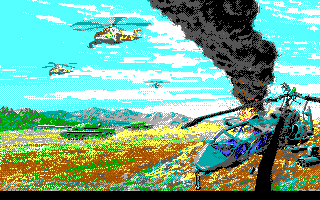
Now that is interesting, we seem to have reverted back to the original format, and not using the PicV1.5 version we just identified. A little strange to use two versions of the format in the same title, but we have seen this at least once before. Let’s look at a few more.
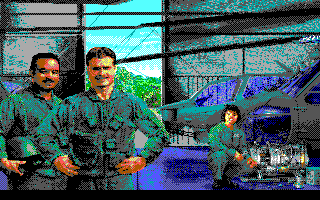
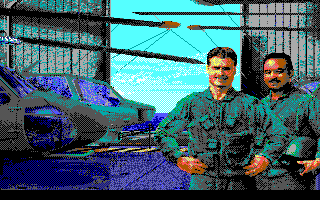
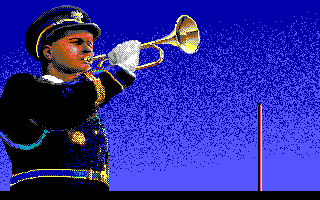
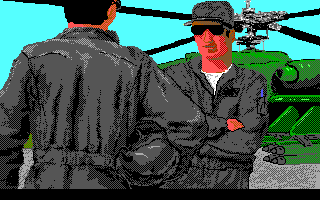
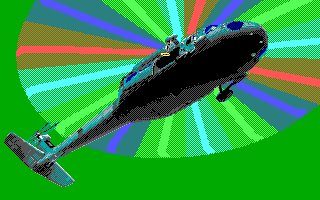
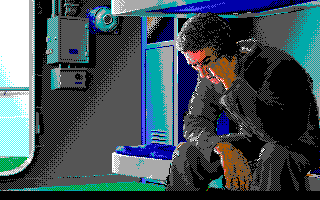
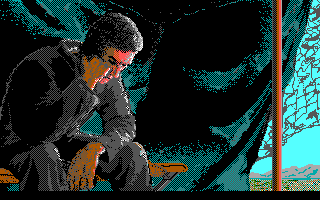
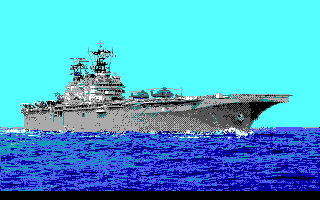
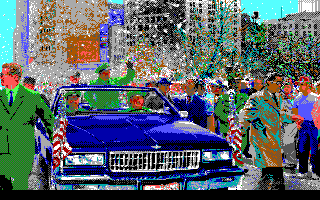
Fairly typical good quality art we’ve come to expect from MicroProse, especially considering the limited palette here. They are all in the original PicV1 format, so no more surprises.
I think that concludes this little adventure, and surprise variant. Best as I’ve been able to determine the PicV1.5 format is only used with the cockpit images of the EGA version of Gunship 2000. I have a little more work to do on the PIC code before I feel ready to release it, but it should be out fairly soon now. I hope to have everything wrapped up before the end of the year, so we can start on new adventures in the new year.


 Ouch my eye!
Leave a reply to Bobblen Cancel reply