Stardate -298165.9: As is often the case, new adventures in reverse engineering are inspired by random comments that I stumble across. I was enjoying a lazy Sunday when I stumbled across this in one of the groups I participate in.

The “request” (it wasn’t directed at me specifically) comes as a result of the release of DiskMaster 2 earlier in the day. I’ve never heard of the NGF format before, so my interest was definitely piqued. I was also a bit bored, so I decided to take a look.
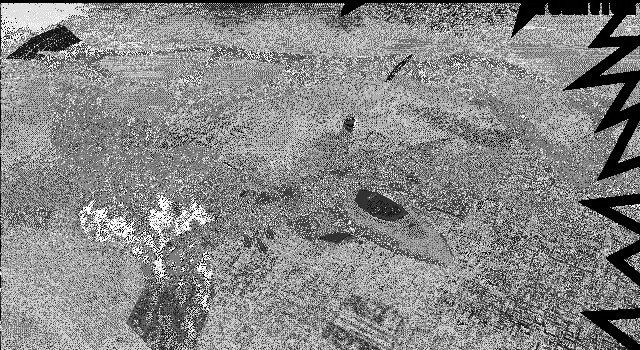
They didn’t just pose the question, they provided a preview of the contents, which only helped capture my interest. Not sure how the preview was generated, whether they used Gimp, or it’s a feature of DiskMaster. But it’s clear the decode is good, I can see a proper image in all that noise, all it needs is a palette. So I asked for the file, and they sent it over. This one should be easy!
Origins of NGF
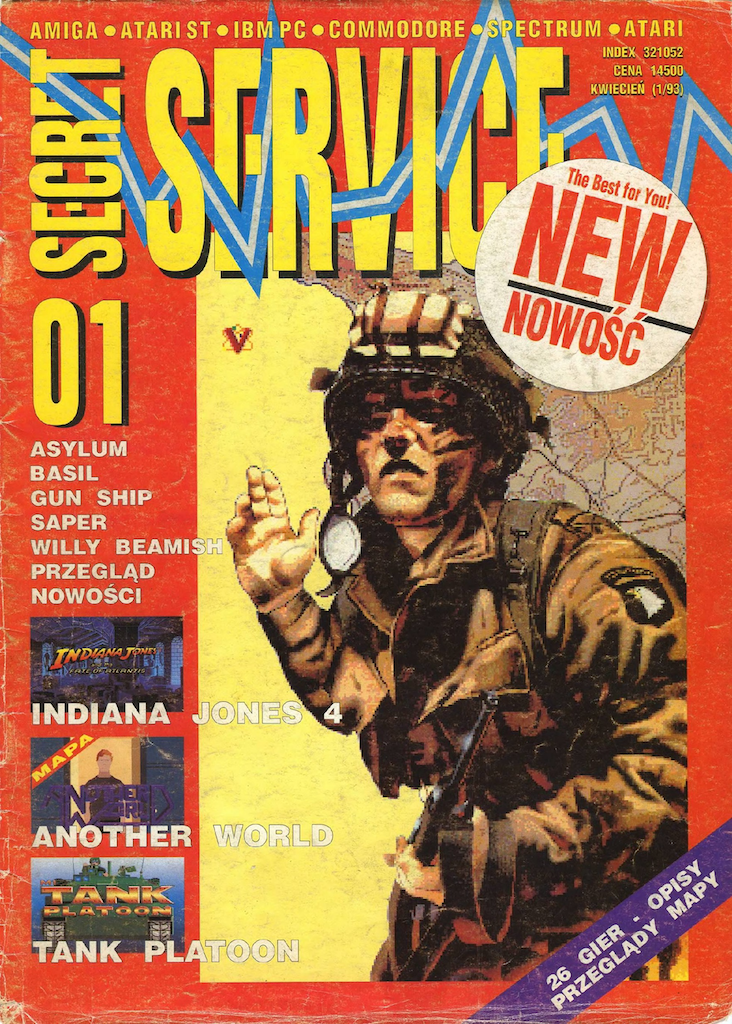
Today’s mystery format comes by way of a gaming magazine called “Secret Service” from Poland, published by ProScript in the 1990’s. The magazine apparently also included CD’s with their monthly issues, this is where we find our files of interest. To the best of my knowledge this format only shows up with the “Secret Service” CD’s, so it looks to be unique to them. As such I will attribute this format to ProScript the publisher of the magazine. I have no idea what “NGF” might stand for. Chances are that it’s an acronym, or short form, for something in Polish — which I don’t speak. If any of my Polish readers want to chime in with thoughts, or further details, I will be happy to add them. With that said, now we know where it came from, now lets see if we can figure this one out.
First Look
While I suspect we will figure this one out largely with a different approach than normal, I think we’ll start off with the traditional approach in the hex editor.
Hex View  00 01 02 03 04 05 06 07 08 09 0A 0B 0C 0D 0E 0F
00000000  1F 8B 08 00 00 00 00 00 00 00 EC BD 3F 6C 1B C9  ............?l..
00000010  BA F6 E9 FB C9 58 9F F0 6A 9D 8C 15 09 E7 8B 4E  .....X..j......N
00000020  42 40 03 25 CE D6 C0 62 17 E8 60 71 E9 89 2E 93  B@.%...b..`q....
00000030  06 8C 8E 4C 03 0A 04 6C E2 E0 2C E8 D0 A9 C3 8E  ...L...l..,.....
         ⋮                                                ⋮
00029F80  2D BB 6E 10 30 FA 75 83 96 A5 ED 31 02 46 BF 1E  -.n.0.u....1.F..
00029F90  03 6A D9 75 83 80 D1 AF 1B B4 2C 6D 8F 11 30 FA  .j.u......,m..0.
00029FA0  F5 18 50 CB AE 2B 04 3C F9 F7 37 57 62 C3 44 AF  ..P..+.<..7Wb.D.
00029FB0  12 05 00                                         ...

1F 8B: GZIP Signature
08:    Compression Method - Deflate
00:    Flags
00 00 00 00: modification time (not set)
00:    Extra Flags
00:    Operating System ID

57 62 C3 44: CRC32
AF 12 05 00: 0x000512AF (332463) Decompressed Size
As soon as I tried to open the file in ImHex, it identified it as being (possibly) gzip, so I loaded the pattern for it, and it mostly fits. A bunch of the fields are unset, but this would be the case if this was a single data-block compression, and not a archive file. The important part is that the first 3 bytes look to be correct for gzip. We can’t really validate visually the CRC or the decompressed size values at the end of the file, but at least the size looks reasonable. Best thing we can do is try to unzip it. When we go to unzip it, we get no errors, and the resultant file is indeed 332,463 bytes in size. Time to take a 2nd look.
Peeling the onion
After unzipping the contents this is what we end up with. Full disclosure here, when I originally looked at this file, it had been sent to me already unzipped. It wasn’t until later when I started looking at other files directly from DiskMaster that I discovered they were GZIPed. So this “second look” is actually what I had as my first look. It made more sense to write about it in order of layers though, and not the order in which I discovered things. With that said, let’s get on with it
Hex View  00 01 02 03 04 05 06 07 08 09 0A 0B 0C 0D 0E 0F
00000000  4E 47 46 02 00 80 02 E0 01 62 5A 41 6A 62 5A 29  NGF......bZAjbZ)
00000010  39 39 8B 8B 7B 8B 8B 8B 73 6A 5A 6A 73 62 73 6A  99..{...sjZjsbsj
00000020  52 9C A4 AC 73 62 52 9C A4 A4 83 94 9C 52 4A 41  R...sbR......RJA
00000030  73 6A 62 20 20 20 83 7B 73 A4 A4 AC 52 5A 5A 94  sjb   .{s...RZZ.
00000040  A4 AC 8B 9C A4 62 5A 4A 6A 62 4A 6A 5A 4A 62 73  .....bZJjbJjZJbs
00000050  7B 7B 8B 9C 41 4A 52 7B 7B 7B 6A 6A 5A 7B 73 62  {{..AJR{{{jjZ{sb
00000060  9C 9C A4 39 39 39 94 94 94 62 62 5A 6A 7B 8B 52  ...999...bbZj{.R
00000070  62 73 94 8B 83 5A 4A 41 83 7B 83 7B 62 5A A4 AC  bs...ZJA.{.{bZ..
00000080  B4 D0 DA D0 DA DA D0 DA D0 DA D0 DA D0 DA DA E5  ................
00000090  DA D0 DA DA E5 DA D0 DA D0 EF EF DA EF D0 EF D0  ................
000000A0  D0 EF D0 D0 EF DA D0 D0 D0 DA D0 D0 D0 D0 D0 D0  ................
000000B0  D0 D0 E5 E5 D0 D0 D0 D0 D0 D8 D0 EF D8 EF D8 EF  ................
000000C0  D8 EF EF EF EF EF EF EF EF D8 EF D8 EF D8 EF D0  ................
000000D0  D8 EF D0 EF D8 D0 D0 EF D8 EF D0 D8 EF D0 D8 D0  ................
000000E0  D8 EF D0 D8 EF D8 D8 EF D0 D8 D0 D8 D0 D8 EF D8  ................
000000F0  D0 D0 EF D0 D8 D0 D0 D0 E5 EF D0 D0 E5 D0 D0 D0  ................

4E 47 46: "NGF" - Format Identifier
02 00: 0x00002 (2) - Version?
80 02: 0x0280 (640) - Width
E0 01: 0x01E0 (480) - Height
62 … B4: Unknown/Palette?
D0 … : Image Data?
The first thing that jumps out is of course the 3 byte ASCII readable signature “NGF”. After that we have what looks to be a 16 bit value of 0x0002 (2), possibly a version identifier? Then we have what look to be the image dimensions of 640 x 480. After that we have what looks like it could be palette data, as we see groupings of 3, but it is far too short for a full 256 colour palette, and it is too long for a 16 colour palette. We see a definite change in data around 0x00000080, and what follows at that point does not appear to be palette data, but rather image data. That means there are only 120 bytes, or enough for 40 RGB entries, but it is interesting that it does seem to fall on a boundary of 3. After the 120 bytes we have what looks to be uncompressed image data. So I think it’s time to switch directions in how we attack this.
A New Direction
Since we have what looks to be the image dimensions of 640 x 480, and we have what looks to be uncompressed image data. A quick check tells us that a 640 x 480 x 8 bit image will need 307,200 bytes. Our file is a fair bit bigger than that, so it’s likely that is our pixel arrangement. With that we might as well fire up Gimp and try to load the file as raw image data.
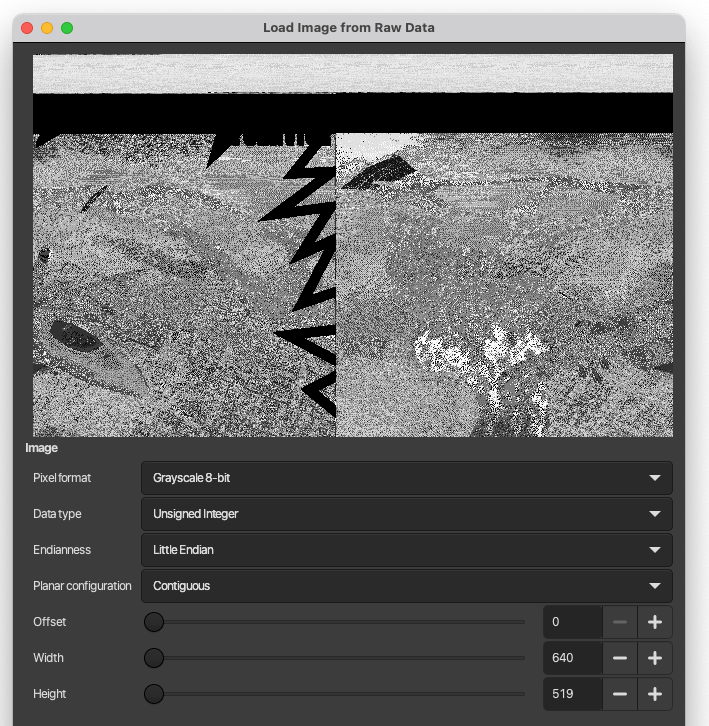
Well that is promising, we can see what we saw in the image preview sent earlier, but obviously not aligned correctly. Which is to be expected as I haven’t tried to compensate for any data offset yet. The next thing we can see is that we have quite a bit if extra data, enough for 519 lines at 640 wide. The recognizable part of the image appears at the bottom. While it isn’t clear in the image above, I did scroll down to the bottom and the image does appear to run to the very end.
As it seems the image as at the end of the file, let’s hop back into the hex editor and take a look at the data at the end of the file, and then at the boundary where we would expect a 640 x 480 image to begin (307,200 bytes before the end of file)
Hex View  00 01 02 03 04 05 06 07 08 09 0A 0B 0C 0D 0E 0F
00006270  73 6A 73 8B 8B 9C AC A4 B4 52 4A 52 6A 73 94 62  sjs......RJRjs.b
00006280  5A 62 7B 83 A4 5A 52 5A 83 94 AC 6A 6A 73 A4 9C  Zb{..ZRZ...jjs..
00006290  A4 83 73 73 4A 41 4A A4 94 94 73 83 9C 62 6A 8B  ..ssJAJ...s..bj.
000062A0  8B 9C A4 52 62 73 94 83 83 DE 62 18 AC CD AC 00  ...Rbs....b.....
000062B0  00 00 00 00 00 00 00 00 00 00 00 00 00 00 00 00  ................
000062C0  00 00 00 00 00 00 00 00 00 00 00 00 00 00 00 00  ................
000062D0  00 00 00 00 00 00 00 00 00 00 00 00 00 00 00 00  ................
000062E0  00 00 00 00 00 00 00 00 00 00 00 00 00 00 00 00  ................
         ⋮                                                ⋮
00051260  00 00 00 00 00 00 00 00 00 00 00 00 00 00 00 00  ................
00051270  00 00 00 00 00 00 00 00 00 00 00 00 00 00 00 00  ................
00051280  00 00 00 00 00 00 00 00 01 01 01 01 00 00 00 00  ................
00051290  00 00 00 00 00 00 00 00 00 00 00 00 00 00 00 00  ................
000512A0  00 00 00 00 00 00 00 00 00 00 00 00 00 00 00     ...............

73 … AC: data immediately before image - Palette?
00: First / Last bytes of image data
Well that is interesting, we definitely see a transition in the data pattern at the point where we expect the image data to begin, base on the assumption that the last 307,200 bytes of the file are the image. The data appearing before the image also looks to have groupings of 3, so quite possibly a palette. Let’s scroll back a bit further to see if we have enough here for a full 256 colour palette.
Hex View  00 01 02 03 04 05 06 07 08 09 0A 0B 0C 0D 0E 0F
00005F70  E8 D4 E3 E8 D4 D9 D4 E1 E1 CA D4 D9 DD D9 E8 D9  ................
00005F80  E6 CA E6 D9 E3 CA E1 D9 E6 E6 E1 E6 E6 CA E6 CA  ................
00005F90  D9 D4 CA CA CA CA E6 CA CA E6 CA CA E6 E6 CA E6  ................
00005FA0  CA E6 CA E6 CA E6 E1 CA CA E6 E6 CA E6 E1 D6 00  ................
00005FB0  00 00 FF FF FF 4A 39 39 AC AC BD AC A4 AC 5A 4A  .....J99......ZJ
00005FC0  41 31 20 29 AC AC A4 08 00 08 41 4A 4A 83 7B 83  A1 )......AJJ.{.
00005FD0  8B 7B 6A 7B 7B 83 9C 94 83 52 5A 73 6A 62 62 41  .{j{{....RZsjbbA
00005FE0  39 41 B4 B4 BD 18 10 18 B4 B4 C5 6A 5A 52 41 4A  9A.........jZRAJ

00 00 00: Black Palette Entry?
FF FF FF: White Palette Entry?
Well that certainly looks promising. We have a triplet of 00‘s at the position where we would expect the first entry to be if we had a 256 colour palette here, Starting exactly 768 bytes before the image data. That’s followed by another triplet, for what would be white. The data that comes before that looks to be more image data, though we didn’t see anything obvious in that area when we looked. But first let’s pop back into Gimp now and plug in our offsets for both the image data and palette to see what we get.
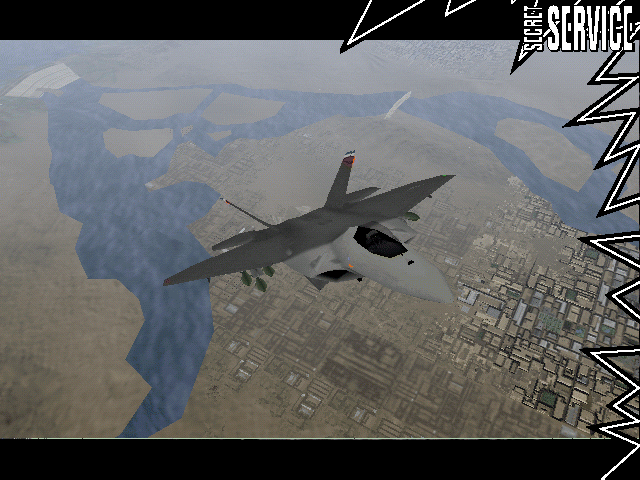
Well damn if that doesn’t look like a proper image. We do see some oddness in the last line of the “active” image area, but the “lightning bolt” passes through it cleanly, so I suspect that is in the image itself and not a decoding error. Now the question is, what the heck do we have in the area between the header at the top, and the palette?
We have enough to get the image, but I’m still puzzled by the extra data. It looks like it could be image data, the problem is we have only 24,366 bytes of it (plus the 120 that look different). That’s not enough for another 640 x 480 image, even at a different colour depth. Maybe this part is compressed? Well that doesn’t make sense, as we see large runs of repeated values. Maybe it’s something else, some sort of meta-data? So far we’ve only looked at one sample. So let’s grab a few more images to compare with.
Fumbling Towards Ecstasy
The first thing I noticed is that all the files decompress to exactly the same size. Suggesting that the prefixed data is fixed in size, at least for 640 x 640 images. (Just a reminder, it was this point where I actually discovered the gzip compression) With everything being the same size, we can use the same offsets to quickly extract the images with Gimp while we’re at it.

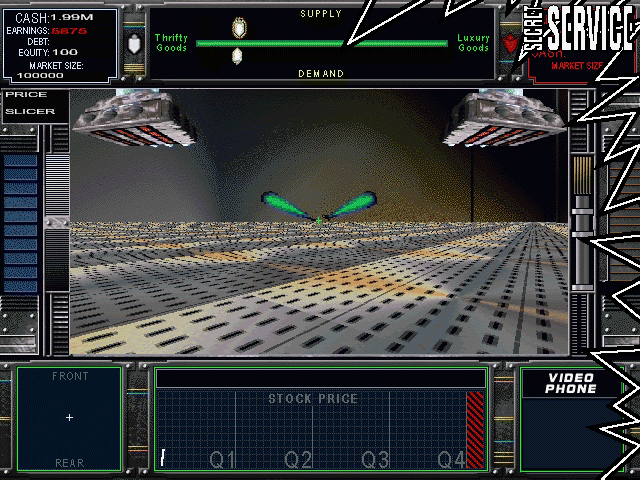
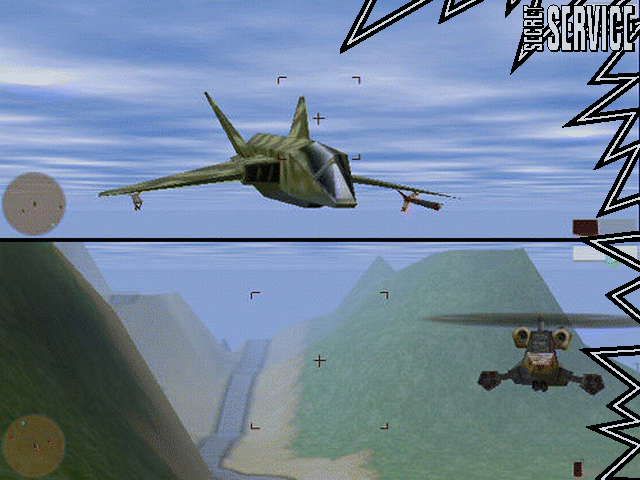
Let’s pull up ye olde hex-view and see how they compare now. I’ll repeat the one from before just to refresh our memories.
File: F22ADF00.NGF
Hex View  00 01 02 03 04 05 06 07 08 09 0A 0B 0C 0D 0E 0F
00000000  4E 47 46 02 00 80 02 E0 01 62 5A 41 6A 62 5A 29
00000010  39 39 8B 8B 7B 8B 8B 8B 73 6A 5A 6A 73 62 73 6A
00000020  52 9C A4 AC 73 62 52 9C A4 A4 83 94 9C 52 4A 41
00000030  73 6A 62 20 20 20 83 7B 73 A4 A4 AC 52 5A 5A 94
00000040  A4 AC 8B 9C A4 62 5A 4A 6A 62 4A 6A 5A 4A 62 73
00000050  7B 7B 8B 9C 41 4A 52 7B 7B 7B 6A 6A 5A 7B 73 62
00000060  9C 9C A4 39 39 39 94 94 94 62 62 5A 6A 7B 8B 52
00000070  62 73 94 8B 83 5A 4A 41 83 7B 83 7B 62 5A A4 AC
00000080  B4 D0 DA D0 DA DA D0 DA D0 DA D0 DA D0 DA DA E5

4E 47 46: "NGF" - Format Identifier
02 00: 0x00002 (2) - Version?
80 02: 0x0280 (640) - Width
E0 01: 0x01E0 (480) - Height
62 … B4: Unknown/Palette?
D0 … : Unknown/Image Data?
File: README00.NGF
Hex View 00 01 02 03 04 05 06 07 08 09 0A 0B 0C 0D 0E 0F
00000000 4E 47 46 02 00 80 02 E0 01 00 B4 F6 A4 A4 10 DE
00000010 E6 00 F6 08 00 08 AC F6 08 10 00 6A C5 DE 00 AC
00000020 EE D5 08 00 18 9C D5 39 62 62 CD C5 10 EE F6 00
00000030 DE 18 10 00 00 00 C5 00 00 4A A4 AC F6 F6 00 EE
00000040 FF 00 00 AC FF FF E6 00 52 20 08 AC CD A4 00 9C
00000050 F6 EE E6 5A FF 08 00 4A 00 00 18 AC EE 7B 62 31
00000060 D5 DE C5 00 BD F6 FF F6 00 FF FF 00 CD 52 08 EE
00000070 F6 10 D5 A4 00 FF 00 00 F6 00 00 FF 00 08 FF EE
00000080 73 EC EC EC EC EC EC EC EC EC EC ED EC EC EC EC
4E 47 46: "NGF" - Format Identifier
02 00: 0x00002 (2) - Version?
80 02: 0x0280 (640) - Width
E0 01: 0x01E0 (480) - Height
00 … 73: Unknown/Palette?
EC … : Unknown/Image Data?File: CORP04.NGF
Hex View 00 01 02 03 04 05 06 07 08 09 0A 0B 0C 0D 0E 0F
00000000 4E 47 46 02 00 80 02 E0 01 62 5A 5A 00 08 10 5A
00000010 52 52 10 31 31 4A 39 31 08 18 18 39 31 29 08 18
00000020 29 41 31 29 7B 7B 73 83 9C 83 18 18 18 29 20 20
00000030 4A 4A 41 10 08 10 31 52 39 08 10 20 18 08 10 5A
00000040 6A 62 29 31 31 5A 5A 5A 20 20 18 00 00 08 08 00
00000050 08 8B 83 7B 41 41 41 00 00 00 52 52 52 39 39 39
00000060 18 20 20 73 6A 6A 00 00 10 10 18 20 20 39 39 08
00000070 20 20 6A 5A 5A 00 10 18 52 41 39 41 10 10 B4 AC
00000080 94 E3 E3 DC E3 DC DC DC E3 DC E6 DC C8 C8 C8 C8
4E 47 46: "NGF" - Format Identifier
02 00: 0x00002 (2) - Version?
80 02: 0x0280 (640) - Width
E0 01: 0x01E0 (480) - Height
62 … 94: Unknown/Palette?
E3 … : Unknown/Image Data?File: RETURN00.NGF
Hex View 00 01 02 03 04 05 06 07 08 09 0A 0B 0C 0D 0E 0F
00000000 4E 47 46 02 00 80 02 E0 01 7B A4 BD 73 94 CD 18
00000010 31 20 6A 83 7B 73 94 94 6A 7B 7B 20 39 20 73 7B
00000020 94 5A 5A 5A 73 94 C5 9C B4 D5 6A 8B 83 5A 7B 73
00000030 6A 83 BD 8B A4 D5 18 18 18 73 94 D5 9C AC D5 4A
00000040 4A 41 5A 7B 62 8B A4 DE 83 9C CD 83 9C D5 8B A4
00000050 C5 8B AC D5 83 94 9C 6A 94 C5 8B 9C A4 39 39 31
00000060 73 83 7B 7B A4 CD 73 9C C5 29 31 20 5A 7B 8B 94
00000070 A4 D5 8B 9C CD 62 73 73 7B 94 C5 7B 8B A4 B4 BD
00000080 D5 C9 D1 C9 D1 EE E2 D5 C9 C9 C9 C9 C9 C9 C9 D1
4E 47 46: "NGF" - Format Identifier
02 00: 0x00002 (2) - Version?
80 02: 0x0280 (640) - Width
E0 01: 0x01E0 (480) - Height
7B … D5: Unknown/Palette?
C9 … : Unknown/Image Data?Well it looks pretty clear to me that there is a distinctive 120 byte region before the remainder of the extra data. Now I’m ashamed to say that I pondered on what this data might be for too long. Likely because of another format I recently worked on (which will be the subject of an upcoming post soon) that had some unexpected data along side the image. It wasn’t until a friend of mine said this, that the light bulb went off in my head.

Leave it? Not on my watch!! But yeah, a thumbnail is an obvious candidate, that I managed to completely ignore.
The Light at the end of the Tunnel
Now let’s see if it holds. And that 120 byte region must be the palette for the thumbnail. Every time I look at that data it looks more and more like palette data. The problem is the image data we see is in the higher range of possibilities, so there must be some offset to the palette. let’s see if we can figure it out. Quickly scanning through the data of the suspected image regions seems to show values that are no less than 0xC8 (200) With out suspected palette of 40 entries, that means the last entry should be 0xEF (239). Using the features of ImHex, I was able to check, and verify that indeed the all the values in the image area for the thumbnail do fall in that range. Great, now we know our palette offset. Now all that’s left is to figure out the image dimensions. Thumbnails are typically square, or close to it, so let’s just take the square root of the size in bytes as a starting point.
√ 24,366 ≈ 156
To make things a bit easier here, since Gimp doesn’t let me set an arbitrary start index offset for the palette data, using ImHex I’ve inserted 00‘s before and after the palette data so that we have a full 768 byte palette. I was careful to make sure the real data happens at the correct area from entries 200 – 239. I also trimmed the file down to just the palette and data, since we know the rest. Doing so will allow Gimp to self adjust, as I increase the width, Gimp will reduce the height to fit within the bounds of the data.
Now we can hop back into Gimp set-up our offsets, and our starting point, and then start adjusting the width until something looks good. (hopefully something appears). As the full image is 640×480, I would expect our actual thumbnail width to be larger rather than smaller.
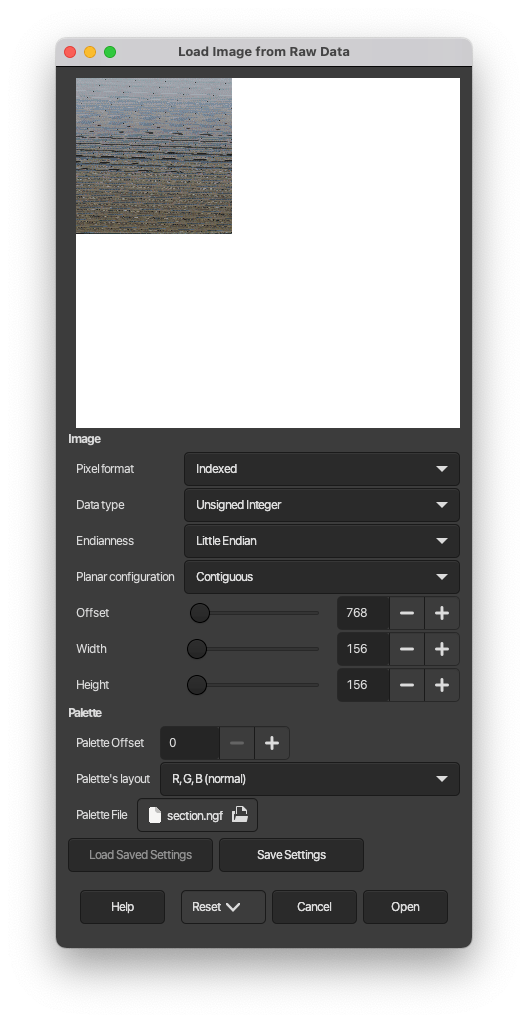
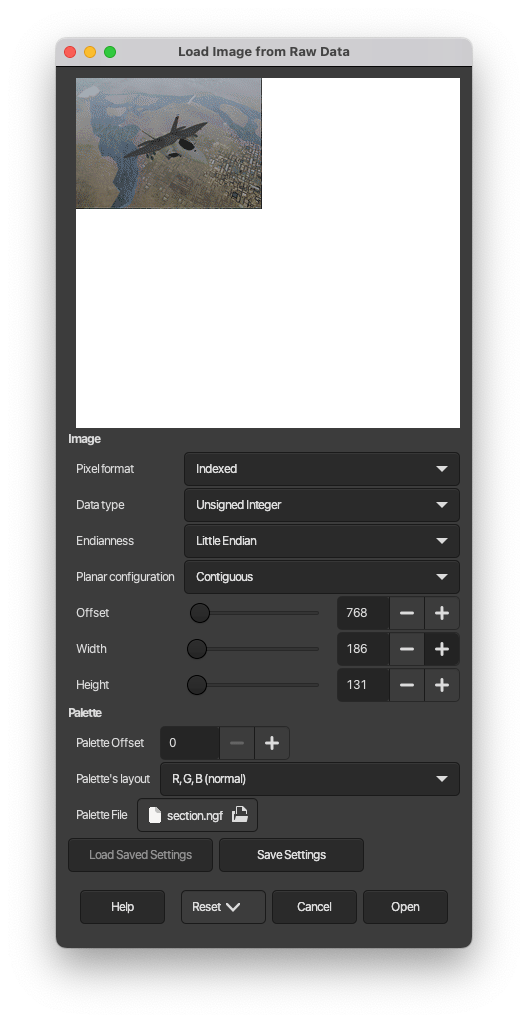
From the images above you can see that I set up to read the palette at 0, started the image at 768 bytes in, and started with a width of 156×156. I then increased the width and watched as the image came together. The end result is we have an image with dimensions of 186 x 131.
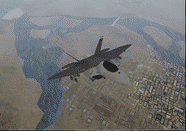
I’m going to guess that this is a fixed size, as the aspect ratio of width to height is 1.42, while a 640 x 480 image has an aspect ratio of 1.33. So I don’t see any obvious way how to calculate the thumbnail size from the full image size. Unfortunately all the images we’ve looked at are 640 x 480 so we don’t have any data to inform us otherwise.
Where’s the code?
And there you have it, we actually managed to fully decode an image format without writing a single line of code! With that said, let’s at least define the structure of the .NGF file format as a C structure to solidify it. I won’t cover any other code here, as it’s pretty much simple read/write, but I will push out a repo in the future with code to read the format and spit out a standard set of images for the full image and the thumbnail.
#define NGF_THUMB_WIDTH  (186)
#define NGF_THUMB_HEIGHT (131)
#define NGF_THUMB_PAL_START (200)
#define NGF_THUMB_PAL_LENGTH (40)

typedef struct {
    uint8_t r;
    uint8_t g;
    uint8_t b;
} ngf_pal_t;

typedef struct {
    char     sig[3];  // always "NGF"
    uint16_t version; // always 0x0002
    uint16_t width;   // image width (640)
    uint16_t height;  // image height (480)
} ngf_hdr_t;

typedef struct {
    ngf_pal_t pal[NGF_THUMB_PAL_LENGTH];
    uint8_t   pix[NGF_THUMB_WIDTH * NGF_THUMB_HEIGHT]
} ngf_thumbnail_t;

typedef struct {
    ngf_pal_t pal[256];
    uint8_t   pix[]; // hdr.width * hdr.height bytes
} ngf_image_t;

typedef struct {
    ngf_hdr_t       hdr;
    ngf_thumbnail_t thumb;
    ngf_image_t     image;
} ngf_file_t;
That pretty much wraps things up. This one was pretty quick and easy, ignoring my brain fart where I ignored the obvious. I promise the next one will prove to be more of a challenge and interesting. As for what NGF stands for, I still have no clue, but the truth is out there.



Leave a comment