Okay maybe the end of my last post was a little evil. But I swear it wasn’t just a gimmick to get you to come back and read more. I knew things weren’t perfect, and I wanted to separate out the debugging of those issues, as they are not directly related to the rendering code that was the scope of that post. So just to recap a little, we have all the pieces of the pipe built in order to be able to take a PIC file and convert it into a PPM image file. Now we can visually see the results of what is happening in the images themselves, which will hopefully make things easier to debug. So without further ado, let’s get on with the big reveal.
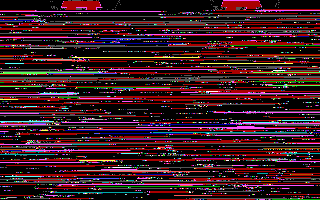
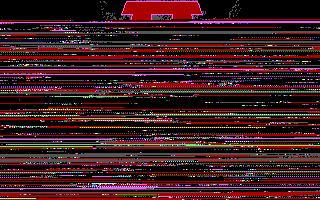
As you can see we didn’t get very far into it, but we kind of expected that already. But the good news is, the part that we can see matches what we expect from our reference image. From the two images above, the image on the left is assuming 1 pixel per byte, and on the right is assuming the pixels are packed two to a byte. Clearly our hypothesis that the image data is packed was correct. From the colours, it looks like the palette and rendering is good too, as they match what we see in-game. We can also see that our RLE decoding looks to be correct, as we know several expansions happened in that space, and we don’t see tearing that would suggest a one-off error. So that brings us to the LZW decompression as being the source of our errors. Let’s first see if the corruption is starting when the table fills up, or at some other point. That will be a good indicator that we need to either implement resetting the table, or expanding the code. To do that, we’ll make the decompressor stop once the table is full.
PIC LZW decompressor
Opening PIC Image: 'TITLE16.PIC'	File Size: 7529
Creating RLE Image: 'TITLE16.RLE'
Decompression Failed with error: LZW_STRING_TABLE_FULL
Debug Trace: new: 1a9 next: 200 pos: 295

PIC RLE decompressor
Opening PIC Image: 'TITLE16.RLE'	File Size: 502
Creating RAW Image: 'TITLE16.RAW'
Decompression Complete

RAW to PPM image converter
Resolution: 320 x 200
Using Packed Pixel Arrangement
Opening RAW Image: 'TITLE16.RAW'	File Size: 3125
Warning: Image size exceeds source length, image will be padded
Creating PPM Image: 'TITLE16.PPM'
Saving PPM Image
Image Export completed without errors
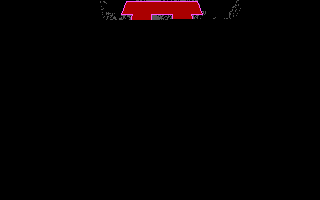
As we can see, we no longer get excess data, now we have a shortfall. From the images below we can see that the point of corruption is indeed happening once the table fills (left is what we had above, right is what we just generated here). The most likely correction here would be to allow the table to expand using wider code widths. The question now is, what is the maximum width?
LZW Part 2
Refactoring our LZW code to support variable width codes isn’t too hard. First we need to update our limits, as we now have a ‘MIN’ and ‘MAX’, not just a width.
#define SYMBOL_WIDTH (8)                              // NOTE: currently code can only handle byte sized symbols
#define LZW_MIN_CODE_WIDTH (SYMBOL_WIDTH + 1)         // default code size is 1 larger than the symbol size
#define LZW_MAX_CODE_WIDTH (10)                       // the maximum width in bits for a code

#define LZW_TABLE_SIZE (1 << LZW_MAX_CODE_WIDTH)      // size of the dictionary
#define LZW_MAX_CODE ((1 << LZW_MAX_CODE_WIDTH) - 1)  // maximum possible valid code
#define LZW_LIMIT (1 << LZW_MAX_CODE_WIDTH)           // overflow code value

#define LZW_SYMBOL_LIMIT (LZW_TABLE_SIZE - 255)       // size of the symbol stack
Then we need to add a few more state variables to manage the variable code width to our state.
typedef struct {
    uint8_t     bit_count;   // count of bits currently loaded in bit_buffer
    uint32_t    bit_buffer;  // small working buffer for the input stream

    uint8_t     code_bits;   // current code width in bits
    uint32_t    code_mask;   // current bitmask for the code
    uint32_t    resize_code; // current code to force a width increase or reset

    uint32_t    next_code;   // value of next available code

    lzw_dictionary_t dictionary[LZW_TABLE_SIZE]; // table containing the chaining codes
    uint8_t     symbol_stack[LZW_SYMBOL_LIMIT];  // used for constructing the stream of bits to output during expansion
} lzw_state_t;
We need to add a function to increase the code width, and update the new state variables.
// increase the code width
void lzw_resize(lzw_state_t *ctx) {
    ctx->code_bits++;                         // increase width by 1
    ctx->resize_code = (1 << ctx->code_bits); // update the code value to trigger the next resize
    ctx->code_mask = ctx->resize_code - 1;    // update the mask for the new width
}
We will also need to update the initialization code to initialize the new state variables.
void lzw_init(lzw_state_t *ctx) {

    // initiailze the chain code table
    for(unsigned int i=0; i < (1 << SYMBOL_WIDTH); i++) {
        ctx->dictionary[i].prefix = LZW_EOC; // set all codes as end of chain initially
        ctx->dictionary[i].symbol = i & ((1 << SYMBOL_WIDTH) - 1);
    }

    ctx->bit_buffer = 0L;
    ctx->bit_count = 0;

    ctx->code_bits = LZW_MIN_CODE_WIDTH;
    ctx->resize_code = (1 << LZW_MIN_CODE_WIDTH);
    ctx->code_mask = ((1 << LZW_MIN_CODE_WIDTH) - 1);
    ctx->next_code = (1 << SYMBOL_WIDTH);
}
The function that reads in the codes also needs an update, to utilize the variable widths. Mostly this is replacing the constants we initially used with our new variables.
uint16_t read_code(FILE *src, lzw_state_t *ctx) {

    // top up the working buffer with up to 32 bits of data
    // keep it full for as long as possible
    while((!feof(src)) && (24 >= ctx->bit_count)) {
        uint32_t new_bits = fgetc(src);
        if(!feof(src)) {
            ctx->bit_buffer |= (new_bits << ctx->bit_count);
            ctx->bit_count += 8;
        }
    }

    // not enough bits to output a code, must be at EOF
    if(ctx->bit_count < ctx->code_bits) {
        return LZW_EOF;
    }

    // extract the current code from the low 'bit_count' bits of the buffer
    uint16_t rval = ctx->bit_buffer & ctx->code_mask;

    // shift in new bits to replace the code we read out
    ctx->bit_buffer >>= ctx->code_bits;
    ctx->bit_count -= ctx->code_bits;

    return rval;
}
Finally we need to update the main loop to recognize when to resize, and trigger the resize.
        // create a new code, if we can
        if(LZW_LIMIT > ctx->next_code) {
            lzw_add_code(old_code, symbol, ctx);
            // check to see if we need to increase bits
            if(ctx->next_code >= ctx->resize_code) {
                // check if we are at max bits, if so reset instead of resize
                if(LZW_MAX_CODE_WIDTH > ctx->code_bits) {
                    // we can expand
                    lzw_resize(ctx);
                }
            }
        } else {
            return LZW_STRING_TABLE_FULL;
        }
        old_code = new_code;
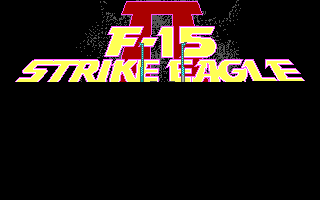
After refactoring the LZW code to do code width expansion whenever the table became full, and then walking up the maximum width starting from 10 bits, we can see the following progression. (skipped 9 bits, as that is what we already had above, but I did run it to confirm I got the same result) Both 10 bits and 11 bits were successful, but 12 bits failed with an unexpected code error and fails at the same visual point as 11 bits. This leads me to believe 11 bits is our maximum code width. Below, the images go left-right from 10 bits max width to 11 bits max width. The right most image below, is 11 bits, with the code dictionary frozen. The frozen dictionary image appears just as earlier when we had the fixed 9 bits code width, but let it continue once the dictionary was full, this indicates that the table is being reset, and we will need to figure out that reset mechanism.


So far we have only been looking at a 1 colour packed pixel image. I used that because they are the smallest files, and the palette is known. Now before we figure out the reset, we should look at a 256 colour file, to make sure we don’t have any more hidden surprises. (I’ve also reverted back to failing on the full table, as it’s cleaner)
Copy-Paste = Bad Pixels
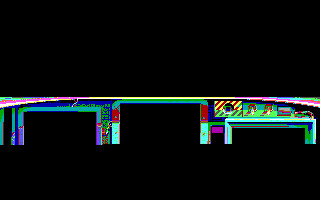
Well that’s not quite right. The image is recognizable as the cockpit, but clearly the colours are way off. Now is it just that a custom palette was used, or do we have a bug somewhere in the rendering code? I think we have a small bug in the rendering code. Looking back at the first few images, we should have seen a shift when we tried to render the title16 image with the wrong pixel decoding. I missed that before, I should have seen it. Unless by some freak chance that the double pixel value is always somehow a reasonable colour compared to the proper colour is pretty slim. Lets take a look what went wrong.
// write a pixel to the output stream, return 0 on success
int write_pixel(FILE *dst, uint8_t index, bool isPacked) {
    if(isPacked) {   // packed mode, write 2 pixels
        int nw = fwrite(&pal[index & 0x0f], 3, 1, dst); // write the first pixel
        index >>= 4; // shift in the next index
        nw += fwrite(&pal[index & 0x0f], 3, 1, dst); // write the second pixel
        return (nw != 2); // return 0 if we wrote 2 pixels
    }
    // normal unpacked mode
    return (1 != fwrite(&pal[index & 0x0f], 3, 1, dst));
}
Oops! Stupid copy-paste error. For normal unpacked mode we shouldn’t be masking the index by 0x0f to make it a 0-15 value. Let’s fix that and try again. And for fun we can look at title16 in the incorrect packing again too.
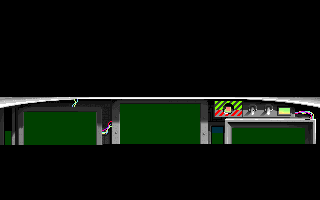

Well that looks a heck of a lot better for the cockpit. And the Title16 is behaving more like I should have expected from the start. Now the colours in the cockpit are mostly correct, but several are not, so a custom palette must be used by the game, that will be a task for later. Finally , for good measure, we should test our last variant of the PIC file we have ‘title640’.
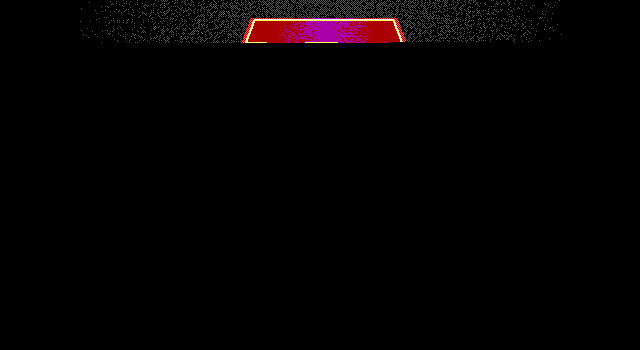
That’s looking really good too. The part we can see matches what can be seen in-game, so I think everything in our pipeline is good now, with the exception of the LZW code. So, hopefully, now all we need to do is figure out is the reset mechanism for the LZW table, and we should get a full image.
LZW Part 3
Time to refactor the LZW code yet again, this time to initiate a table reset. There are two ways I can think of that could trigger the table reset. Many implementations reserve code 256 for this, or possibly code 257. I instrumented the decompression code to print out the codes as things went along, so I could see what they were leading up to the failure. I did not see either of these codes in the stream. So that likely means that the reset is happening automagically the same as a code expansion happens. So lets add in the necessary reset function, and then have it triggered at the same point as the resize, but only if we are at the maximum width. First up, let’s move the initialization code of the variables we added earlier into a separate function that can also be called for reset, as those are the variables that would need to be reset (along with next code).
// reset of the LZW table state
void lzw_reset(lzw_state_t *ctx) {
    ctx->code_bits = LZW_MIN_CODE_WIDTH;
    ctx->resize_code = (1 << LZW_MIN_CODE_WIDTH);
    ctx->code_mask = ((1 << LZW_MIN_CODE_WIDTH) - 1);
    ctx->next_code = (1 << SYMBOL_WIDTH);
}
And then for convenience call reset during initialization, instead of setting them directly.
void lzw_init(lzw_state_t *ctx) {

    // initiailze the chain code table
    for(unsigned int i=0; i < (1 << SYMBOL_WIDTH); i++) {
        ctx->dictionary[i].prefix = LZW_EOC; // set all codes as end of chain initially
        ctx->dictionary[i].symbol = i & ((1 << SYMBOL_WIDTH) - 1);
    }

    ctx->bit_buffer = 0L;
    ctx->bit_count = 0;

    lzw_reset(ctx); // use reset to init the table vars state
}
Finally update the decompression loop to be able to reset. We will change the error state as well, when we get to the current ‘FULL’ state to indicate a corrupt stream, as it should be impossible to ever get there under normal circumstances.
        // create a new code, if we can
        if(LZW_LIMIT > ctx->next_code) {
            lzw_add_code(old_code, symbol, ctx);
            // check to see if we need to increase bits
            if(ctx->next_code >= ctx->resize_code) {
                // check if we are at max bits, if so reset instead of resize
                if(LZW_MAX_CODE_WIDTH > ctx->code_bits) {
                    // we can expand
                    lzw_resize(ctx);
                } else {
                    // we must reset
                    lzw_reset(ctx);
                    new_code = symbol; // root the new chain tree from the last symbol we wrote
                }
            }
        } else {
            return LZW_CORRUPT_STREAM;
        }
        old_code = new_code;
And with that we should be done. Nothing left to do but give it a go.
PIC LZW decompressor
Opening PIC Image: 'TITLE16.PIC'	File Size: 7529
Creating RLE Image: 'TITLE16.RLE'
Decompression Complete

PIC RLE decompressor
Opening PIC Image: 'TITLE16.RLE'	File Size: 14826
Creating RAW Image: 'TITLE16.RAW'
Decompression Complete

RAW to PPM image converter
Resolution: 320 x 200
Using Packed Pixel Arrangement
Opening RAW Image: 'TITLE16.RAW'	File Size: 32001
Creating PPM Image: 'TITLE16.PPM'
Saving PPM Image
Image Export completed without errors
No warnings or errors! This looks really promising. The file sizes look appropriate, I think we’re good. But, the proof is in the pudding so to speak.
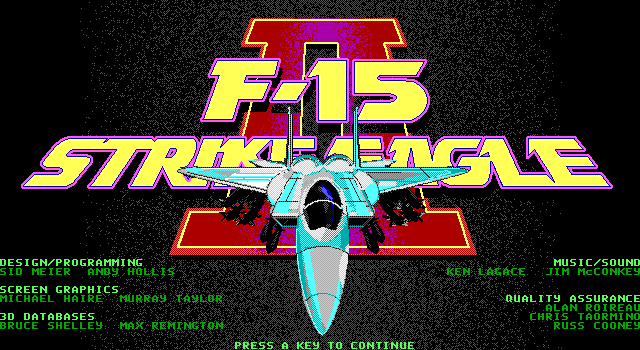
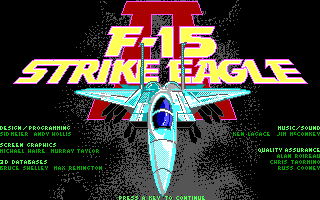
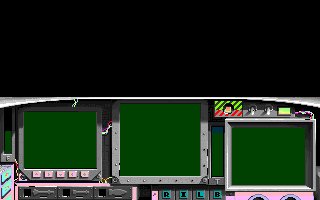
Winner winner! Chicken Dinner! Everything looks perfect, with the exception of the palette on the 256 colour image, but that’s an exercise for another time. Next steps would be to tie all the parts together as constantly executing 3 programs to convert one file is a bit crazy. Now that we have a working solution it’s a good time to do that.
We actually established quite a bit this time, through the debugging and trials, and it went much faster thanks to being able to see the output. We now know that the PIC format uses variable code widths from 9-11 bits, and uses a table reset that is triggered when the table is full at 11 bits back to 9 bits. We also have verified that pixel packing is indeed used with some images. So I think this is a great place to wrap things up for this post. While we have images now, the adventure isn’t over just yet.
Now given the number of posts I’ve taken to get to this point in the progress, you might think it has taken a lot of time to get here, in reality all the progress to this point happened over just a few evenings. Going by the original timeline of events, based on my emails with neuviemeporte, we are now just at the conclusion of May 19, 2024. It has taken me far longer to document the progress here, than it did to do the actual work.
This Post is the sixth in a series of posts surrounding my reverse engineering efforts of the PIC file format that MicroProse used with their games. Specifically F-15 Strike Eagle II (Though I plan to trace the format through other titles to see if and how it changes). To read my other posts on this topic you can use this link to my archive page for the PIC File Format which will contain all my posts to date on the subject.

 Ouch my eye!
Leave a comment