Sorry for the silence everyone. It’s been a tough ride the past while. I have been dealing with a serious illness with a member of my family, and have spent most of my time and energy helping there. As a result I have not had the energy, or inspiration, to make any new posts which take a lot of time to do. Rest assured I have been, in the background, doing quite a bit of work with some outstanding items that we’ve already covered, as well as some new ones we haven’t seen yet. More is coming, just might be slow in making it here. Lots of loose ends I want to tie up, as well as a list of new formats that I’m excited to start looking deeper into. In the meantime please bear with me as I try to find a balance between work, family, life, and blogging. As a result this one is going to just be a quickie, about a new (to me) reverse engineering tool I’ve started to use, and thought some of you might be interested in it too. If you don’t already use it. (wouldn’t surprise me that I’m late to the party on this)
In the meantime
In the meantime, if you are interested in digging into some files yourself, I recently came across a fantastic tool that makes that process a whole lot easier. ImHex is an absolutely amazing interactive hex editing tool, with some serious super-powers when it comes to reverse-engineering. I actually stumbled on it a while back, and didn’t like it at first, mostly it was the look and feel of it. Though I recently gave it another shot, and after customizing the appearance and clearing out the clutter with the ‘minimal’ workspace setting, I’m much happier now. It’s an open source project, and for those of you who do any sort of GUI base application development, or game development, ImGui is probably a name you’re familiar with (and if you aren’t, you should), well ImHex uses ImGui for its UI.
Super-powers?
Yes I did say super-powers, and I meant it. It has a number of features that take this hex editor well above any others I’ve used in the past. For me the most useful, for determining file structures, is the scriptable pattern editor. It allows me to define the structures as I figure them out in a C like language (they say it’s C++/Rust inspired). Which is amazing, as I can visually see how that plays out on the data itself, long before writing any lines of real code. I’ve used editors in the past that allowed for tagging, which was okay, but frustrating in that you couldn’t just tag an area as having a defined structure, highlighting each of the members… now I can! Even better, I can simply select a start position and say this is an array of a structure, and BAM! it’s all there. It can actually go well beyond that, but for me, and for now that’s enough for now. Down the road I can see using the scripting powers to seek out and dynamically decode things like variable sized structures. It also has a built-in disassembler for may architectures, I haven’t had a chance to use it yet, but could be promising when navigating an executable and trying to find certain things, like hard-coded parameters for the position or colour of an element you want to modify. Best of all it’s multi-platform, so no matter if you are Mac, Windows, or Linux, you can use it.
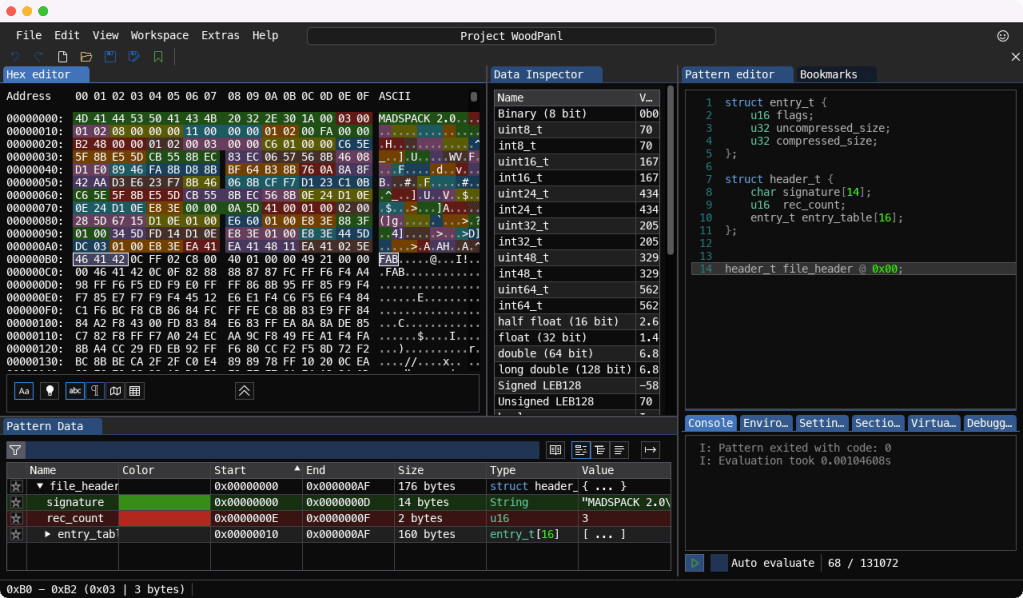
Just like that, that small bit of script code on the right, automatically parsed and highlighted all the stuff in the hex view, and put it in a digestible form in the Pattern Data view below. Not sure if this tool is the perfect reverse-engineering tool, but it’s damn close.
That’s it for this one. Hope some of you find as much use from ImHex as I am sure going to. Until the next time…
Yes I did drop a little Easter Egg in this post of things to come 😉

 Ouch my eye!
Leave a comment