Here we go again, on yet another side quest, I didn’t mean to, but couldn’t help myself. After finishing off with the CAT file variant we saw with M1 Tank Platoon from MicroProse in my last post, I took a quick poke around the other files included with the game. A number of files with “MAX” in the name along with “EGA”, “VGA”, and “MCGA” caught my eye. These are obviously related to the various graphics modes the game supports, and likely contain more graphic assets, just like we found with the 3 CAT files in my last post. I’ll try to keep this adventure a quick one, so with that let’s dig into it.
-rw-rw-r--  33253 19 Jun  2023 CGA_MAX1
-rw-rw-r--  27274 19 Jun  2023 CGA_MAX2
-rw-rw-r--  29021 19 Jun  2023 CGA_MAX3
-rw-rw-r--  36846 19 Jun  2023 CGA_MAX4
-rw-rw-r--  40232 19 Jun  2023 EGA_MAX1
-rw-rw-r--  27333 19 Jun  2023 EGA_MAX2
-rw-rw-r--  35610 19 Jun  2023 EGA_MAX3
-rw-rw-r--  48196 19 Jun  2023 EGA_MAX4
-rw-rw-r--  70951 19 Jun  2023 MCGAMAX1
-rw-rw-r--  30309 19 Jun  2023 MCGAMAX2
-rw-rw-r--  76110 19 Jun  2023 MCGAMAX3
-rw-rw-r--  53070 19 Jun  2023 MCGAMAX4
-rw-rw-r--  43000 19 Jun  2023 MCGAMAX5
Interesting that there is one more MCGA file than there is EGA or CGA. I wonder if the file size is limited to 64K, and they had to break the MCGA content up a bit more due to the larger size. I guess we’ll only know if we take a look at what’s inside. (Ed. I clearly missed the two files larger than 64K when I said that, so the mystery continues)
First look
As is tradition around these parts, let’s dive right into looking at the files with a hex viewer. As our first CAT file in the last post was the EGA content, let’s start with EGA_MAX1.
File: MAX/EGA_MAX1  [40232 bytes]
Offset    x0 x1 x2 x3 x4 x5 x6 x7 x8 x9 xA xB xC xD xE xF  Decoded Text
0000000x: 30 30 30 30 00 00 00 00 40 01 00 00 08 00 00 00  0 0 0 0 · · · · @ · · · · · · ·
0000001x: 41 44 53 00 00 00 00 00 48 01 00 00 10 21 00 00  A D S · · · · · H · · · · ! · ·
0000002x: 41 54 54 4E 4C 00 00 00 58 22 00 00 16 00 00 00  A T T N L · · · X " · · · · · ·
0000003x: 41 54 54 4E 52 00 00 00 6E 22 00 00 41 00 00 00  A T T N R · · · n " · · A · · ·
        ⋮                                                 ⋮
0000012x: 54 49 54 4C 45 31 31 00 33 76 00 00 9C 21 00 00  T I T L E 1 1 · 3 v · · · ! · ·
0000013x: 4C 4F 47 4F 00 00 00 00 CF 97 00 00 59 05 00 00  L O G O · · · · · · · · Y · · ·
0000014x: 02 00 01 00 F5 55 AA 00 A0 00 C8 00 F5 00 02 0A  · · · · · U · · · · · · · · · ·
0000015x: 1C 48 B0 A0 C1 07 01 11 1A 5C C8 B0 A0 42 82 0F  · H · · · · · · · \ · · · B · ·

30  ...  00: Asset name (8 bytes)
40 01 00 00: 0x00000140 (320) Offset of 1st asset data
08 00 00 00: 0x00000008 (8) Size of 1st asset
48 01 00 00: 0x00000148 (328) Offset of 2nd asset data
02 00 01 00: Beginning of 1st asset data
A0 00 C8 00: Beginning of 2nd asset data
Well that appears to be very CAT like. I find it odd that a 2nd type of aggregate file is being used here. It’s almost as if two different people were managing the project, and they couldn’t agree on how to store the assets. Regardless, we’re here now so let’s figure this one out. Given the alignment of the names, it’s obvious that each record is 16 bytes in size. The fields pretty much stand out on their own, and are pretty obvious. We start off with an 8 byte name field, followed by a 32bit offset, and then a 32bit length. There does not appear to be a length, or count, prefix like we see with CAT files, so we will have to calculate the number of entries by using the offset of the first data payload, and dividing it by the record size.
0x0140 (320) / 16 = 20
A quick count of the names and we do indeed have 20 records, so it all works out. We can also validate that the size field is what it is by subtracting the 2nd data offset from the 1st, and again that works out to match. So we have the structure pretty cleanly figured out, let’s turn that into a proper structure.
typedef struct {
    char name[8];    // Name of asset (filename without extension)
    uint32_t offset; // absolute file offset to start of data for this entry
    uint32_t size;   // data length of this entry
} mps_max_entry_t;
With that structure it should be easy enough to modify our CAT code just like we did the last time, to parse and extract from the MAX files. As we’ve already covered the code, and the only real change is the structure above, I’m not going to detail the code here. It will be posted in a github repo when we conclude the format.
MicroProse MAX Asset Extractor
Opening: 'EGA_MAX1'	File Size: 40232 bytes
Catalogue contains 20 items
 1:     0000      8  [@00000140]
 2:      ADS   8464  [@00000148]
 3:    ATTNL     22  [@00002258]
 4:    ATTNR     65  [@0000226e]
 5:   BLASTA    228  [@000022af]
 6:   BLASTB    189  [@00002393]
 7: CREDITS2   8540  [@00002450]
 8:   LTRACK    818  [@000045ac]
 9:      MAG    107  [@000048de]
10:      MPS   2521  [@00004949]
11:   RTRACK    817  [@00005322]
12:  TCOMARM     52  [@00005653]
13:  TITCOMA    401  [@00005687]
14:  TITCOMB    396  [@00005818]
15:  TITCOMC    400  [@000059a4]
16:  TITCOMD    397  [@00005b34]
17:  TITCOME    396  [@00005cc1]
18:    TITLE   6118  [@00005e4d]
19:  TITLE11   8604  [@00007633]
20:     LOGO   1369  [@000097cf]
Well that was easy. Now for extraction, since we don’t know the format of the data, I’ll give it a .MAX extension for the time being. Once we determine the type we can change it. But before we do that, let’s look at the listings of all the MAX files to see if we have all the same files, or does MCGA have additional assets.
CGA Assets:

MicroProse MAX Asset Extractor
Opening: 'CGA_MAX1'
File Size: 33253 bytes
Catalogue contains 20 items

MicroProse MAX Asset Extractor
Opening: 'CGA_MAX2'
File Size: 27274 bytes
Catalogue contains 19 items

MicroProse MAX Asset Extractor
Opening: 'CGA_MAX3'
File Size: 29021 bytes
Catalogue contains 94 items

MicroProse MAX Asset Extractor
Opening: 'CGA_MAX4'
File Size: 36846 bytes
Catalogue contains 5 items


Total Items: 138
EGA Assets:
MicroProse MAX Asset Extractor
Opening: 'EGA_MAX1'
File Size: 40232 bytes
Catalogue contains 20 items
MicroProse MAX Asset Extractor
Opening: 'EGA_MAX2'
File Size: 27333 bytes
Catalogue contains 19 items
MicroProse MAX Asset Extractor
Opening: 'EGA_MAX3'
File Size: 35610 bytes
Catalogue contains 93 items
MicroProse MAX Asset Extractor
Opening: 'EGA_MAX4'
File Size: 48196 bytes
Catalogue contains 5 items
Total Items: 137MCGA Assets:
MicroProse MAX Asset Extractor
Opening: 'MCGAMAX1'
File Size: 70951 bytes
Catalogue contains 20 items
MicroProse MAX Asset Extractor
Opening: 'MCGAMAX2'
File Size: 30309 bytes
Catalogue contains 19 items
MicroProse MAX Asset Extractor
Opening: 'MCGAMAX3'
File Size: 76110 bytes
Catalogue contains 93 items
MicroProse MAX Asset Extractor
Opening: 'MCGAMAX4'
File Size: 53070 bytes
Catalogue contains 3 items
MicroProse MAX Asset Extractor
Opening: 'MCGAMAX5'
File Size: 43000 bytes
Catalogue contains 2 items
Total Items: 137
Now that is interesting, and I think it does confirm that the file size has been capped to 64K. So from the looks of it both MAX1 and MAX2 having the same fixed set of assets, with the remaining assets being spread over however many files as it takes. I will have to see if I can identify the one extra file that CGA seems to have.
Full asset lists here, collapsed as they are a bit long. (click to expand)
CGA Asset List
     0000      8
      ADS   6351
    ATTNL     22
    ATTNR     65
   BLASTA    217
   BLASTB    194
 CREDITS2   6744
   LTRACK    868
      MAG    106
      MPS   2209
   RTRACK    873
  TCOMARM     50
  TITCOMA    327
  TITCOMB    320
  TITCOMC    330
  TITCOMD    313
  TITCOME    317
    TITLE   5267
  TITLE11   6983
     LOGO   1369
      2S1   1313
      2S3   1690
     BMP1   1445
     BMP2   1389
     LEO1   1629
     LEO2   1662
       M1   1501
     M109   1504
     M113    951
     M163    995
       M2   1416
      M60   1600
     MRLS   1428
     MTLB   1181
      T55   1445
      T62   1526
      T72   1541
      T80   1595
    VEHID   1159
     0000      8
    BACK2    605
    BACK3    341
    BACK4    370
    BACK5     35
    BACKH    264
    BACKT    927
   BLACKA    357
   BLACKB    345
   BLACKC    342
   BLACKD    308
   BLACKE    295
   BLACKF    317
   BLACKG    327
   BLACKH    326
   BLACKI    345
 COMMANDT   4185
   EYES2A     25
   EYES2B     23
   EYES2C     25
   EYES2D     25
    EYESA     23
    EYESC     19
    EYESD     22
    EYESE     25
    EYESF     22
    EYESG     20
    EYESH     21
    EYESI     22
    EYESJ     22
     GUNA    128
     GUNB    129
     GUNC    129
     GUND    130
    HELIA     41
    HELIB     43
    HELIC     27
    HELID     21
   HOUSEA    631
   HOUSEB    652
   HOUSEC    851
   HOUSED    752
   HOUSEE    693
   HOUSEF    648
   M5778T   7596
 M58CLOSE   1329
     MANA     52
     MANB     65
     MANC     68
     MAND     68
  MAPBACK   1169
  MOUTH2A     17
  MOUTH2B     17
  MOUTH2C     18
  MOUTH2D     18
  MOUTH2E     18
  MOUTH2F     16
  MOUTH2G     17
  MOUTH2H     18
  MOUTH2I     18
   MOUTHK     17
   MOUTHL     17
   MOUTHM     17
   MOUTHN     18
   MOUTHO     17
   MOUTHP     17
   MOUTHQ     16
   MOUTHR     17
   MOUTHS     17
   MOUTHT     17
    MSPRA     11
    MSPRB     11
    MSPRC     19
    MSPRD     10
    MSPRE     12
    MSPRF     12
    MSPRG     12
    MSPRH     16
    MSPRI     11
    MSPRJ     26
    MSPRK     26
    MSPRL      9
    MSPRM     80
    MSPRN     76
   TANKSA    153
   TANKSB    153
   TANKSC    155
   TANKSD    174
   TANKSE    170
   TANKSF    148
   TANKSG    172
   TANKSH    170
   TANKSI    175
   TANKSJ    176
   DEATHT   9113
    LOSTT   6969
     RETT   7778
     WONT   8695
     CERT   4211
EGA Asset List
0000 8
ADS 8464
ATTNL 22
ATTNR 65
BLASTA 228
BLASTB 189
CREDITS2 8540
LTRACK 818
MAG 107
MPS 2521
RTRACK 817
TCOMARM 52
TITCOMA 401
TITCOMB 396
TITCOMC 400
TITCOMD 397
TITCOME 396
TITLE 6118
TITLE11 8604
LOGO 1369
2S1 1313
2S3 1690
BMP1 1445
BMP2 1389
LEO1 1629
LEO2 1662
M1 1501
M109 1504
M113 951
M163 995
M2 1416
M60 1600
MRLS 1428
MTLB 1181
T55 1445
T62 1526
T72 1541
T80 1595
VEHID 1218
0000 8
BACK2 605
BACK4 496
BACK5 35
BACKH 345
BACKT 1177
BLACKA 433
BLACKB 420
BLACKC 408
BLACKD 373
BLACKE 366
BLACKF 392
BLACKG 408
BLACKH 406
BLACKI 426
COMMANDT 5272
EYES2A 21
EYES2B 20
EYES2C 21
EYES2D 21
EYESA 27
EYESC 23
EYESD 27
EYESE 28
EYESF 25
EYESG 21
EYESH 25
EYESI 27
EYESJ 25
GUNA 134
GUNB 139
GUNC 138
GUND 144
HELIA 44
HELIB 44
HELIC 27
HELID 21
HOUSEA 840
HOUSEB 881
HOUSEC 1023
HOUSED 1078
HOUSEE 940
HOUSEF 938
M5778T 10675
M58CLOSE 1376
MANA 52
MANB 65
MANC 68
MAND 68
MAPBACK 1202
MOUTH2A 14
MOUTH2B 14
MOUTH2C 16
MOUTH2D 16
MOUTH2E 16
MOUTH2F 14
MOUTH2G 14
MOUTH2H 16
MOUTH2I 16
MOUTHK 18
MOUTHL 18
MOUTHM 19
MOUTHN 20
MOUTHO 18
MOUTHP 19
MOUTHQ 18
MOUTHR 18
MOUTHS 18
MOUTHT 19
MSPRA 11
MSPRB 11
MSPRC 19
MSPRD 12
MSPRE 12
MSPRF 12
MSPRG 10
MSPRH 19
MSPRI 11
MSPRJ 30
MSPRK 29
MSPRL 40
MSPRM 80
MSPRN 76
TANKSA 153
TANKSB 153
TANKSC 160
TANKSD 176
TANKSE 170
TANKSF 151
TANKSG 172
TANKSH 169
TANKSI 173
TANKSJ 174
DEATHT 11061
LOSTT 11434
RETT 10237
WONT 11173
CERT 4211MCGA Asset List
0000 9
ADS 8879
ATTNL 53
ATTNR 133
BLASTA 361
BLASTB 365
CREDITS2 16815
LTRACK 1621
MAG 169
MPS 2776
RTRACK 1628
TCOMARM 91
TITCOMA 713
TITCOMB 715
TITCOMC 715
TITCOMD 701
TITCOME 707
TITLE 14571
TITLE11 17830
LOGO 1779
2S1 1422
2S3 1804
BMP1 1576
BMP2 1507
LEO1 1763
LEO2 1783
M1 1604
M109 1625
M113 1074
M163 1125
M2 1507
M60 1706
MRLS 1558
MTLB 1277
T55 1569
T62 1650
T72 1648
T80 1723
VEHID 2084
0000 9
BACK2 647
BACK4 880
BACK5 50
BACKH 705
BACKT 2684
BLACKA 1129
BLACKB 1087
BLACKC 1068
BLACKD 983
BLACKE 1012
BLACKF 1010
BLACKG 1145
BLACKH 1178
BLACKI 1203
COMMANDT 14386
EYES2A 28
EYES2B 28
EYES2C 29
EYES2D 29
EYESA 43
EYESC 43
EYESD 43
EYESE 48
EYESF 41
EYESG 40
EYESH 41
EYESI 43
EYESJ 40
GUNA 262
GUNB 269
GUNC 262
GUND 255
HELIA 50
HELIB 50
HELIC 37
HELID 26
HOUSEA 1607
HOUSEB 1702
HOUSEC 2036
HOUSED 2042
HOUSEE 2000
HOUSEF 1875
M5778T 23269
M58CLOSE 2807
MANA 61
MANB 67
MANC 70
MAND 77
MAPBACK 2536
MOUTH2A 22
MOUTH2B 23
MOUTH2C 25
MOUTH2D 22
MOUTH2E 23
MOUTH2F 26
MOUTH2G 26
MOUTH2H 27
MOUTH2I 22
MOUTHK 22
MOUTHL 23
MOUTHM 25
MOUTHN 25
MOUTHO 27
MOUTHP 23
MOUTHQ 26
MOUTHR 23
MOUTHS 27
MOUTHT 22
MSPRA 16
MSPRB 14
MSPRC 26
MSPRD 17
MSPRE 14
MSPRF 17
MSPRG 12
MSPRH 26
MSPRI 14
MSPRJ 40
MSPRK 40
MSPRL 48
MSPRM 91
MSPRN 90
TANKSA 255
TANKSB 256
TANKSC 259
TANKSD 291
TANKSE 293
TANKSF 248
TANKSG 262
TANKSH 260
TANKSI 270
TANKSJ 272
DEATHT 21720
LOSTT 23144
RETT 21248
WONT 24925
CERT 4953As we can see from the listings above, the CGA assets contains a file called “BACK3” which the others do not. Not sure if this is an unused asset, or an error and it is missing. But otherwise all 3 have the exact same set of assets. Sadly I doubt we’ll find any spicy Easter eggs here.
First look at the assets
So looking through the lists, I think it’s pretty clear that these are image assets (or at least most of them are). Now as we have no extensions for them we have no idea what the format is. I wonder if it might be the same .PK format we saw in the CAT files. I think we’ll start with “MPS.MAX”, this is likely the MicroProse Labs logo, that we used previously when figuring out the PIC format, and like before we’ll start with the EGA version of it.
File: EGA_MPS.MAX  [2521 bytes]
Offset    x0 x1 x2 x3 x4 x5 x6 x7 x8 x9 xA xB xC xD xE xF  Decoded Text
0000000x: A0 00 C8 00 F5 00 02 0A 1C 48 B0 A0 C1 83 01 11  · · · · · · · · · H · · · · · ·
0000001x: 20 5A C8 B0 A1 C3 87 10 23 4A 9C 48 B1 A2 43 84    Z · · · · · · # J · H · · C ·
0000002x: 18 33 6A DC C8 D1 20 82 8E 20 43 8A 04 F9 71 A4  · 3 j · · ·   · ·   C · · · q ·
0000003x: C9 93 1D 4B A2 5C C9 32 A3 CA 96 30 51 BE 8C 49  · · · K · \ · 2 · · · 0 Q · · I

A0 00: 0x00A0 (160) Width
C8 00: 0x00C8 (200) Height
F5: Typical marker for PIC encoded data stream. (11 bit LZW, Linear pixel arrangement)
Well that certainly looks consistent with what we learned with the .PK files last time. We only didn’t have the image dimensions encoded with the data, but we did find that the image was effectively encoded as linear, but was actually 4bit packed. Let’s try rendering it as-is, to see if it holds. I’ll strip off the dimensions and rename it as a .PIC then pass it to my PIC88 code to render it.
% pic2png 160x200 EGA_MPS.PIC
MicroProse PIC(88) to PNG image converter
Resolution: 160 x 200
Opening PIC Image: 'EGA_MPS.PIC'	File Size: 2517
Creating PNG Image: 'EGA_MPS.png'
Reading PIC image	Mem Size: 31960 bytes
Correcting palette................ Palette converted to 24 bit
Writing PNG image	File Size: 2578 bytes
Yikes! something is wrong here. Oddly the encoder didn’t complain, but that image is clearly not right either. Could this be a corrupted image? Also odd the Mem Size value after decoding should be 32000, which means we didn’t get enough pixel data either. The good news is it does appear to have been encoded like a PIC, otherwise the decoder would have crapped out with an error, or the image would have been absolute random garbage. We can at least see that there is a correct image buried in there somewhere. Let’s try the other versions before coming back to this.
Let’s try the CGA one, it also specifies 160×200.
% pic2png 160x200 CGA_MPS.PIC
MicroProse PIC(88) to PNG image converter
Resolution: 160 x 200
Opening PIC Image: 'CGA_MPS.PIC'	File Size: 2205
Creating PNG Image: 'CGA_MPS.png'
Reading PIC image	Mem Size: 32000 bytes
Correcting palette................ Palette converted to 24 bit
Writing PNG image	File Size: 2247 bytes

Now that’s more like what we would expect. Let’s try forcing the encoding to be packed, by changing the F5 to 0B in the first byte of the file, and then rendering at 320×200, like we did with the .PK files.
% pic2png 320x200 CGA_MPS.PIC
MicroProse PIC(88) to PNG image converter
Resolution: 320 x 200
Opening PIC Image: 'CGA_MPS.PIC'	File Size: 2205
Creating PNG Image: 'CGA_MPS.png'
Reading PIC image	Mem Size: 64000 bytes
Correcting palette................ Palette converted to 24 bit
Writing PNG image	File Size: 2711 bytes

Well that worked… sort of. It looks like the column data is swapped. We’ve seen this before when we were first decoding the PIC format trying to determine the pixel order within a byte. I wonder if that is why these images are encoded as linear and not packed, to bypass the nibble expansion code in the PIC decoder, and then they do the nibble expansion in a separate pass as it is different here. I have no idea how they’re actually doing it, but that is how I’m going to do it. Time to customize my PIC code a bit and give it a go. Might as well have it use the dimensions too so I don’t have to keep editing the binary of the files.
% max2png CGA_MPS.MAX
MicroProse MAX to PNG image converter
Opening MAX Image: 'CGA_MPS.MAX'	File Size: 2209
Resolution: 160 x 200
Creating PNG Image: 'CGA_MPS.png'
Reading MAX image	Mem Size: 32000 bytes
Correcting palette................ Palette converted to 24 bit
Max Image Fixup
Expanding: 160x200 => 320x200
Writing PNG image	File Size: 2539 bytes
Now that is a heck of a lot better, and I think provides a decent explanation of why the F5 encoding value was used. (maybe) I decided to try this new decode path with the .PK files from before, but they render incorrectly then, so they definitely use the normal PIC nibble ordering there and no idea why those ones would have been encoded as F5 and not 0B. Now we still have the downside in that we don’t know if we should be doing this expansion and nibble swapping or not, other than from the archive we pulled it from. As a result this may need to be managed through an external switch. Now that we have the 4 bit encoding solved (probably), let’s look at the 8 bit images in the MCGA files.
Since we have a the ability to read in the image dimensions now, all I need to do is disable the “fixup” code I made for the 4 bit packed CGA & EGA images (though EGA still remains untested) to be able to get back to “default” and be able to decode the MCGA files.
% max2png VGA_MPS.MAX
MicroProse MAX to PNG image converter
Opening MAX Image: 'VGA_MPS.MAX'	File Size: 2776
Resolution: 320 x 200
Creating PNG Image: 'VGA_MPS.png'
Reading MAX image	Mem Size: 64000 bytes
Correcting palette................ Palette converted to 24 bit
Writing PNG image	File Size: 2880 bytes
Perfect! that seems to be as expected. So really the only outlier here (so far) has been the EGA version. I guess we should try some other assets to see if they present the same problem.
It’s not a bug it’s a feature!
Let’s grab “LOGO” as our next guinea pig for testing.


Well it looks like the CGA and EGA versions both work fine, though since we don’t know the correct CGA palette, we’re likely showing the wrong colour. This is great news, we are not completely broken for the EGA files, it’s just that file that has something going on. While those two appear fine, there is something very odd with the VGA/MCGA version. The image height is insanely high. Maybe I do have a corruption problem here, or I’ve completely misread the file structure. The -7 error code also signifies a LZW code error, so something is going on deeper in the file too.
% max2png MCGA/LOGO.MAX
MicroProse MAX to PNG image converter
Opening MAX Image: 'MCGA/LOGO.MAX'	File Size: 1779
Resolution: 320 x 32968
Creating PNG Image: 'MCGA/LOGO.png'
Reading MAX image	Mem Size: 35705 bytes
Warning: Decompression returned with code -7
Correcting palette................ Palette converted to 24 bit
Writing PNG image	File Size: 11687 bytes
Let’s pull it up in the hex viewer to see what’s going on with this file.
File: MCGA/LOGO.MAX  [1779 bytes]
Offset    x0 x1 x2 x3 x4 x5 x6 x7 x8 x9 xA xB xC xD xE xF  Decoded Text
0000000x: 40 01 C8 80 F6 00 02 0A 1C 48 B0 A0 C1 83 08 13  @ · · · · · · · · H · · · · · ·
0000001x: 2A 5C C8 B0 A1 C3 87 10 23 4A 9C 48 B1 A2 C5 8B  * \ · · · · · · # J · H · · · ·
0000002x: 18 33 6A DC C8 B1 A3 C7 8F 20 43 8A 1C 49 B2 A4  · 3 j · · · · · ·   C · · I · ·
0000003x: C9 93 28 53 AA 5C C9 B2 A5 CB 97 30 63 CA 9C 49  · · ( S · \ · · · · · 0 c · · I

40 01: 0x0140 (320) Image Width
C8 80: 0x80C8 (32968) Image Height??
F6: PIC Encoding marker (10 bit LZW, Linear Pixel Encoding)
Okay now that is interesting. We start off with a normal width, but then have this insane height value. However on closer inspection if we zero out the upper byte, we end up with 200 as we were expecting. I don’t think this 80 value is a mistake either as it is just the MSBit being set, perhaps they stole a bit from the height value to use as a flag bit to indicate something. Back in ’88 image heights would never have come close to needing that bit… even today with our 4K+ displays we’re not close to needing it. Then we’re followed by F6 which is unusual, but we did account for variable width when we determined the PIC format, so this should be fine. Perhaps the error we saw was the result of trying to decode such a large image. I think this may be the fist time we’ve seen a value other than 0B of F5 in an asset from MicroProse in the wild. Let’s try masking off that one bit, and decoding the image to see what we get. We’ll come back later to see if we can figure out what that bit might be signifying.
% max2png MCGA/LOGO.MAX
MicroProse MAX to PNG image converter
Opening MAX Image: 'MCGA/LOGO.
MAX'	File Size: 1779
Resolution: 320 x 200
Creating PNG Image: 'MCGA/LOGO.png'
Reading MAX image	Mem Size: 35705 bytes
Warning: Decompression returned with code -7
Correcting palette................ Palette converted to 24 bit
Writing PNG image	File Size: 1456 bytes
Well that’s a whole heck of a lot better, but we’re still getting that error. Maybe I have a bug in my code around the maximum code size, let’s take a look.
        if(ctx->next_code == ctx->resize_code) {
            // check if we are at max bits, if so reset instead of resize
            if(LZW_MAX_CODE_WIDTH > ctx->code_bits) { // we can expand
                lzw_resize(ctx);
            } else { // we must reset
                lzw_reset(ctx);
                new_code = symbol; // root the new chain tree from the last symbol we wrote
            }
        }
Well crap! I don’t have bit width selection enabled at all LZW_MAX_CODE_WIDTH is a constant macro expression. Looks like the code I grabbed is an older generation of code before I implemented the file selected maximum bit width. Luckily it’s a super easy fix, we have the value, just weren’t using it.
        if(ctx->next_code == ctx->resize_code) {
            // check if we are at max bits, if so reset instead of resize
            if(pic->max_width > ctx->code_bits) { // we can expand
                lzw_resize(ctx);
            } else { // we must reset
                lzw_reset(ctx);
                new_code = symbol; // root the new chain tree from the last symbol we wrote
            }
        }
Okay, with that fixed (I hope) let’s try again. One. More. Time. (fingers crossed)
% max2png MCGA/LOGO.MAX
MicroProse MAX to PNG image converter
Opening MAX Image: 'MCGA/LOGO.MAX'	File Size: 1779
Resolution: 320 x 200
Creating PNG Image: 'MCGA/LOGO.png'
Reading MAX image	Mem Size: 64000 bytes
Warning: Decompression returned with code -4
Correcting palette................ Palette converted to 24 bit
Writing PNG image	File Size: 1873 bytes
Success! Nailed it first try 😉 Not a complete success though, we now have a -4 return error code. This code indicates a buffer overflow, meaning there is more image data, than the buffer we allocated for. Yet we can see the whole image, and it looks fine. I wonder if that “flag bit” earlier has something to do with this? Let’s stick a pin in that for now though. We’ve made a bunch of changes and fixes, maybe we’ve fixed that original EGA image so let’s give that a go again.
The primordial soup
% max2png EGA/MPS.MAX
MicroProse MAX to PNG image converter
Opening MAX Image: 'EGA/MPS.MAX'	File Size: 2521
Resolution: 160 x 200
Creating PNG Image: 'EGA/MPS.png'
Reading MAX image	Mem Size: 31960 bytes
Correcting palette................ Palette converted to 24 bit
Max Image Fixup
Expanding: 160x200 => 320x200
Writing PNG image	File Size: 2910 bytes

Well crap! Still not working, but also still not erroring. Strange. It’s not bugging out the LZW decoding, so that’s good, and the more I think about it, this must be something going on in the RLE data. Let’s resurrect our old testing code from when we were figuring out the PIC format, and get just the output from the LZW decompressor. If you recall to decode a PIC image we had a flow something like the following
[.PIC] -> LZW decompressor -> RLE decoder -> Pixel Unpacker -> [RAW Image]
By all appearances the LZW portion appears to be working, and certainly incorrect RLE decoding could explain what we are seeing. So let’s look at what is being fed into the RLE decoder.
File: EGA_MPS.RLE  [32001 bytes]
Offset    x0 x1 x2 x3 x4 x5 x6 x7 x8 x9 xA xB xC xD xE xF  Decoded Text
0000000x: F5 00 00 00 00 00 00 00 00 00 00 00 00 00 00 00  · · · · · · · · · · · · · · · ·
0000001x: 00 00 00 00 00 00 00 00 00 00 00 00 00 00 00 00  · · · · · · · · · · · · · · · ·
0000002x: 00 00 00 00 00 00 00 08 88 88 88 88 88 88 88 88  · · · · · · · · · · · · · · · ·
0000003x: 88 88 88 88 88 88 88 88 88 88 88 88 88 88 88 88  · · · · · · · · · · · · · · · ·

F5: Format Byte Pass Through
We can ignore the first byte of F5 as that is just our format byte being passed forward by the test program. What follows is very interesting. This is not what I expected to see at all. This looks to be RAW uncompressed image data, not RLE compressed data. If it was RLE data, as PIC files normally encode, we would not see long strings of 00, instead we would see a sequence like 00 90 26 to encode all the 00‘s we see above. Also note the size, it is 32001 bytes, which is exactly what it should be for an uncompressed image of 160×200 (Remember pixels are packed 2 per byte for the EGA image). I wonder, are they all like that, or just the select ones, let’s look at the VGA one to see, as that one was working just fine.
File: VGA_MPS.RLE  [64001 bytes]
Offset    x0 x1 x2 x3 x4 x5 x6 x7 x8 x9 xA xB xC xD xE xF  Decoded Text
0000000x: F5 00 00 00 00 00 00 00 00 00 00 00 00 00 00 00  · · · · · · · · · · · · · · · ·
0000001x: 00 00 00 00 00 00 00 00 00 00 00 00 00 00 00 00  · · · · · · · · · · · · · · · ·
0000002x: 00 00 00 00 00 00 00 00 00 00 00 00 00 00 00 00  · · · · · · · · · · · · · · · ·
0000003x: 00 00 00 00 00 00 00 00 00 00 00 00 00 00 00 00  · · · · · · · · · · · · · · · ·

F5: Format Byte Pass Through
Well that’s interesting, even the files that work are also not RLE compressed. Again the long string of 00‘s as well as the size support that conclusion. I guess that is possible since bytes are copied through the decoder unless a 90 token is encountered, at which point a run is processed. I guess 90 is less common in the data than you would think, allowing for several files to pass unaffected. Perhaps these assets are in some sort of Proto-PIC format, where MicroProse hadn’t fully settled on the format and all its features just yet, and this version did not include RLE. Regardless of the reason, we have a direction to go with here. Let’s bypass the RLE stage in our decoder and see what we get.
% max2png EGA/MPS.MAX
MicroProse MAX to PNG image converter
Opening MAX Image: 'EGA/MPS.MAX'	File Size: 2521
Resolution: 160 x 200
Creating PNG Image: 'EGA/MPS.png'
Reading MAX image	Mem Size: 32000 bytes
Correcting palette................ Palette converted to 24 bit
Max Image Fixup
Expanding: 160x200 => 320x200
Writing PNG image	File Size: 2880 bytes
That seems to have done the trick. Going back and trying all the assets we’ve done before shows that this change has not broken anything. But for good measure let’s try one more image.
The trailing bits
At this point I think we’re in a pretty good place. Let’s try a few more, and then see if we can knock off the last of the unknowns. What better place to start than the title screen of the game.

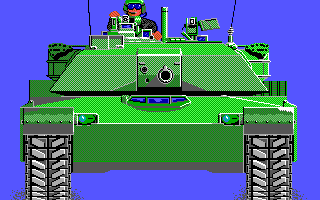

MicroProse MAX to PNG image converter
Opening MAX Image: 'CGA/TITLE.MAX'	File Size: 5267
Resolution: 160 x 200
Creating PNG Image: 'CGA/TITLE.png'
Reading MAX image	Mem Size: 32000 bytes
Correcting palette................ Palette converted to 24 bit
Max Image Fixup
Expanding: 160x200 => 320x200
Writing PNG image	File Size: 4935 bytes
MicroProse MAX to PNG image converter
Opening MAX Image: 'EGA/TITLE.MAX'	File Size: 6118
Resolution: 160 x 200
Creating PNG Image: 'EGA/TITLE.png'
Reading MAX image	Mem Size: 32000 bytes
Correcting palette................ Palette converted to 24 bit
Max Image Fixup
Expanding: 160x200 => 320x200
Writing PNG image	File Size: 5229 bytes
MicroProse MAX to PNG image converter
Opening MAX Image: 'MCGA/TITLE.MAX'	File Size: 14571
Resolution: 320 x 200
Creating PNG Image: 'MCGA/TITLE.png'
Reading MAX image	Mem Size: 64000 bytes
Warning: Decompression returned with code -4
Correcting palette................ Palette converted to 24 bit
Writing PNG image	File Size: 11408 bytes
They all look to have decoded fine, though the VGA one still displays the warning about the buffer overflow. Would be nice to find the palette for the 256 colour images too, it appears to be different than the one I found for the .PK images as they still didn’t render right with it. I did look and that VGA image does have that extra bit set again, so far it seems we only get that warning when that apparent flag bit is set. Let’s try one more candidate, we’ll use ADS, It’s always fun to see what other games they were promoting at the time.
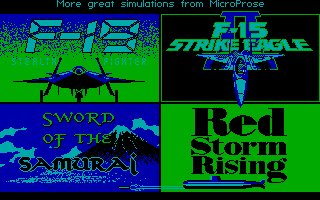


MicroProse MAX to PNG image converter
Opening MAX Image: 'CGA/ADS.MAX'	File Size: 6351
Resolution: 160 x 200
Creating PNG Image: 'CGA/ADS.png'
Reading MAX image	Mem Size: 32000 bytes
Correcting palette................ Palette converted to 24 bit
Max Image Fixup
Expanding: 160x200 => 320x200
Writing PNG image	File Size: 6176 bytes
MicroProse MAX to PNG image converter
Opening MAX Image: 'EGA/ADS.MAX'	File Size: 8464
Resolution: 160 x 200
Creating PNG Image: 'EGA/ADS.png'
Reading MAX image	Mem Size: 32000 bytes
Correcting palette................ Palette converted to 24 bit
Max Image Fixup
Expanding: 160x200 => 320x200
Writing PNG image	File Size: 7982 bytes
MicroProse MAX to PNG image converter
Opening MAX Image: 'MCGA/ADS.MAX'	File Size: 8879
Resolution: 320 x 200
Creating PNG Image: 'MCGA/ADS.png'
Reading MAX image	Mem Size: 64000 bytes
Warning: Decompression returned with code -4
Correcting palette................ Palette converted to 24 bit
Writing PNG image	File Size: 7982 bytes
Once again all 3 seem to decode fine, but again the VGA one is giving a warning. It also has the flag bit set, there probably is a correlation between the two. Would be nice to know the CGA palette settings so we render with the correct colours, but I’d be more interested in finding the palettes for the 256 colour images, than writing the code to add support for rendering the various CGA palettes. But first, we need to figure out that pesky buffer overflow problem. Since we have our trusty LZW-only decoder that we used for solving the RLE problem, let’s run that on ADS to see what we get. (Again I need to edit the file to make it a PIC88 format image by stripping out the image dimensions, the dimensions aren’t needed here anyway)
% pic2rle VGA_ADS.PIC
PIC LZW decompressor
Opening PIC Image: 'VGA_ADS.PIC'	File Size: 8875
Creating RLE Image: 'VGA_ADS.RLE'
Decompression Complete
Okay that is interesting, the LZW code had no problem with it, so the overrun must be happening at a later stage. Since we’ve taken RLE out of the loop, it must be the pixel writer. So it looks like we have a good LZW stream, juts not enough buffer to write all the data in it. Let’s see what the LZW decoder gave us.
File: VGA_ADS.RLE  [64769 bytes]
Offset    x0 x1 x2 x3 x4 x5 x6 x7 x8 x9 xA xB xC xD xE xF  Decoded Text
0000000x: F5 00 00 00 00 00 00 00 00 00 00 00 00 00 00 00  · · · · · · · · · · · · · · · ·
0000001x: 00 00 00 00 00 00 00 00 00 00 00 00 00 00 00 00  · · · · · · · · · · · · · · · ·
0000002x: 00 00 00 00 00 00 00 00 00 00 00 00 00 00 00 00  · · · · · · · · · · · · · · · ·
0000003x: 00 00 00 00 00 00 00 00 00 00 0F 00 00 00 00 00  · · · · · · · · · · · · · · · ·
        ⋮                                                 ⋮
0000F9Fx: 00 00 00 00 00 00 00 00 00 00 00 00 00 00 00 00  · · · · · · · · · · · · · · · ·
0000FA0x: 00 00 00 00 00 00 2A 00 2A 00 00 2A 2A 2A 00 00  · · · · · · * · * · · * * * · ·
0000FA1x: 2A 00 2A 2A 15 00 2A 2A 2A 15 15 15 15 15 3F 15  * · * * · · * * * · · · · · ? ·
0000FA2x: 3F 15 15 3F 3F 3F 15 15 3F 15 3F 3F 3F 15 3F 3F  ? · · ? ? ? · · ? · ? ? ? · ? ?
0000FA3x: 3F 00 00 00 00 00 00 00 00 00 00 00 00 00 00 00  ? · · · · · · · · · · · · · · ·
0000FA4x: 00 00 00 00 00 00 00 00 00 00 00 00 00 00 00 00  · · · · · · · · · · · · · · · ·

00 00 00: First Entry of Palette Data
I almost missed this, that is a fantasic number! We subtract one, since the format byte is not actually part of the image, so we really have an output of 64,768 bytes, which is still not right. A 320×200 image should only take 64,000 bytes. Which means we at 768 byts oversized. You know what is 768 bytes in size? A damn 256 colour RGB palette, that’s what! I couldn’t be happier to see that number, we are killing two birds with one stone here. Looking down at what comes at 00FA01 which is where the file should end if it was 64,001 bytes of just image data, we can see what looks to be valid palette data. In this case it’s mostly 00‘s, with only the frst 16 entries valid, but that makes sense for this image as it appears to just be the EGA ADS image converted for 8 bit colour.
I’m guessing I was right in that that 80 we saw in the upper byte of the image height was a flag for something, in this case it looks to indicate the image includes palette data. Let’s quickly modify our code to take advantage of this fact and see what we get. I’ll increase the calculated buffer by 768 bytes if the flag is set.


MicroProse MAX to PNG image converter
Opening MAX Image: 'MCGA/TITLE.MAX'	File Size: 14571
Resolution: 320 x 200
Creating PNG Image: 'MCGA/TITLE.png'
Reading MAX image	Mem Size: 64768 bytes
Applying embedded palette
Correcting palette................ Palette converted to 24 bit
Writing PNG image	File Size: 11408 bytes
MicroProse MAX to PNG image converter
Opening MAX Image: 'MCGA/ADS.MAX' File Size: 8879
Resolution: 320 x 200
Creating PNG Image: 'MCGA/ADS.png'
Reading MAX image Mem Size: 64768 bytes
Applying embedded palette
Correcting palette................ Palette converted to 24 bit
Writing PNG image File Size: 7982 bytesBy George I think we’ve got it! Not only do we have a visually corrected image, but that pesky overflow error is gone. It’s interesting to note that the mechanism for tacking on the palette after the image data like this is exactly how ZSoft added 256 colour support to PCX images of the time. Also the 4 bit per pixel encoding order also matches that of ZSoft/PCX, so I wouldn’t be surprised if these image assets were created in ZSoft’s PC Paintbrush, or PCX was used as an intermediary form of the images, and then the internal data was just compied over in hteir transcoder.
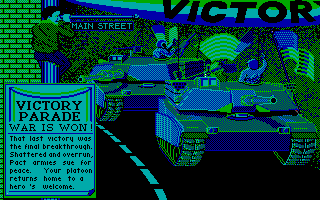
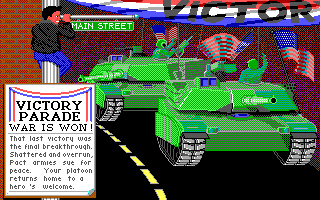
This image seems particularly appropriate at this moment.

A victory lap
Let’s take a bit of a victory lap through the MCGA (VGA) assets and then wrap things up for this post as it has gotten REALLY long, so much for being a quick one. This little side quest ended up being more involved than I had expected, I thought at most we would just find more .PK assets, was not expecting a totally different encoding.


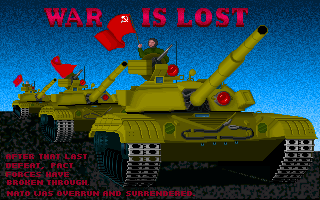
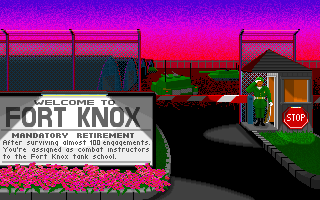

The last title image in the gallery above does not contain an embedded palette, so I applied the one extracted from TITLE earlier.
Final thoughts
Well that was quite the adventure, and far more involved than I would have guessed. In the end we figured it all out, and with that unlocked what is likely all the assets that M1 Tank Platoon has. There is more data within MCGAGRPH.TNK that we poked into in the last post to get the palette for the .PK files. At this point after taking another quick look I believe that to be more palettes and not images. Still worth an investigation down the road, but for now I’m done with M1 Tank Platoon.
I’ll be honest I’m still somewhat baffled by some of the choices made with M1 Tank Platoon. It really does feel like there were two drivers of this tank. We have two different container formats for no apparent good reason, so you have twice the reader code. Then you have two different image variants, nearly identical, but different enough to require different code. Top that off with the fact that each is partially packaged inside of the PIC framework that the game also contains. Adding even more unnecessary functionally duplicate code.
Speaking of code. I will create a mps-max repo and post my code there for managing the MAX container format. The repo should go live in a day or two, I’ll update this post with a link once it’s live. (or possibly make a new post with a quick announcement). As for the images within the MAX container, along with the .PK images from the last post, I will post the tools for reading and writing those along with the PIC related tools in the near future as they will rely at least in part on the PIC library.
That brings this little side-quest to a conclusion, hopefully I’ll be able to get my head back on track to finish up the other loose ends shortly. I’ve already blown my planned schedule of releases to oblivion. Till next time, happy hacking.

 Ouch my eye!
Leave a comment