We have some unfinished business with regards to the MicroProse CAT file format, it’s time to start wrapping things up. The last time when we looked at the CAT file format we determined the files structure, and wrote some code to extract the contents. We also mentioned the existence of a slightly different variant found with MicroProse’s M1 Tank Platoon. So let’s take a look at this other variant to see how it differs from the version we’ve already looked at.
The other kitten in the litter
So far we have only seen this variant with M1, but might be with other titles, and I suspect older ones at that. I suspect this is version 1 of the CAT format, even though in the same year as M1 Tank Platoon came out other titles that were released used the variant we’ve already looked at and titles since then have only used the other variant to the best of my knowledge. So with that in mind, I’m going to consider this one we’re looking at here as V1, and the one we previously looked at as V2.
File: M1.CAT  [23761 bytes]
Offset    x0 x1 x2 x3 x4 x5 x6 x7 x8 x9 xA xB xC xD xE xF  Decoded Text
0000000x: 5A 00 53 31 2E 50 4B 00 00 00 00 00 00 00 5C 00  Z · S 1 . P K · · · · · · · \ ·
0000001x: 00 00 48 19 4F 31 2E 50 4B 00 00 00 00 00 00 00  · · H · O 1 . P K · · · · · · ·
0000002x: A4 19 00 00 0D 09 43 31 2E 50 4B 00 00 00 00 00  · · · · · · C 1 . P K · · · · ·
0000003x: 00 00 B1 22 00 00 80 14 47 31 2E 50 4B 00 00 00  · · · " · · · · G 1 . P K · · ·
0000004x: 00 00 00 00 31 37 00 00 B9 15 44 31 2E 50 4B 00  · · · · 1 7 · · · · D 1 . P K ·
0000005x: 00 00 00 00 00 00 EA 4C 00 00 E7 0F F5 00 20 3D  · · · · · · · L · · · · · ·   =
0000006x: 78 10 F0 03 41 48 10 FE 41 2A F0 08 D1 BF 3B 91  x · · · A H · · A * · · · · ; ·
0000007x: E2 DC BB 83 05 CF 44 62 74 EE 3D 21 C6 0C D2 02  · · · · · · D b t · = ! · · · ·

5A 00: 0x005a (90) Length of header
53  ...  19: File Record (18 bytes)
F5 ...: File Data
We appear to have a few significant differences from the other version of the CAT file we have looked at. For starters instead of having a record count as the first bit of data, we have what looks to be the size of the table of records bytes. Also the record size appears to be smaller at 18 bytes instead of the 24 we saw with the other variant. We can validate that the first 16 bit value is indeed the size by calculating the size ourselves. Luckily we don’t have that many records in this case. We do see with 5 records of 18 bytes we achieve the same 90 (0x5a) value we see at the top of the file. Now let’s dig into the record structure itself.
File: M1.CAT  [23761 bytes]
Offset    x0 x1 x2 x3 x4 x5 x6 x7 x8 x9 xA xB xC xD xE xF  Decoded Text
0000000x: 5A 00 53 31 2E 50 4B 00 00 00 00 00 00 00 5C 00  Z · S 1 . P K · · · · · · · \ ·
0000001x: 00 00 48 19 4F 31 2E 50 4B 00 00 00 00 00 00 00  · · H · O 1 . P K · · · · · · ·
0000002x: A4 19 00 00 0D 09 43 31 2E 50 4B 00 00 00 00 00  · · · · · · C 1 . P K · · · · ·
0000003x: 00 00 B1 22 00 00 80 14 47 31 2E 50 4B 00 00 00  · · · " · · · · G 1 . P K · · ·
0000004x: 00 00 00 00 31 37 00 00 B9 15 44 31 2E 50 4B 00  · · · · 1 7 · · · · D 1 . P K ·
0000005x: 00 00 00 00 00 00 EA 4C 00 00 E7 0F F5 00 20 3D  · · · · · · · L · · · · · ·   =
0000006x: 78 10 F0 03 41 48 10 FE 41 2A F0 08 D1 BF 3B 91  x · · · A H · · A * · · · · ; ·
0000007x: E2 DC BB 83 05 CF 44 62 74 EE 3D 21 C6 0C D2 02  · · · · · · D b t · = ! · · · ·

53  ...  00: Filename (12 bytes)
5C 00 00 00: 0x0000005C - File Data Offset
48 19: 0x1948 (6472) - File Size
F5 ...: File Data
Just like the other variant the record seems to start off with a 12 byte field for holding the file name of the asset. For the most part what follows are the same fields as the previous version, but presented in a different order. The first field after the name looks to be the 32 bit absolute offset within the CAT file of the file data. Then we what appears to be the file size field, however it is only 16 bits now instead of the 32bits we saw previously. At that point we are into the start of the next record, so it appears there is no file date and time included with this variant.
We can once again validate the fields. We can see that the first record points to 0000005C for the start of data, and that does align with what we also see as the start of data from when we determined the extents of the records. For validating the size we can take the offsets of the first two records and subtract them, the result should be the size of the first file.
0x000019A4 (6564) – 0x0000005C (92) = 0x00001948 (6472)
I’m not going to go into the code of reading this variant, as the mechanics of it are exactly the same as the version we looked at before, the only difference is the structure itself. We still have all the same critical fields. I will be including code for reading and writing this variant in the code-repo that I release at the end of the next post on the format. With that said, for clarity, here is the structures that describe the CAT-V1 format.
typedef struct {
    char name[12]; // in DOS 8.3 format
    uint32_t offset; // absolute file offset to start of data for this entry
    uint16_t size;   // data length of this entry
} mps_cat_v1_entry_t;

typedef struct {
    uint16_t size;   // count is size / sizeof(mps_cat_v1_entry_t)
    mps_cat_v1_entry_t entries[]; // holds 'count' records
} mps_cat_v1_file_t;
Extracting the CAT V1 contents
So while I’m not going to post the code here, I will show the results of reading and extracting using the structures we determined for this variant. (full source will be available at my github repo) The code is identical to what was created for the previous version, with just the structure changed, and the file timestamp stuff removed.
MicroProse CAT (V1) Extractor
Opening: 'M1.CAT'	File Size: 23761 bytes
Catalogue contains 5 items
 1:        S1.PK   6472  [@0000005c] [Extracting]
 2:        O1.PK   2317  [@000019a4] [Extracting]
 3:        C1.PK   5248  [@000022b1] [Extracting]
 4:        G1.PK   5561  [@00003731] [Extracting]
 5:        D1.PK   4071  [@00004cea] [Extracting]
After taking a quick look it appears that the .PK files may actually be PIC88 images.
File: S1.PK  [6472 bytes]
Offset    x0 x1 x2 x3 x4 x5 x6 x7 x8 x9 xA xB xC xD xE xF  Decoded Text
0000000x: F5 00 20 3D 78 10 F0 03 41 48 10 FE 41 2A F0 08  · ·   = x · · · A H · · A * · ·
0000001x: D1 BF 3B 91 E2 DC BB 83 05 CF 44 62 74 EE 3D 21  · · ; · · · · · · · D b t · = !
0000002x: C6 0C D2 02 06 01 09 00 EB B8 80 09 3D 85 0E 08  · · · · · · · · · · · · = · · ·
0000003x: FE FB F7 E8 8A 42 05 2A 57 FE B9 B3 F2 CE BD 95  · · · · · B · * W · · · · · · ·
Nothing to lose by trying to decode one right? Let’s see what we get.

Well that’s strange it looks like we are interlaced or somehow half the width, maybe this is encoded for CGA and is interlaced somehow? Let’s try re-rendering at 160 instead of 320.

Well that fixed the double image, but we are horribly stretched vertically, there also appears to be a slight distortion. I wonder… maybe the Format Identifier byte is different from what we expect here, and this is really a packed image. Let’s try manually changing it to see what we get.
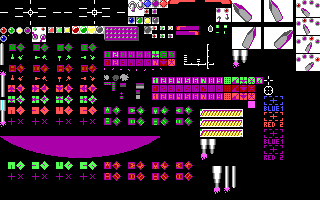
Well that seems to have done the trick. This is also clearly a 16 colour image, so not CGA specific. Strange that the format byte is different from how we expected relative to the encoding of the data. Let’s take a look at the rest of the files to see if they are the same.


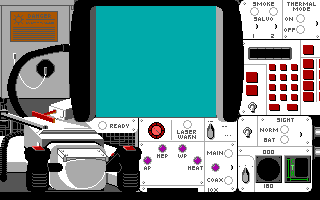

All the images required the adjustment to the format byte, in order ti work with my existing PIC decoder, so I may need to update the knowledge base for PIC here too. Perhaps with this .PK version, the format identifier is inverse from what we expect. I’ll have to mull that over for a bit, in the meantime, there are two more CAT files with the game M1A.CAT and M1B.CAT, let’s take a look to see what they contain. Besides, the more data we have, the better we can decide how to handle this deviation of PIC.
The other CAT files
We’ll go in alphabetical order here, so let’s begin with M1A.CAT.
MicroProse CAT (V1) Extractor
Opening: 'M1A.CAT'	File Size: 23483 bytes
Catalogue contains 5 items
 1:        S1.PK   6219  [@0000005c] [Extracting]
 2:        O1.PK   2178  [@000018a7] [Extracting]
 3:        C1.PK   5419  [@00002129] [Extracting]
 4:        G1.PK   5518  [@00003654] [Extracting]
 5:        D1.PK   4057  [@00004be2] [Extracting]
Interesting, these are the same file names as before, so perhaps the graphic assets for a different video mode? They still appear to be PIC88 images with the same F5 marker as before.
File: S1.PK  [6219 bytes]
Offset    x0 x1 x2 x3 x4 x5 x6 x7 x8 x9 xA xB xC xD xE xF  Decoded Text
0000000x: F5 CC 20 3D 18 16 F0 03 41 48 10 66 40 2A 30 00  · ·   = · · · · A H · f @ * 0 ·
0000001x: C0 8C 08 22 24 C4 88 00 00 C2 C4 88 31 06 80 10  · · · " $ · · · · · · · 1 · · ·
0000002x: 01 69 81 B0 80 04 58 70 5C 20 00 86 42 07 04 67  · i · · · · X p \   · · B · · g
0000003x: CC 18 20 40 A1 82 94 2A 27 44 50 19 21 86 CA 19  · ·   @ · · · * ' D P · ! · · ·
Let’s see what we get, first will try rendering normally and adjust from there.
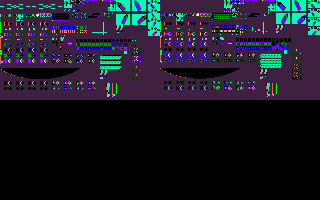

Once again looks like the encoding value needs to be corrected for our decoder. With that, let’s look at the rest.


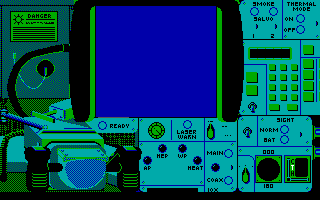

Maybe this .PK variant has the format byte inverted from what we expect, or maybe this is the only encoding it expects. We will need to update our knowledge book on PIC to cover this case, as it is otherwise a standard PIC88 encoded image. Judging from the colouring (and number used), my guess is that these assets are for CGA, meaning the previous ones were likely for EGA. If that is the case, we expect to see more of the same from the remaining CAT file.
The plot thickens
Last on the chopping block is the M1B.CAT file, at this point I expect to see the same assets, but for another graphics adapter, we’ve done EGA and CGA, so my guess is VGA-256 as that’s all that’s left that the game supported.
MicroProse CAT (V1) Extractor
Opening: 'M1B.CAT'	File Size: 52457 bytes
Catalogue contains 5 items
 1:        S1.PK   9123  [@0000005c] [Extracting]
 2:        O1.PK   5809  [@000023ff] [Extracting]
 3:        C1.PK  12527  [@00003ab0] [Extracting]
 4:        G1.PK  14981  [@00006b9f] [Extracting]
 5:        D1.PK   9925  [@0000a624] [Extracting]
No surprises this time, everything is the same as before, even down to the F5 marker, though if these are 256 colour images we would expect F5 here.
File: S1.PK  [9123 bytes]
Offset    x0 x1 x2 x3 x4 x5 x6 x7 x8 x9 xA xB xC xD xE xF  Decoded Text
0000000x: F5 00 20 79 78 10 F0 07 41 48 21 20 28 DC 01 89  · ·   y x · · · A H !   ( · · ·
0000001x: 00 84 86 1A 36 74 D8 01 01 00 80 1C 37 02 04 2C  · · · · 6 t · · · · · · 7 · · ,
0000002x: F0 C1 44 8B 8D 42 90 28 B1 08 C0 87 92 25 49 8A  · · D · · B · ( · · · · · % I ·
0000003x: 40 5A 80 04 92 81 24 30 95 9C 0C A8 60 89 4C 98  @ Z · · · · $ 0 · · · · ` · L ·
With that, let’s take a look to see if these are indeed 256 colour images.
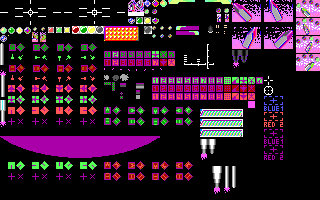
A little hard on the eyes as I don’t have the correct palette to render with. It is, however, indeed a 256 colour image. Unfortunately that means that the format byte is not simply inverted from what we expect, and there is no other indicator to tell us that this is a packed image or a linear one. I’ll have to adjust my decoder to allow for forcing the encoding one way or another, as we cannot simply rely on the format identifier (at least for PIC88). But this is good enough to confirm that we can indeed read the format, and the contained files within are indeed all PIC files. Let’s take a quick look to see if we can locate a palette to use with the files.
Finding the palette
A quick scan through the M1 Tank Platoon files doesn’t reveal any .PAL files, or anything else that looks like it might be a palette, but maybe we can find it in one of the executable files. Now M1, like so many games of the time, obfuscates the .EXE files by renaming them. In this case the .TNK files are the executables. From those the most likely candidate is the one for MCGA graphics (320×200 VGA 256 colour) as these are 256 colour images. Thus we’ll start by peeking into MCGAGRPH.TNK.
File: MCGAGRPH.TNK  [23052 bytes]
Offset    x0 x1 x2 x3 x4 x5 x6 x7 x8 x9 xA xB xC xD xE xF  Decoded Text
0000000x: 4D 5A 0C 00 2E 00 10 00 20 00 01 20 01 20 00 00  M Z · · . · · ·   · ·   ·   · ·
0000001x: 00 00 ED 93 00 00 00 00 1E 00 00 00 01 00 1C 00  · · · · · · · · · · · · · · · ·
0000002x: 00 00 0D 0A 08 00 14 0A 08 00 1B 0A 08 00 D7 28  · · · · · · · · · · · · · · · (
0000003x: 08 00 E8 28 08 00 12 29 08 00 24 29 08 00 F0 2A  · · · ( · · · ) · · $ ) · · · *
        ⋮                                                 ⋮
000001Fx: 00 00 00 00 00 00 00 00 00 00 00 00 00 00 00 00  · · · · · · · · · · · · · · · ·
0000020x: 43 47 41 47 52 50 48 2E 41 53 4D 20 30 35 2D 30  C G A G R P H . A S M   0 5 - 0
0000021x: 33 2D 38 38 00 00 00 00 0A 00 24 00 08 00 7A 00  3 - 8 8 · · · · · · $ · · · z ·
        ⋮                                                 ⋮
0000058x: B4 BF C9 D2 DA E1 E7 EC F0 F3 F5 0E F7 8E 9C A9  · · · · · · · · · · · · · · · ·
0000059x: B5 C0 CA D3 DB E2 E8 ED F1 F4 F6 F7 0F 00 00 00  · · · · · · · · · · · · · · · ·
000005Ax: 00 00 2A 00 2A 00 00 2A 2A 2A 00 00 2A 00 2A 2A  · · * · * · · * * * · · * · * *
000005Bx: 15 00 2A 2A 2A 15 15 15 15 15 3F 15 3F 15 15 3F  · · * * * · · · · · ? · ? · · ?
000005Cx: 3F 3F 15 15 3F 15 3F 3F 3F 15 3F 3F 3F 3F 3F 3F  ? ? · · ? · ? ? ? · ? ? ? ? ? ?
        ⋮                                                 ⋮
0000086x: 2A 2A 3F 15 2A 3F 2A 2A 2A 2A 2A 2A 3F 2A 3F 2A  * * ? · * ? * * * * * * ? * ? *
0000087x: 2A 3F 3F 3F 15 2A 3F 2A 15 3F 2A 2A 3F 2A 2A 3F  * ? ? ? · * ? * · ? * * ? * * ?
0000088x: 2A 3F 3F 3F 2A 00 00 00 00 00 00 00 00 00 00 00  * ? ? ? * · · · · · · · · · · ·
0000089x: 00 00 00 00 00 00 00 00 00 00 00 00 00 90 00 00  · · · · · · · · · · · · · · · ·
000008Ax: 00 00 00 00 00 00 00 A0 FF 7F 00 80 FF 7F FF 7F  · · · · · · · · · · · · · · · ·
Got really lucky there in that there was what was pretty clearly palette data starting at 00059D and it cleanly runs to 00089C giving us the full 768 bytes for 256 RGB colour palette entries. Let’s re-render our file now using our extracted palette.

Looks reasonable, let’s take a look at the rest of them. The MCGAGRPH.TNK file I looked at actually appears to be mostly data, and may even contain some embedded images or sprites. An adventure to revisit for another day.

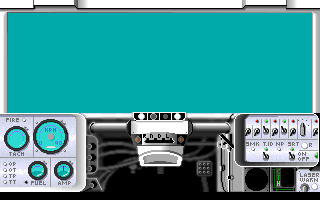


The graphics are actually quite nice, typical quality for MicroProse of this era. Though perhaps a bit too bright. A little scuff and dirt might add to the immersion as well.
Final thoughts
First let’s talk about the CAT-V1 format, we’ve clearly shown we can read it, and that’s not surprising really, it’s not like we had to decompress anything. Once we established the structure of the data it’s simple enough to copy out the desired bytes for the asset we want. Not sure if I’ll try to do a universal CAT utility, or if I’ll leave V1 on it’s own, as so far we’ve only seen it with M1 Tank Platoon. Regardless of which path I choose, I will include code for reading and writing both the V1 and V2 formats in the code when I post it to github, which will most likely be after my next post, so stay tuned. (I had initially intended to have that in this post, but then we made the unexpected PIC/PK adventure)
Honestly I’m still not sure what to make of this outlier of the PIC format. There are no external indicators we can use to tell us if the data is to be interpreted as packed or linear. This could be an error in implementation on the part of MicroProse, or perhaps they hadn’t settled in on how to utilize the format byte at this point in the PIC files history. This was back in 1988 after all which is at the beginning of the PIC file format’s history, as far as we’ve uncovered so far. This could also just be a result of how the game engine handles the data internally, and an intentional choice here. Regardless we need to be able to special case this in order to be able to render, and encode files for M1 Tank Platoon. I think the most likely solution here is to allow for the ability to force an encoding or decoding that differs form what the format identifier specifies, but I will have to think about the mechanics of that.
For now I think that’s enough for today, this post is already getting long. In my next post about the CAT file format We’ll put together the read/write/modify utility. It will be more of the same for my next post on the PIC file format, as we put together the final bits of code to read and encode all the variants we’ve uncovered so far.

 Ouch my eye!
Leave a comment