At the request of one of my readers here, I was asked to look at another graphics asset format. This time it’s the IMG format used by Strategic Simulations, Inc. (SSI) with their 1989 release of Red Lightning. I honestly don’t know much about this game, and all I have really is the one asset file that was sent for me to look at. The goal here is to be able to read and write this format, to facilitate modding of the game. With that said, let’s see what we can find out, and help make it happen for our reader.
Update: I’ll expand this list as more titles are found. so far the following titles appear to use the SSI-IMG format discussed in this post.
– Red Lightning (1989)
– Conflict: Middle East (1991)
– Conflict: Korea (1992) [Only for CGA graphics, currently not supported by my code]
This one is going to be a bit odd, as I only have the single file. I was provided a few screenshots of the game as visuals and reference below. Given the name EGAHEXES.IMG I suspect it will somehow be related to the image on the right.


First look at the IMG file
The first thing I noticed is the file size of the IMG file 64000 bytes. That’s too round of a number to suggest a compressed file. A 320×200 256 colour would be 64000 bytes, but this is EGA, so 16 colour (I’m assuming so based on the file name). Looking at the standard graphics modes available mode 0Eh fits the bill. 640×200 16 colour would occupy exactly 64000 bytes. This gives us our likely resolution to work with, but feels odd to me.
File: EGAHEXES.IMG  [64000 bytes]
Offset    x0 x1 x2 x3 x4 x5 x6 x7 x8 x9 xA xB xC xD xE xF  Decoded Text
0000000x: 00 00 00 00 00 00 00 00 00 00 00 00 00 00 00 00  · · · · · · · · · · · · · · · ·
0000001x: 00 00 00 00 00 00 00 00 00 00 00 00 00 00 00 00  · · · · · · · · · · · · · · · ·
0000002x: 00 00 00 00 00 00 00 00 00 00 00 00 00 00 00 00  · · · · · · · · · · · · · · · ·
0000003x: 00 00 00 00 00 00 00 00 00 00 00 00 00 00 00 00  · · · · · · · · · · · · · · · ·
Looking at the file data itself, it is clear that there is no discernible header information here, so this is likely raw image data. Also by the vast sea of 00 we can safely conclude that the image is indeed not compressed. The question is what arrangement is the data in. The size suggests that the data is packed, or planar. The easiest way going forward would be to do so visually.
Rendering the IMG file
I’m going to grab raw rendering code I developed earlier when working on the PIC file format and use that for a basis here. I’ll use the standard EGA palette for colours. And this is what we get.
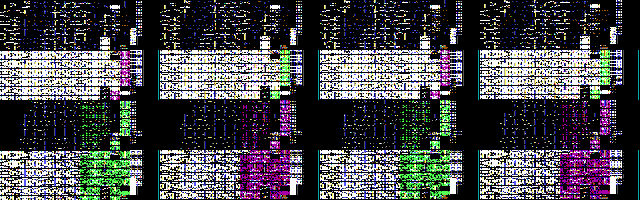
It is clear that the image data is most definitely planar. Interestingly we can sort of see the hexes still even with the image as garbled as it is. Let’s borrow our planar code from our adventures with the PIC93 file format to deplane the image.
void pln2lin(memstream_buf_t *dst, memstream_buf_t *src) {
    int ofs2 = src->len / 2;  // 1/2
    int ofs1 = ofs2 / 2;      // 1/4
    int ofs3 = ofs1 + ofs2;   // 3/4

    for(int i = 0; i < ofs1; i++) {
        uint8_t p0 = src->data[       i];
        uint8_t p1 = src->data[ofs1 + i];
        uint8_t p2 = src->data[ofs2 + i];
        uint8_t p3 = src->data[ofs3 + i];

        for(int b = 0; b < 8; b++) { // 8 pixels packed per byte
            uint8_t px = 0;
            px |= p0 & 0x80; px >>= 1;
            px |= p1 & 0x80; px >>= 1;
            px |= p2 & 0x80; px >>= 1;
            px |= p3 & 0x80; px >>= 4; // final shift
            if(dst->pos < dst->len) dst->data[dst->pos++] = px;
            p0 <<= 1; p1 <<= 1; p2 <<= 1; p3 <<= 1; // shift in the next pixel
        }
    }
}
With that in place, let’s see what we get.

Well that looks to have done the trick. We can clearly make out each of the hex sprites used to generate the game map. Clearly the image is indeed 640×200, despite my feelings about that resolution. Colours look correct, so our plane mapping must be good. Also nice to see the artists initials and date in the bottom right. Now that we can read it, writing it is just a matter of reversing the deplaning step, which is pretty straight forward.
void lin2pln(memstream_buf_t *dst, memstream_buf_t *src) {
    int ofs2 = dst->len / 2;  // 1/2
    int ofs1 = ofs2 / 2;      // 1/4
    int ofs3 = ofs1 + ofs2;   // 3/4
    uint8_t p0 = 0;
    uint8_t p1 = 0;
    uint8_t p2 = 0;
    uint8_t p3 = 0;

    for(int i = 0; i < ofs1; i++) {
        for(int b = 0; b < 8; b++) { // 8 pixels packed per byte
            p0 <<= 1; p1 <<= 1; p2 <<= 1; p3 <<= 1; // make room for the next pixel
            uint8_t px = 0;
            if(src->pos < src->len) px = src->data[src->pos++];
            p0 |= px & 0x01; px >>= 1;
            p1 |= px & 0x01; px >>= 1;
            p2 |= px & 0x01; px >>= 1;
            p3 |= px & 0x01; px >>= 1; // final shift
        }

        dst->data[       i] = p0;
        dst->data[ofs1 + i] = p1;
        dst->data[ofs2 + i] = p2;
        dst->data[ofs3 + i] = p3;
    }
}
Writing a BMP file
In order to be “useful” as a modding tool, we need to put the image into a more usable format… PPM is not that format. So far I’ve been rendering into 24 bit PPM images, what we need is a format that can hold an indexed image, this way our indices are preserved, and the translation becomes much easier. For that task we will turn to the Microsoft Windows BMP format, as it is also quite simple to implement. PNG would probably be better, but is more complex to implement as the image must be compressed, BMP allows for uncompressed which is easier for us. To read or write BMP files we need to be able to parse the header structure.
#define BMPFILESIG (0x4d42)  // "BM" // Windows BMP signature
typedef uint16_t bmp_signature_t;

typedef struct {
	uint32_t  file_size;     // File Size in bytes
	uint32_t  RES;           // reserved (always 0)
	uint32_t  image_offset;  // File offset to image raster data
} dib_header_t;

#define BMP72DPI (2835) // 72 DPI converted to PPM
typedef struct {
	uint32_t  header_size;       // size of this header (40)
	uint32_t  image_width;       // bitmap width
	int32_t   image_height;      // bitmap height (can be -ive to flip scan order)
	uint16_t  num_planes;        // Number of planes (must be 1)
	uint16_t  bits_per_pixel;    // 1,4,8,18,24 (some versions support 2 and 32)
	uint32_t  compression;       // 0 = uncompressed
	uint32_t  bitmap_size;       // Size of image or can be left at 0
	uint32_t  horiz_res;         // horizontal Pixels per meter (PPM)
	uint32_t  vert_res;          // vertical pixels per meter (PPM)
	uint32_t  num_colors;        // number of colours in the palette
	uint32_t  important_colors;  // number of important colours (0 = all)
} bmi_header_t;

typedef struct {
    dib_header_t dib;
    bmi_header_t bmi;
} bmp_header_t;

typedef struct {
    uint8_t r;
    uint8_t g;
    uint8_t b;
    uint8_t a; // this is reserved and 0 for BMP
} bmp_palette_entry_t;
To write a BMP is just to write out the signature, the headers, palette data if an indexed image, and then the image data itself. Typically BMP stores the image data in scanlines going from the bottom to the top, though this can be reversed by specifying a negative height. Scanlines also must be padded out to a 32bit boundary. Finally if dealing with images that have less than 8 bits per pixel, the data is stored in big endian order, that is the left most pixel, is in the most significant bit position.
#define HDRBUFSZ (sizeof(bmp_signature_t) + sizeof(bmp_header_t))
int save_bmp(const char *fn, memstream_buf_t *src, uint width, uint height) {
    int rval = 0;
    FILE *fp = NULL;
    uint8_t *buf = NULL; // line buffer, also holds header info

    // do some basic error checking on the inputs
    if((NULL == fn) || (NULL == src) || (NULL == src->data)) {
        rval = -1;  // NULL pointer error
        goto bmp_cleanup;
    }

    // try to open/create output file
    if(NULL == (fp = fopen(fn,"wb"))) {
        rval = -2;  // can't open/create output file
        goto bmp_cleanup;
    }

    // stride is the bytes per line in the BMP file, which are padded
    // out to 32 bit boundaries
    // we get 2 pixels per byte for being 16 colour, so stride is halved
    uint32_t stride = ((width + 3) & (~0x0003)) / 2;
    uint32_t bmp_img_sz = (stride) * height;

    // allocate a buffer to hold the header and a single scanline of data
    // this could be optimized if necessary to only allocate the larger of
    // the line buffer, or the header + padding as they are used at mutually
    // exclusive times
    if(NULL == (buf = calloc(1, HDRBUFSZ + stride + 2))) {
        rval = -3;  // unable to allocate mem
        goto bmp_cleanup;
    }

    // signature starts after padding to maintain 32bit
    // alignment for the rest of the header
    bmp_signature_t *sig = (bmp_signature_t *)&buf[stride + 2];

    // bmp header starts after signature
    bmp_header_t *bmp = (bmp_header_t *)&buf[stride + 2 + sizeof(bmp_signature_t)];

    // setup the signature and DIB header fields
    *sig = BMPFILESIG;
    bmp->dib.image_offset = HDRBUFSZ + sizeof(pal);
    bmp->dib.file_size = bmp->dib.image_offset + bmp_img_sz;

    // setup the bmi header fields
    bmp->bmi.header_size = sizeof(bmi_header_t);
    bmp->bmi.image_width = width;
    bmp->bmi.image_height = height;
    bmp->bmi.num_planes = 1;     // always 1
    bmp->bmi.bits_per_pixel = 4; // 16 colour image
    bmp->bmi.compression = 0;    // uncompressed
    bmp->bmi.bitmap_size = bmp_img_sz;
    bmp->bmi.horiz_res = BMP96DPI;
    bmp->bmi.vert_res = BMP96DPI;
    bmp->bmi.num_colors = 16; // palette has 16 colours
    bmp->bmi.important_colors = 0; // all colours are important

    // write out the header
    int nr = fwrite(sig, HDRBUFSZ, 1, fp);
    if(nr != 1) {
        rval = -4;  // unable to write file
        goto bmp_cleanup;
    }

    // we're using our global palette here, wich is already in BMP format
    // write out the palette
    nr = fwrite(pal, sizeof(pal), 1, fp);
    if(nr != 1) {
        rval = -4;  // can't write file
        goto bmp_cleanup;
    }

    // now we need to output the image scanlines. For maximum
    // compatibility we do so in the natural order for BMP
    // which is from bottom to top. For 16 colour/4 bit image
    // the pixels are packed two per byte, left most pixel in
    // the most significant nibble.
    // start by pointing to start of last line of data
    uint8_t *px = &src->data[src->len - width];
    // loop through the lines
    for(int y = 0; y < height; y++) {
        bzero(buf, stride); // zero out the line in the output buffer
        // loop through all the pixels for a line
        // we are packing 2 pixels per byte, so width is half
        for(int x = 0; x < ((width + 1) / 2); x++) {
            uint8_t sp = *px++; // get the first pixel
            sp <<= 4; // shift it to make room for the next one
            if((x * 2 + 1) < width) { // test for odd pixel end
                sp |= (*px++) & 0x0f; // get the next pixel
            }
            buf[x] = sp; // write it to the line buffer
        }
        nr = fwrite(buf, stride, 1, fp); // write out the line
        if(nr != 1) {
            rval = -4;  // unable to write file
            goto bmp_cleanup;
        }
        px -= (width * 2); // move back to start of previous line
    }

bmp_cleanup:
    if(fp) fclose(fp);
    if(buf) free(buf);
    return rval;
}
Considerably more code than we had for PPM, but really not complex, most of it is just generating the header data. Reading a BMP is equally straight forward, though we need to pay more attention to some of the header values to maximize compatibility. For simplicity our reader will only support BMP images that are uncompressed, indexed. and 16 colour. Despite the fact that a 16 colour image demands a palette, we will ignore the palette in the BMP file and assume the standard CGA/EGA/VGA palette and indices.
int load_bmp(memstream_buf_t *dst, const char *fn, uint *width, uint *height) {
    int rval = 0;
    FILE *fp = NULL;
    uint8_t *buf = NULL; // line buffer
    bmp_header_t *bmp = NULL;

    // do some basic error checking on the inputs
    if((NULL == fn) || (NULL == dst) || (NULL == width) || (NULL == height)) {
        rval = -1;  // NULL pointer error
        goto bmp_cleanup;
    }

    // try to open input file
    if(NULL == (fp = fopen(fn,"rb"))) {
        rval = -2;  // can't open input file
        goto bmp_cleanup;
    }

    bmp_signature_t sig = 0;
    int nr = fread(&sig, sizeof(bmp_signature_t), 1, fp);
    if(nr != 1) {
        rval = -3;  // unable to read file
        goto bmp_cleanup;
    }
    if(BMPFILESIG != sig) {
        rval = -4; // not a BMP file
        goto bmp_cleanup;
    }

    // allocate a buffer to hold the header
    if(NULL == (bmp = calloc(1, sizeof(bmp_header_t)))) {
        rval = -5;  // unable to allocate mem
        goto bmp_cleanup;
    }
    nr = fread(bmp, sizeof(bmp_header_t), 1, fp);
    if(nr != 1) {
        rval = -3;  // unable to read file
        goto bmp_cleanup;
    }

    // check some basic header vitals to make sure it's in a format we can work with
    if((1 != bmp->bmi.num_planes) ||
       (sizeof(bmi_header_t) != bmp->bmi.header_size) ||
       (0 != bmp->dib.RES)) {
        rval = -6;  // invalid header
        goto bmp_cleanup;
    }
    if((4 != bmp->bmi.bits_per_pixel) ||
       (16 != bmp->bmi.num_colors) ||
       (0 != bmp->bmi.compression)) {
        rval = -7;  // unsupported BMP format
        goto bmp_cleanup;
    }

    // seek to the start of the image data, as we don't use the palette data
    // we assume the standard CGA/EGA/VGA 16 colour palette
    fseek(fp, bmp->dib.image_offset, SEEK_SET);

    // check if the destination buffer is null, if not, free it
    // we will allocate it ourselves momentarily
    if(NULL != dst->data) {
        free(dst->data);
        dst->data = NULL;
    }

    // if height is negative, flip the render order
    bool flip = (bmp->bmi.image_height < 0);
    bmp->bmi.image_height = abs(bmp->bmi.image_height);

    uint lw = bmp->bmi.image_width;
    uint lh = bmp->bmi.image_height;

    // stride is the bytes per line in the BMP file, which are padded
    // we get 2 pixels per byte for being 16 colour
    uint32_t stride = ((lw + 3) & (~0x0003)) / 2;

    // allocate our line and output buffers
    if(NULL == (dst->data = calloc(1, lw * lh))) {
        rval = -5;  // unable to allocate mem
        goto bmp_cleanup;
    }
    dst->len = lw * lh;
    dst->pos = 0;

    if(NULL == (buf = calloc(1, stride))) {
        rval = -5;  // unable to allocate mem
        goto bmp_cleanup;
    }

    // now we need to read the image scanlines.
    // start by pointing to start of last line of data
    uint8_t *px = &dst->data[dst->len - lw];
    if(flip) px = dst->data; // if flipped, start at beginning
    // loop through the lines
    for(int y = 0; y < lh; y++) {
        nr = fread(buf, stride, 1, fp); // read a line
        if(nr != 1) {
            rval = -3;  // unable to read file
            goto bmp_cleanup;
        }

        // loop through all the pixels for a line
        // we are packing 2 pixels per byte, so width is half
        for(int x = 0; x < ((lw + 1) / 2); x++) {
            uint8_t sp = buf[x]; // get the pixel pair
            *px++ = (sp >> 4) & 0x0f; // write the 1st pixel
            if((x * 2 + 1) < lw) { // test for odd pixel end
                *px++ = sp & 0x0f; // write the 2nd pixel
            }
        }
        if(!flip) { // if not flipped, wehave to walk backwards
            px -= (lw * 2); // move back to start of previous line
        }
    }

    *width = lw;
    *height = lh;

bmp_cleanup:
    fclose_s(fp);
    free_s(buf);
    free_s(bmp);
    return rval;
}
That pretty much wraps up everything we need to be able to read and write the SSI IMG file format. Let’s run a quick test to make sure everything works properly.
% img2bmp 640x200 EGAHEXES.IMG EGAHEXES-TEST.BMP
SSI-IMG to BMP image converter
Resolution: 640 x 200
Opening IMG File: EGAHEXES.IMG	File Size: 64000
Creating BMP File: EGAHEXES-TEST.BMP
Done
% bmp2img EGAHEXES-TEST.BMP EGAHEXES-TEST.IMG
BMP to SSI-IMG image converter
Loading BMP File: EGAHEXES-TEST.BMP
Resolution: 640 x 200
Creating IMG File: EGAHEXES-TEST.IMG
Done
% md5 EGAHEXES.IMG EGAHEXES-TEST.IMG
MD5 (EGAHEXES.IMG)      = 6795b46141350c5b2e069d2d5ae56ac7
MD5 (EGAHEXES-TEST.IMG) = 6795b46141350c5b2e069d2d5ae56ac7
Success! And that’s a wrap… Let the modding begin! For those interested I’ve posted the read and write IMG code to my github and have released it under the MIT license. Do what you will with it, just give credit if you use it in your own code. I should add that the code I’ve presented currently only works for 4 plane (aka 16 colour EGA/VGA) images. Some modification would be required for other plane arrangements (like CGA).
Finding the game
Despite already decoding the format, I decided to try and track down the game to see what else I could learn about it. As you can see below the game does not contain too many files, at least for the image set I was able to find. So really not much else to learn.
-rw-rw-rw-    6253  6 Jul  2024 CGA.BGI
-rw-rw-rw-   16384  6 Jul  2024 CGAHEXES.IMG
-rw-rw-rw-   64000  6 Jul  2024 EGAHEXES.IMG
-rw-rw-rw-    5363  6 Jul  2024 EGAVGA.BGI
-rw-rw-rw-   51962  6 Jul  2024 GH.SCE
-rw-rw-rw-   51962  6 Jul  2024 LTB.SCE
-rw-rw-rw-   66512  6 Jul  2024 OB.ASC
-rw-rw-rw-    5197  6 Jul  2024 README
-rw-rw-rw-  142096  6 Jul  2024 RL.EXE
-rw-rw-rw-   51962  6 Jul  2024 RL.SCE
-rw-rw-rw-   51962  6 Jul  2024 RLSLTR.SCE
One of the things that jumps out to me is the use of Borland Graphics Interface (BGI) drivers, meaning that this title was built using Borland development tools, and they used the stock drivers that the compiler provides. I’m actually amazed that the game was developed and released using the BGI library, as the BGI library was notoriously slow.
Poking into one of the SCE files we can see that the strings are length prefixed, meaning that the game was most likely coded using Turbo Pascal. I always forget how popular Pascal was as a programming language back then. Pascal was one of my early languages that I programmed with back in the mid-late 1980’s, including being frustrated by the lacklustre performance of BGI. Though by the time of t his title, I had moved on to C. With that said, I was a huge fan of the Borland tools, and continued to use them, just not the bundled graphics library when I needed to do something that required performance.
File: GH.SCE  [51962 bytes]
Offset    x0 x1 x2 x3 x4 x5 x6 x7 x8 x9 xA xB xC xD xE xF  Decoded Text
0000000x: 06 00 16 33 35 20 41 69 72 20 41 73 73 61 75 6C  · · · 3 5   A i r   A s s a u l
0000001x: 74 20 42 72 69 67 61 64 65 8B D8 E8 07 00 C7 06  t   B r i g a d e · · · · · · ·
0000002x: A7 04 00 00 C3 FF 06 A7 04 8B 00 00 00 00 00 00  · · · · · · · · · · · · · · · ·
0000003x: 01 00 00 00 00 00 00 00 00 00 00 00 00 00 06 00  · · · · · · · · · · · · · · · ·
0000004x: 16 33 36 20 41 69 72 20 41 73 73 61 75 6C 74 20  · 3 6   A i r   A s s a u l t
0000005x: 42 72 69 67 61 64 65 52 A3 04 03 89 1E 06 03 8B  B r i g a d e R · · · · · · · ·
0000006x: 0E F0 02 8B 16 F2 02 89 00 00 00 00 00 00 02 00  · · · · · · · · · · · · · · · ·
0000007x: 00 00 00 00 00 00 00 00 00 00 00 00 05 00 1A 37  · · · · · · · · · · · · · · · 7

16: 0x16 (22)
Now that we see that the game engine used the standard BGI library I can’t help but wonder if this IMG format we just decoded isn’t just the native format for the BGI library.
After doing a bit of searching, it appears not, or at least the 4 byte width and height values were not included into the file. (ED: it may still be the native format, it is possible the width/height prefix was not always part of the BGI image format) The image data itself being planar data may very well be compatible with the getimage() and putimage() BGI functions. This link seems to suggest the data was native to whatever the graphics mode was, thus planar would make sense for EGA & VGA. Also looking at the size of the CGA version of the file, it appears as if the entire CGA framebuffer is used, not just the active part. I may make a future post about the CGA variant, but for now my focus was on the EVA/VGA version.
That wraps it up for this one, and this adventure I think. Not much else to solve here, except possibly the CGA format. This was a quick and easy solve, and a welcome distraction from my ongoing PIC file format work. Though even that is approaching the end, so will need to find new formats to break down and decode soon.

 Ouch my eye!
Leave a comment