Last time we left off in a pretty good place, and with a decent understanding of the structure of the MicroProse SPC file format. Even if not totally correct, or complete, it seems to be good enough to traverse through the file to locate all the data. So with that, in this post we are going to convert that data into images we can see, and make any adjustments to our understanding of the format as necessary from there.
Making pretty pictures
We still have a lot of unknowns here, but I think we actually have enough here to start rendering something to see if we are actually on the right track. There’s no special sauce here, so again not going to bother with posting code, just going to get right into the results. Only thing to note is that we don’t seem to have a palette with these files, or at least haven’t identified one yet. As such I’m going to use the default 16 colour CGA/EGA/VGA palette. The only other thing of note is the pixel structure within the scanline data itself.
typedef struct {
    uint8_t p[4]; // each entry is 8 bits of one of the pixel planes
} spc_pixels_t;
For now I’m just going to map then one to one. No doubt we will need to determine the order here to get a proper looking image.
Explorer for MicroProse SPC Files
Analyzing: 'ARROW.SPC'	File Size: 176 bytes
images: 1
unk2: 0001 (1)
unk3: 0000 (0)
unk4: 00 00 00 00 00 00
Pos: 00000c (12)

*** IMAGE 0 ***
unk1: 0000 (0)
unk2: 0000 (0)
width: 10
height: 20
Pos: 000014 image:  0 line   0: len:  1 unk1: 0000 (0)
Pos: 00001c image:  0 line   1: len:  1 unk1: 0000 (0)
   ⋮             ⋮            ⋮     ⋮       ⋮
Pos: 0000a0 image:  0 line  18: len:  0 unk1: 0002 (2)
Pos: 0000a4 image:  0 line  19: len:  0 unk1: 0002 (2)
Creating: 'ARROW-000.PPM'
Pos: 0000a8 (168)
Done
So far so good, but the real question is what does it look like? Well from the image below you can see it looks to have been a success. I had to do a screen capture of it enlarged, because 10×20 pixels is tiny, especially on modern screens. (Actual size:  )
)

Explorer for MicroProse SPC Files
Analyzing: 'WANTED.SPC'	File Size: 55312 bytes
images: 2
unk2: 0001 (1)
unk3: 07fe (2046)
unk4: 00 00 00 00 00 00
Pos: 00000c (12)

*** IMAGE 0 ***
unk1: 0000 (0)
unk2: 0000 (0)
width: 451
height: 141
Pos: 000014 image:  0 line   0: len: 57 unk1: 0000 (0)
Pos: 0000fc image:  0 line   1: len: 57 unk1: 0000 (0)
   ⋮             ⋮            ⋮     ⋮       ⋮
Pos: 007e0c image:  0 line 139: len: 57 unk1: 0000 (0)
Pos: 007ef4 image:  0 line 140: len: 57 unk1: 0000 (0)
Creating: 'WANTED-000.PPM'
Pos: 007fdc (32732)

*** IMAGE 1 ***
unk1: 0008 (8)
unk2: 0000 (0)
width: 451
height: 110
Pos: 007fe4 image:  1 line   0: len: 57 unk1: 0000 (0)
Pos: 0080cc image:  1 line   1: len: 57 unk1: 0000 (0)
   ⋮             ⋮            ⋮     ⋮       ⋮
Pos: 00d7d4 image:  1 line 108: len: 11 unk1: 0019 (25)
Pos: 00d804 image:  1 line 109: len:  0 unk1: 0039 (57)
Creating: 'WANTED-001.PPM'
Pos: 00d808 (55304)
Done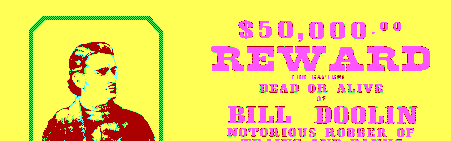
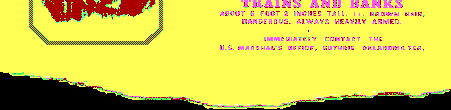
The images look to be decoding correctly. Looks like our images are actually 2 fragments of the same image. Strange they would provide width and height again, and not just have line records for the whole image. The image does seem to have a break around 32K, so maybe there was a limitation with respect to memory with how they implemented it. I’m going to have to think about that, but in the meantime let’s see if we can fix that palette. by extracting the palette from one of the PIC files. There’s one called PAL.PIC that is literally a 640×400 image of 00 pixels, which I assume is used by the game for the palette for the game, so I’ll grab that one.
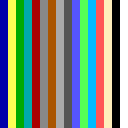
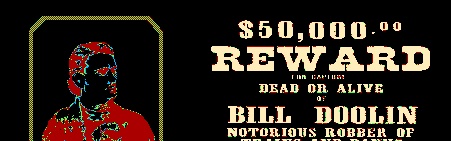

Looks like an inverted image, clearly our plane mapping is not correct. Let’s see if we can fix that. After a bit of trial and error I came up with the following arrangement. Looks like I was wrong about the pixel data, it looks like that too is being written (and read) as 16 bit values, with two planes packed into each word. Basically the first word contains Planes 0 and 1, but because of endianess it is written in reverse order, the same reversal happens for planes 2 and 3 in the 2nd word. I’ve chosen to stick with byte mapping as it makes more sense to me, so that has resulted in the following updated version of the pixel struct.
typedef struct { // order based on the appearance that the
    uint8_t p1;  // MicroProse appears to load this as 2 16 bit words
    uint8_t p0;  // hence the odd swap in the order due to little-endian
    uint8_t p3;  // byte ordering
    uint8_t p2;
} spc_pixels_t;
And that leads us to this image. At first I thought it was wrong because of the blue, but if you look at the palette reference above, you can see that 0 is blue and 14 is black. Otherwise the image looks great. I wonder if any of those unknown bytes indicate that these should be stitched together?
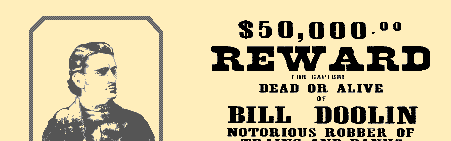
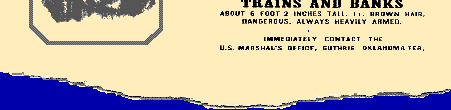
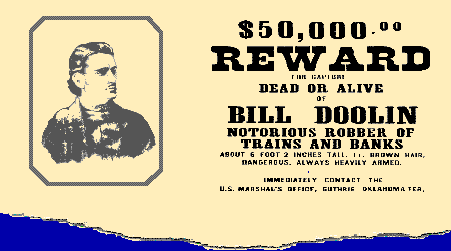
For now, I’ve forced it to stitch the two together to produce the following composite.
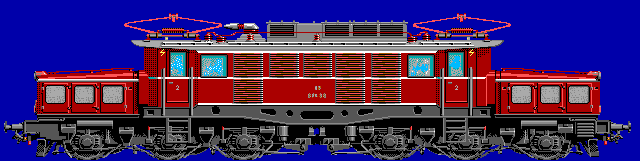
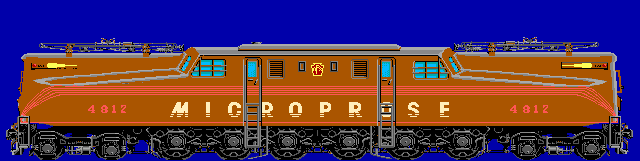
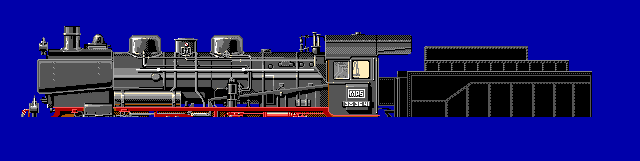
And for completeness, this is CREDIT.SPC


If I remember correctly these are part of the title animation, and the trains are animated running in opposite directions, so I believe that in this case the images should be separate.
A clearer structure
So far so good, let’s move on and grab a new file to see how we do. TYCOONS.SPC looks interesting, I know that there are a bunch of TYCOONxx.PIC files depicting pictures of various Tycoons in the game.
Analyzing: 'TYCOONS.SPC'	File Size: 64848 bytes
images: 23
unk2: 0004 (4)
unk3: 00b2 (178)
unk4: 60 01 0e 02 bc 02
Pos: 00000c (12)

*** IMAGE 0 ***
unk1: 036a (874)
unk2: 0418 (1048)
width: 1222
height: 1396
Pos: 000014 image:  0 line   0: len: 1570 unk1: 06d0 (1744)
Pos: 0018a0 image:  0 line   1: len: 65535 unk1: ffff (65535)
unexpected EOF
Creating: 'TYCOONS-000.PPM'
Pos: 00fd50 (64848)
Done
Well crap! So much for a good run, let’s look at the hex of this file to see what’s going on. 23 images? Is that real, or have we completely gotten that first word wrong? From the attempted decode of the image, we can see things are totally off as well.
File: TYCOONS.SPC  [64848 bytes]
Offset    x0 x1 x2 x3 x4 x5 x6 x7 x8 x9 xA xB xC xD xE xF  Decoded Text
0000000x: 17 00 04 00 B2 00 60 01 0E 02 BC 02 6A 03 18 04  · · · · · · ` · · · · · j · · ·
0000001x: C6 04 74 05 22 06 D0 06 7E 07 2C 08 DA 08 88 09  · · t · " · · · ~ · , · · · · ·
0000002x: 36 0A E4 0A 92 0B 40 0C EE 0C 9C 0D 4A 0E F8 0E  6 · · · · · @ · · · · · J · · ·
0000003x: 00 00 00 00 00 00 00 00 00 00 00 00 00 00 00 00  · · · · · · · · · · · · · · · ·
0000004x: 3D 00 4D 00 08 00 00 00 FF 00 FF FF FF 00 FF FF  = · M · · · · · · · · · · · · ·
0000005x: FF 00 FF FF FF 00 FF FF FF 00 FF FF FF 00 FF FF  · · · · · · · · · · · · · · · ·
0000006x: FF 00 FF FF F8 08 F0 F8 08 00 00 00 FF 7F FF FF  · · · · · · · · · · · · · · · ·


17 00: 23 image count?
04 00: 0x0004 (4) This changed from 01 00 (0x0001)
3D 00: 61 Width?
4D 00: 77 Height?
Well that is interesting, and possibly changes a lot of things as we understood them so far. Looks like the image no longer starts where we initially thought, now appears at 0x0040. Also the 2nd word, that changed from 0x0001 to 0x0004 hmmm that has my spidey senses tingling. we also now appear to have 46 bytes of data after the image count, or 23 16 bit words, so 23 is probably a legitimate value here, and it is the count. And earlier I never connected it, but whenever we had a value of 2, we had 2 non-zero values following it. So perhaps what follows the count, is some sort of index for the images? If the first one was 0x0001 and we started at 0x0010 and now it 0x0004 and we’re starting at 0x0040 it looks to be a multiple of 16. Now my spidey senses are really going off! First let’s confirm by looking at the next location of with a value of 00B2 so let’s go to 0B20.
00000B0x: FF FF 00 FF FF FF 00 FF FF FF 00 FF FF FF 00 FF  · · · · · · · · · · · · · · · ·
00000B1x: FF FF 00 FF F8 F8 00 F8 C7 CF 30 CF 1C 3C C3 3C  · · · · · · · · · · 0 · · < · <
00000B2x: 3F 00 4D 00 08 00 00 00 FF 00 FF FF FF 00 FF FF  ? · M · · · · · · · · · · · · ·
00000B3x: FF 00 FF FF FF 00 FF FF FF 00 FF FF FF 00 FF FF  · · · · · · · · · · · · · · · ·

3D 00: 63 Width?
4D 00: 77 Height?
Well would you look at that, it looks to be an image header. (without those unknown prefixed values we had before) Now for those of you who are familiar with x86 architecture, particularly Real Mode on x86 which is where we live in the DOS world. In Real Mode memory is divided into segments, and memory is addressed via a segment:offset pair, and segments are spaced? Anyone… Anyone? You got it, 16 bytes apart. So if we were to load this file in its entirety into memory, starting at the start of a segment, these values could be directly added to the segment register value to determine the segment where the image lives, clever.
Updating the structure
Now we need to make a few fundamental changes to our structures. Firstly we’ll start with our image structure, to remove those unknown values that prefixed the width and height values.
typedef struct {
    uint16_t width;  // image width
    uint16_t height; // image height
} spc_image_t;
Before we forget we need to update our scanline structure as well, as we now know what the unknown value is.
typedef struct {
    uint16_t len;   // length of line in 32bit records
    uint16_t start; // number of bytes to skip before inserting data
} spc_line_t;
Writing out the pixel data now looks something like the following.
            uint32_t yo = (y * ((width+7) / 8)); // calculating byte address here, not pixel address
            uint32_t xs = (line.start);          // additional bytes to skip
            for(int i=0; i < line.len; i++) {
                buf[0][yo+xs+i] = plane[i].p0;   // copy the data to the plane buffers
                buf[1][yo+xs+i] = plane[i].p1;
                buf[2][yo+xs+i] = plane[i].p2;
                buf[3][yo+xs+i] = plane[i].p3;
            }
Now the most fundamental changes are to the main header itself, and how we handle it. The main header really simplifies down now.
typedef struct {
    uint16_t images;     // number of entries in the offsets table
    uint16_t segments[]; // segment page offsets (1 page = 16 bytes)
} spc_hdr_t;
Because of the segment based addressing, everything must start on a 16 byte page boundary. So to read the header, we start by reading the first 16 bytes, and then resize as necessary.
    int nr = fread(hdr, PAGE, 1, fp); // read at least one page (min header size)
    if(0==nr) {
        printf("Error reading File Header\n");
        free(hdr);
        fclose(fp);
        return -1;
    }

    // check to see if we need to resize the  header
    if((hdr->entries) > 7) {

        // should probably be entries-7 here,
        // but looks like MicroProse didn't do that in their code
        uint16_t bytes = (hdr->entries) * sizeof(uint16_t);
        uint16_t pages = bytes / PAGE;
        if(bytes & 0x0f) pages++;
        pages++; // account for the first page we already have

        // lazy instead of realloc or alloc+copy+read remainder
        // we free the current one, allocate the new size, and re-read
        // the whole thing based on the new size
        free(hdr);
        if(NULL == (hdr = calloc(pages, PAGE))) {
            printf("Error allocating memory\n");
            free(hdr);
            fclose(fp);
            return -1;
        }
        fseek(fp, 0, SEEK_SET); // go back to start of file
        nr = fread(hdr, PAGE, pages, fp);
        if(0==nr) {
            printf("Error reading File Header\n");
            free(hdr);
            fclose(fp);
            return -1;
        }
    }
One thing we have to keep in mind now is that whenever we allocate for the MicroProse SPC file, we need to do so in PAGES, and not bytes. I’ve looked at the file sizes of a handful of files, and they are all exact multiples of 16. Consequently that also probably means anything we saw after the last “valid” entry in our data was likely to be uninitialized data. (Though we will still take a closer look after cleaning this up)
Validating the SPC reader
Now after adjusting our structures and read code to seek based on our page address, we get the following:
Explorer for MicroProse SPC Files
Analyzing: 'TYCOONS.SPC'	File Size: 64848 bytes
images: 23
	 0: 000040
	 1: 000b20
	 2: 001600
	 3: 0020e0
	 4: 002bc0
	 5: 0036a0
	 6: 004180
	 7: 004c60
	 8: 005740
	 9: 006220
	10: 006d00
	11: 0077e0
	12: 0082c0
	13: 008da0
	14: 009880
	15: 00a360
	16: 00ae40
	17: 00b920
	18: 00c400
	19: 00cee0
	20: 00d9c0
	21: 00e4a0
	22: 00ef80


*** IMAGE 0 ***
width: 61
height: 77
Pos: 000044 image:  0 line   0: len:  8 start: 0
   ⋮             ⋮             ⋮    ⋮         ⋮
Pos: 000af4 image:  0 line  76: len:  8 start: 0
Creating: 'TYCOONS-000.PPM'

*** IMAGE 1 ***
width: 63
height: 77
Pos: 000b24 image:  1 line   0: len:  8 start: 0
   ⋮             ⋮             ⋮    ⋮         ⋮
Pos: 0015d4 image:  1 line  76: len:  8 start: 0
Creating: 'TYCOONS-001.PPM'

*** IMAGE 2 ***
width: 61
height: 77
Pos: 001604 image:  2 line   0: len:  8 start: 0
   ⋮             ⋮             ⋮    ⋮         ⋮
Pos: 0020b4 image:  2 line  76: len:  8 start: 0
Creating: 'TYCOONS-002.PPM'

*** IMAGE 3 ***
width: 61
height: 77
Pos: 0020e4 image:  3 line   0: len:  8 start: 0
   ⋮             ⋮             ⋮    ⋮         ⋮
Pos: 002b94 image:  3 line  76: len:  8 start: 0
Creating: 'TYCOONS-003.PPM'

*** IMAGE 4 ***
width: 61
height: 77
Pos: 002bc4 image:  4 line   0: len:  8 start: 0
   ⋮             ⋮             ⋮    ⋮         ⋮
Pos: 003674 image:  4 line  76: len:  8 start: 0
Creating: 'TYCOONS-004.PPM'

*** IMAGE 5 ***
width: 61
height: 77
Pos: 0036a4 image:  5 line   0: len:  8 start: 0
   ⋮             ⋮             ⋮    ⋮         ⋮
Pos: 004154 image:  5 line  76: len:  8 start: 0
Creating: 'TYCOONS-005.PPM'

*** IMAGE 6 ***
width: 61
height: 77
Pos: 004184 image:  6 line   0: len:  8 start: 0
   ⋮             ⋮             ⋮    ⋮         ⋮
Pos: 004c34 image:  6 line  76: len:  8 start: 0
Creating: 'TYCOONS-006.PPM'

*** IMAGE 7 ***
width: 61
height: 77
Pos: 004c64 image:  7 line   0: len:  8 start: 0
   ⋮             ⋮             ⋮    ⋮         ⋮
Pos: 005714 image:  7 line  76: len:  8 start: 0
Creating: 'TYCOONS-007.PPM'

*** IMAGE 8 ***
width: 61
height: 77
Pos: 005744 image:  8 line   0: len:  8 start: 0
   ⋮             ⋮             ⋮    ⋮         ⋮
Pos: 0061f4 image:  8 line  76: len:  8 start: 0
Creating: 'TYCOONS-008.PPM'

*** IMAGE 9 ***
width: 61
height: 77
Pos: 006224 image:  9 line   0: len:  8 start: 0
   ⋮             ⋮             ⋮    ⋮         ⋮
Pos: 006cd4 image:  9 line  76: len:  8 start: 0
Creating: 'TYCOONS-009.PPM'

*** IMAGE 10 ***
width: 61
height: 77
Pos: 006d04 image: 10 line   0: len:  8 start: 0
   ⋮             ⋮             ⋮    ⋮         ⋮
Pos: 0077b4 image: 10 line  76: len:  8 start: 0
Creating: 'TYCOONS-010.PPM'

*** IMAGE 11 ***
width: 61
height: 77
Pos: 0077e4 image: 11 line   0: len:  8 start: 0
   ⋮             ⋮             ⋮    ⋮         ⋮
Pos: 008294 image: 11 line  76: len:  8 start: 0
Creating: 'TYCOONS-011.PPM'

*** IMAGE 12 ***
width: 61
height: 77
Pos: 0082c4 image: 12 line   0: len:  8 start: 0
   ⋮             ⋮             ⋮    ⋮         ⋮
Pos: 008d74 image: 12 line  76: len:  8 start: 0
Creating: 'TYCOONS-012.PPM'

*** IMAGE 13 ***
width: 61
height: 77
Pos: 008da4 image: 13 line   0: len:  8 start: 0
   ⋮             ⋮             ⋮    ⋮         ⋮
Pos: 009854 image: 13 line  76: len:  8 start: 0
Creating: 'TYCOONS-013.PPM'

*** IMAGE 14 ***
width: 61
height: 77
Pos: 009884 image: 14 line   0: len:  8 start: 0
   ⋮             ⋮             ⋮    ⋮         ⋮
Pos: 00a334 image: 14 line  76: len:  8 start: 0
Creating: 'TYCOONS-014.PPM'

*** IMAGE 15 ***
width: 61
height: 77
Pos: 00a364 image: 15 line   0: len:  8 start: 0
   ⋮             ⋮             ⋮    ⋮         ⋮
Pos: 00ae14 image: 15 line  76: len:  8 start: 0
Creating: 'TYCOONS-015.PPM'

*** IMAGE 16 ***
width: 61
height: 77
Pos: 00ae44 image: 16 line   0: len:  8 start: 0
   ⋮             ⋮             ⋮    ⋮         ⋮
Pos: 00b8f4 image: 16 line  76: len:  8 start: 0
Creating: 'TYCOONS-016.PPM'

*** IMAGE 17 ***
width: 61
height: 77
Pos: 00b924 image: 17 line   0: len:  8 start: 0
   ⋮             ⋮             ⋮    ⋮         ⋮
Pos: 00c3d4 image: 17 line  76: len:  8 start: 0
Creating: 'TYCOONS-017.PPM'

*** IMAGE 18 ***
width: 61
height: 77
Pos: 00c404 image: 18 line   0: len:  8 start: 0
   ⋮             ⋮             ⋮    ⋮         ⋮
Pos: 00ceb4 image: 18 line  76: len:  8 start: 0
Creating: 'TYCOONS-018.PPM'

*** IMAGE 19 ***
width: 61
height: 77
Pos: 00cee4 image: 19 line   0: len:  8 start: 0
   ⋮             ⋮             ⋮    ⋮         ⋮
Pos: 00d994 image: 19 line  76: len:  8 start: 0
Creating: 'TYCOONS-019.PPM'

*** IMAGE 20 ***
width: 61
height: 77
Pos: 00d9c4 image: 20 line   0: len:  8 start: 0
   ⋮             ⋮             ⋮    ⋮         ⋮
Pos: 00e474 image: 20 line  76: len:  8 start: 0
Creating: 'TYCOONS-020.PPM'

*** IMAGE 21 ***
width: 61
height: 77
Pos: 00e4a4 image: 21 line   0: len:  8 start: 0
   ⋮             ⋮             ⋮    ⋮         ⋮
Pos: 00ef54 image: 21 line  76: len:  8 start: 0
Creating: 'TYCOONS-021.PPM'

*** IMAGE 22 ***
width: 79
height: 80
Pos: 00ef84 image: 22 line   0: len: 10 start: 0
   ⋮             ⋮             ⋮    ⋮         ⋮
Pos: 00fd18 image: 22 line  79: len: 10 start: 0
Creating: 'TYCOONS-022.PPM'
Pos: 00fd44 (64836)
Done
And here is a sampling of the rendered outputs from TYCOONS.SPC. I’d call it a success.


I ran it through a bunch more files, and everything seems to be decoding correctly. I have also gone back and looked at the extra data that appears at various points, and it does appear to just be random uninitialized data, so I don’t think we need to worry about it. However that will mean that when it comes time to write a packer, we won’t be able to easily do a signature based file comparison to validate the results. Not unless I modify the references by zeroing out the uninitialized portions. (which I may very well do for a few samples)
With that I think we have it solved. So that will wrap things up for the MicroProse SPC File Format for now. I’ll come back to this at some point in the near future to write the packer to be able to make custom SPC files for the game. In the meantime I’ll leave this post with a few more extracts from the ANIMxx.SPC files, which are sprites for the title screen animations.







 Ouch my eye!
Leave a comment