Okay well maybe not the money, but the palette. As we left off in my last post, we have been looking for the palette to be able to correctly render the 256 colour images from the game. While we did find a chunk of it, a few small bits remained elusive. In one of our Email exchanges about our mutual progress on various parts of reverse engineering F15-SE2 Neuviemeporte suggested I look into the slideshow “demo” for the F-15 Desert Storm Scenario pack for the palette. It’s a great idea, and this post is in response to that.
Down the rabbit hole we go…
UPDATE: I’ve published my code related to the MPSShow format to my github profile and have released it under the MIT license. Do what you will with it, just give credit if you use it in your own code.
F15STORM prints “MPS Show (c)Microprose 1991” and shows 30 frames from F15-SE2-DS itself, perhaps you can extract the palette from that.
– Neuviemeporte
So what is F15STORM? F15STORM is an executable file that was distributed by MicroProse that was a slideshow “demo” for the F-15 Desert Storm Scenario Pack which adds additional missions onto F-15 Strike Eagle II. The slideshow shows a number of screen captures form the game. From The quote above, looks like the base program is something called “MPS Show” which must be an in-house developed slideshow program, and it appears to contain 30 images. One challenge is that the entire demo, including images, is contained in a single EXE file. As a result getting at the images, and palettes, is going to take a little reverse-engineering. So in the words of the illustrious Dave Jones of EEVblog, “Don’t turn it on… take it apart!“
First steps
-rw-rw-r-- 557147 18 May 1990 F15STORM.EXEInfo for 'F15STORM.EXE' File is 557147 bytes
Signature: 'MZ' - MSDOS Executable
EXE reported size: 12272 bytes [2ff0]
IP: 00b8
checksum: 0000First thing to do is take a look in the hex editor to see if this is a compressed file, and if we can see any data that would suggest being the images.

Well this is a good sign that the file isn’t compressed. The top part seems to be just the actual executable, this is then followed by a long block of 0x00 before finally being broken at around 61A0 well past the file size as stated by the EXE header. Not sure the purpose of all the null data, but it appears that some sort of data file has been appended onto the end. So perhaps the null data is required for the attached executable to be able to find it? not sure, but it doesn’t really matter, we can see from the hex view the data we’re interested in looks start somewhere after 61A0.
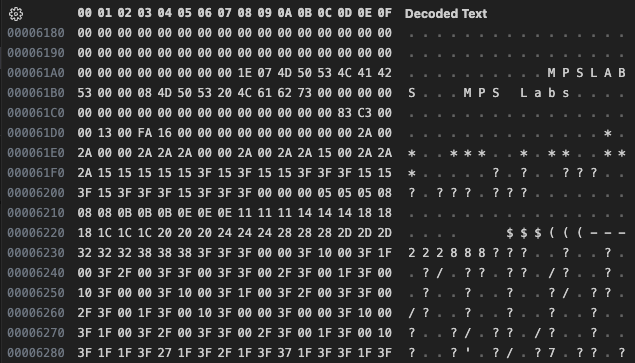
From what we can see it looks like we have some text, and what appears to be palette data. Continuing to scan we see this pattern repeating on a regular basis, but far too soon to contain the image data. These appear to be informational records about the slides themselves.

Looks like the first bit of text is perhaps the filename, followed by a description. Going from filename to filename as landmarks, the blocks all appear to be 835 bytes long. Plenty large to hold a full 256 colour palette so this is really looking good for being able to extract a palette. After all these informational records we see what looks to be the start of some image data at around C380 (this is around where I would have expected the next info record to be).

The image data doesn’t appear to be in the PIC format we’ve been reverse-engineering. Perhaps it’s raw uncompressed image data. Though it doesn’t really matter, if the palette data we’re looking for is contained in the info records. Next we need to establish the actual extent of the records, and see if we can determine where the palette sits in all of it.
In hindsight, it is obvious the image data is RLE encoded as 16 bit entries, with the first 8 bits of every entry being the count, and the 2nd 8 bits being the pixel value. I didn’t see it right away at the time though, it came to me in one of those “sitting on the throne” moments, later that evening.
Finding the record extents
Going back to the first non-zero byte in the data I noticed something.

The very first byte is 0x1E or 30 in decimal, and we have 30 slides, this looks like it could be the number of slides in the show. Then I noticed something peculiar before each of the strings before the text.


The strings appear to be length prefixed. Looking at the other records seems to confirm this. This suggests that MPS Show was written in Pascal though I did not see any compiler, runtime, or linker information in any of the data segments, so it must have been scrubbed out. This information isn’t likely to help us much here, only that any strings will be length prefixed. Next looking at the beginning of the following record we see.

This indicates to me that the record boundary happens between the length prefix for the filename string, and the byte before. As that allows the record count byte to sit outside the record. That means the first record spans from 61A9 to 64EB for a total of 835 bytes, which we had previously established as the length. Now lets calculate the total length for the records 835 * 30 = 25,050 Bytes Add that to the start of our first record 0x61A9 + 25, 050 = 0xC383 which should be the start of our image data. Looking at the data we can see that does indeed appear to be the case.

Establishing the record layout.
We’ve already established that the strings are Pascal style strings with a length prefix. For the time being we will assume that the first strings allotted space ends just before the 2nd. That means that the first string takes up 10 bytes, including the length. Now looking back at the record we can see that the first non-zero byte after the text occurs 26 bytes later. For now we will assume that this is where the 2nd string ends.

Then we can see the next 2 bytes form 0xC383, which if you remember this is where we calculated the image data to begin. The two bytes after that are 0x0000, and the fact that this file is way over 64K in size, I’m going to assume that this next value is the image offset, and is stored as a 32bit value forming 0x0000c383

This is a pretty good start, and with that we can read in the records, and make sure that what we have is good so far. This gives us a record that looks like the following. As the data is not 32-bit aligned, the record will need to be PACKED the method for declaring that is compiler, and even version dependant. I’m showing what needs to be done for the version of GCC I am using, and may need to be different for you (highlighted). Also as we are ending the record with a variable length array, so that we can access those bytes if we want. We will need to be sure to not use sizeof(info_t) when we use fread(), instead we want to tell fread() that our length is 835 bytes. Also, while GCC does have a non-portable way of specifying a Pascal type string, I’m not willing to go that far with the non-portable bits of code here, so instead I’m going to do it manually. (there is no portable way around packing, but there is a portable way around a Pascal string)
#pragma pack(push,1)
typedef struct {
    uint8_t name_len;
    char    name[9];
    uint8_t desc_len;
    char    desc[25];
    uint32_t img_offset;
    uint8_t unknown[];
} info_t;
#pragma pack(pop)
So to read in the records and print them we can do something like the following. Note the careful handling of the strings in the printf() to ensure we only print as many characters as the string says it contains. (ignore the lack of any other error checking, this is just rough test code)
    FILE *fp = fopen("F15STORM.EXE", "rb");
    fseek(fp, 0x61a8, SEEK_SET); // seek to the start of data we found

    uint num_slides = fgetc(fp); // get the number of slides
    printf("Number of slides: %d\n", num_slides);

    info_t *tinfo = (info_t *)calloc(1,835);

    for(uint i=0; i<num_slides; i++) {
        fread((void *)&tinfo, 835, 1, fp);

        printf("%2d: %9.*s - %-25.*s ofs:%06x\n", i,
            tinfo[i].name_len, tinfo[i].name,
            tinfo[i].desc_len, tinfo[i].desc,
            tinfo[i].img_offset);
    }
And when we run it we get the following:
Number of slides: 30
 0:   MPSLABS - MPS Labs                  ofs:00c383
 1:     MENU1 - Menu 1                    ofs:00da7d
 2:     MENU2 - Menu 2                    ofs:01598f
 3:     MENU3 - Menu 3                    ofs:01d5e5
 4:  CARRIERN - carrier nice              ofs:025cd9
 5:  REARCARR - rear carrier view         ofs:026035
 6:   TAKEOFF - Take off                  ofs:0267ad
 7:  CLIMBOUT - climb out view            ofs:02af09
 8:  LEFTVIEW - left view                 ofs:02b325
 9:  PIOLTBAC - piolt back                ofs:02e2c5
10:  RIGHTVIE - right view                ofs:03195b
11:  PLANESHO - plane shoy down           ofs:03454f
12:  CLIMBVIE - climb view                ofs:03959f
13:  CLIMBLOC - climb lock on             ofs:039aaf
14:  BETTERCL - better climb lock on      ofs:03e9db
15:  PLANECLI - plane climb explosion     ofs:04361f
16:  15CLIMBI - 15 climbing outside view  ofs:0483d7
17:  BIOWEACP - bio wea cp                ofs:048999
18:     BIOCP - bio cp                    ofs:04e0ef
19:  BIOCLOSE - bio close cp              ofs:053a41
20:  EXPLOSIO - explosion                 ofs:0590f7
21:  REAROUTS - Rear outside f view       ofs:0593ef
22:  PETREFCP - pet ref cp                ofs:0599f9
23:  GREATREF - great ref close mis loc   ofs:05f68d
24:  GREATCLO - great closer lock on      ofs:064985
25:  AIRBASEV - air base view             ofs:069e07
26:  NICEAIRB - nice air base view        ofs:06ff15
27:  PILOTVIE - pilot view                ofs:07528d
28:  CARRIERL - carrier landing           ofs:0792df
29:  BEBRIEFI - bebriefing                ofs:07deb5
file position at 00c383
Well that worked swimmingly, all the data appears to have read in correctly, and we ended in the right place at the start of the image data. And with the length of the description on slide 16, I think our initial length guess was correct. With the data we can now calculate the image length, by subtracting the start of the first image from the start of the second. Then we can look to see if this length value is encoded anywhere in the first record. 0xDA7D - 0xC383 = 0x16FA.

Once again we can see it in the record, so we can assume that this field is the image data length, and I’m going to assume this is a 32 bit value again. Another thing we can establish here is that the images must be compressed, otherwise for 320×200 they lengths would need to all be 64,000 (0xFA00). While we can actually see oxFA00 in the capture here, it does not show up again in the next slides data. Now curiously the image length does not immediately follow the image offset. We have another 16 bits of data 0x0013 (19 decimal) in there, and scanning through the records, all of them have this value at that location. Perhaps this pertains to the graphics mode to display in (mode13h for 256 colours). Or perhaps this is defining how the image data is encoded. I think we can proceed without this knowledge for now, as it remains constant, we just need to account for its presence. I’ll call it “mode” in our record. Let’s add the new fields to the record, and print out the values as well. As a sanity check I’ll also print the calculated image data length, by subtracting the image offset, from the image offset of the next image.
Number of slides: 30
 0:   MPSLABS - MPS Labs                  ofs:00c383 len:5882   mode:13h [calc len: 5882  ]
 1:     MENU1 - Menu 1                    ofs:00da7d len:201359122 mode:13h [calc len: 32530 ]
 2:     MENU2 - Menu 2                    ofs:01598f len:31830  mode:13h [calc len: 31830 ]
 3:     MENU3 - Menu 3                    ofs:01d5e5 len:34548  mode:13h [calc len: 34548 ]
 4:  CARRIERN - carrier nice              ofs:025cd9 len:860    mode:13h [calc len: 860   ]
 5:  REARCARR - rear carrier view         ofs:026035 len:151193464 mode:13h [calc len: 1912  ]
 6:   TAKEOFF - Take off                  ofs:0267ad len:235816796 mode:13h [calc len: 18268 ]
 7:  CLIMBOUT - climb out view            ofs:02af09 len:1052   mode:13h [calc len: 1052  ]
 8:  LEFTVIEW - left view                 ofs:02b325 len:12192  mode:13h [calc len: 12192 ]
 9:  PIOLTBAC - piolt back                ofs:02e2c5 len:13974  mode:13h [calc len: 13974 ]
10:  RIGHTVIE - right view                ofs:03195b len:11252  mode:13h [calc len: 11252 ]
11:  PLANESHO - plane shoy down           ofs:03454f len:20560  mode:13h [calc len: 20560 ]
12:  CLIMBVIE - climb view                ofs:03959f len:1296   mode:13h [calc len: 1296  ]
13:  CLIMBLOC - climb lock on             ofs:039aaf len:20268  mode:13h [calc len: 20268 ]
14:  BETTERCL - better climb lock on      ofs:03e9db len:19524  mode:13h [calc len: 19524 ]
15:  PLANECLI - plane climb explosion     ofs:04361f len:19896  mode:13h [calc len: 19896 ]
16:  15CLIMBI - 15 climbing outside view  ofs:0483d7 len:1474   mode:13h [calc len: 1474  ]
17:  BIOWEACP - bio wea cp                ofs:048999 len:22358  mode:13h [calc len: 22358 ]
18:     BIOCP - bio cp                    ofs:04e0ef len:22866  mode:13h [calc len: 22866 ]
19:  BIOCLOSE - bio close cp              ofs:053a41 len:22198  mode:13h [calc len: 22198 ]
20:  EXPLOSIO - explosion                 ofs:0590f7 len:760    mode:13h [calc len: 760   ]
21:  REAROUTS - Rear outside f view       ofs:0593ef len:1546   mode:13h [calc len: 1546  ]
22:  PETREFCP - pet ref cp                ofs:0599f9 len:23700  mode:13h [calc len: 23700 ]
23:  GREATREF - great ref close mis loc   ofs:05f68d len:21240  mode:13h [calc len: 21240 ]
24:  GREATCLO - great closer lock on      ofs:064985 len:21634  mode:13h [calc len: 21634 ]
25:  AIRBASEV - air base view             ofs:069e07 len:24846  mode:13h [calc len: 24846 ]
26:  NICEAIRB - nice air base view        ofs:06ff15 len:184570744 mode:13h [calc len: 21368 ]
27:  PILOTVIE - pilot view                ofs:07528d len:16466  mode:13h [calc len: 16466 ]
28:  CARRIERL - carrier landing           ofs:0792df len:19414  mode:13h [calc len: 19414 ]
29:  BEBRIEFI - bebriefing                ofs:07deb5 len:41382  mode:13h [calc len: 41382 ]
end of info data at 00c383
Well that’s certainly not right, let’s try again, with the length field set to 16 bits.
Number of slides: 30
 0:   MPSLABS - MPS Labs                  ofs:00c383 len:5882   mode:13h [calc len: 5882  ]
 1:     MENU1 - Menu 1                    ofs:00da7d len:32530  mode:13h [calc len: 32530 ]
 2:     MENU2 - Menu 2                    ofs:01598f len:31830  mode:13h [calc len: 31830 ]
 3:     MENU3 - Menu 3                    ofs:01d5e5 len:34548  mode:13h [calc len: 34548 ]
 4:  CARRIERN - carrier nice              ofs:025cd9 len:860    mode:13h [calc len: 860   ]
 5:  REARCARR - rear carrier view         ofs:026035 len:1912   mode:13h [calc len: 1912  ]
 6:   TAKEOFF - Take off                  ofs:0267ad len:18268  mode:13h [calc len: 18268 ]
 7:  CLIMBOUT - climb out view            ofs:02af09 len:1052   mode:13h [calc len: 1052  ]
 8:  LEFTVIEW - left view                 ofs:02b325 len:12192  mode:13h [calc len: 12192 ]
 9:  PIOLTBAC - piolt back                ofs:02e2c5 len:13974  mode:13h [calc len: 13974 ]
10:  RIGHTVIE - right view                ofs:03195b len:11252  mode:13h [calc len: 11252 ]
11:  PLANESHO - plane shoy down           ofs:03454f len:20560  mode:13h [calc len: 20560 ]
12:  CLIMBVIE - climb view                ofs:03959f len:1296   mode:13h [calc len: 1296  ]
13:  CLIMBLOC - climb lock on             ofs:039aaf len:20268  mode:13h [calc len: 20268 ]
14:  BETTERCL - better climb lock on      ofs:03e9db len:19524  mode:13h [calc len: 19524 ]
15:  PLANECLI - plane climb explosion     ofs:04361f len:19896  mode:13h [calc len: 19896 ]
16:  15CLIMBI - 15 climbing outside view  ofs:0483d7 len:1474   mode:13h [calc len: 1474  ]
17:  BIOWEACP - bio wea cp                ofs:048999 len:22358  mode:13h [calc len: 22358 ]
18:     BIOCP - bio cp                    ofs:04e0ef len:22866  mode:13h [calc len: 22866 ]
19:  BIOCLOSE - bio close cp              ofs:053a41 len:22198  mode:13h [calc len: 22198 ]
20:  EXPLOSIO - explosion                 ofs:0590f7 len:760    mode:13h [calc len: 760   ]
21:  REAROUTS - Rear outside f view       ofs:0593ef len:1546   mode:13h [calc len: 1546  ]
22:  PETREFCP - pet ref cp                ofs:0599f9 len:23700  mode:13h [calc len: 23700 ]
23:  GREATREF - great ref close mis loc   ofs:05f68d len:21240  mode:13h [calc len: 21240 ]
24:  GREATCLO - great closer lock on      ofs:064985 len:21634  mode:13h [calc len: 21634 ]
25:  AIRBASEV - air base view             ofs:069e07 len:24846  mode:13h [calc len: 24846 ]
26:  NICEAIRB - nice air base view        ofs:06ff15 len:21368  mode:13h [calc len: 21368 ]
27:  PILOTVIE - pilot view                ofs:07528d len:16466  mode:13h [calc len: 16466 ]
28:  CARRIERL - carrier landing           ofs:0792df len:19414  mode:13h [calc len: 19414 ]
29:  BEBRIEFI - bebriefing                ofs:07deb5 len:41382  mode:13h [calc len: 41382 ]
end of info data at 00c383
Much better, so it looks like the length field is actually only 16 bits. At this point we’re getting really close to where the palette data looks to begin. If these images are raw screen captures, then the palette should be “normal” meaning that the first 16 entries should be the usual CGA/EGA values. Let’s look at what those values should be and then see if we can line that up with what we see in the datastream.
  {0x00,0x00,0x00}, {0x00,0x00,0x2a}, {0x00,0x2a,0x00}, {0x00,0x2a,0x2a},
  {0x2a,0x00,0x00}, {0x2a,0x00,0x2a}, {0x2a,0x15,0x00}, {0x2a,0x2a,0x2a},
  {0x15,0x15,0x15}, {0x15,0x15,0x3f}, {0x15,0x3f,0x15}, {0x15,0x3f,0x3f},
  {0x3f,0x15,0x15}, {0x3f,0x15,0x3f}, {0x3f,0x3f,0x15}, {0x3f,0x3f,0x3f},
And sure enough we can see that the first 16 entries do appear.

That leaves us with 32 bits of unknown data after the length and before the palette. Lets store those 32bits as a single value and print the hex to see what is going on with them.
Number of slides: 30
 0:   MPSLABS - MPS Labs                  ofs:00c383 len:5882   mode:13h [00000000]
 1:     MENU1 - Menu 1                    ofs:00da7d len:32530  mode:13h [00000c00]
 2:     MENU2 - Menu 2                    ofs:01598f len:31830  mode:13h [00000000]
 3:     MENU3 - Menu 3                    ofs:01d5e5 len:34548  mode:13h [00000000]
 4:  CARRIERN - carrier nice              ofs:025cd9 len:860    mode:13h [00000000]
 5:  REARCARR - rear carrier view         ofs:026035 len:1912   mode:13h [0b0b0903]
 6:   TAKEOFF - Take off                  ofs:0267ad len:18268  mode:13h [0e0e0e0e]
 7:  CLIMBOUT - climb out view            ofs:02af09 len:1052   mode:13h [00000000]
 8:  LEFTVIEW - left view                 ofs:02b325 len:12192  mode:13h [00000000]
 9:  PIOLTBAC - piolt back                ofs:02e2c5 len:13974  mode:13h [00000000]
10:  RIGHTVIE - right view                ofs:03195b len:11252  mode:13h [00000000]
11:  PLANESHO - plane shoy down           ofs:03454f len:20560  mode:13h [00000000]
12:  CLIMBVIE - climb view                ofs:03959f len:1296   mode:13h [00000000]
13:  CLIMBLOC - climb lock on             ofs:039aaf len:20268  mode:13h [000d0000]
14:  BETTERCL - better climb lock on      ofs:03e9db len:19524  mode:13h [00000000]
15:  PLANECLI - plane climb explosion     ofs:04361f len:19896  mode:13h [00000000]
16:  15CLIMBI - 15 climbing outside view  ofs:0483d7 len:1474   mode:13h [00000000]
17:  BIOWEACP - bio wea cp                ofs:048999 len:22358  mode:13h [00000000]
18:     BIOCP - bio cp                    ofs:04e0ef len:22866  mode:13h [00000000]
19:  BIOCLOSE - bio close cp              ofs:053a41 len:22198  mode:13h [00000000]
20:  EXPLOSIO - explosion                 ofs:0590f7 len:760    mode:13h [00000000]
21:  REAROUTS - Rear outside f view       ofs:0593ef len:1546   mode:13h [00000000]
22:  PETREFCP - pet ref cp                ofs:0599f9 len:23700  mode:13h [00000000]
23:  GREATREF - great ref close mis loc   ofs:05f68d len:21240  mode:13h [00000000]
24:  GREATCLO - great closer lock on      ofs:064985 len:21634  mode:13h [00000000]
25:  AIRBASEV - air base view             ofs:069e07 len:24846  mode:13h [00000000]
26:  NICEAIRB - nice air base view        ofs:06ff15 len:21368  mode:13h [0b0b0b00]
27:  PILOTVIE - pilot view                ofs:07528d len:16466  mode:13h [00000000]
28:  CARRIERL - carrier landing           ofs:0792df len:19414  mode:13h [00000000]
29:  BEBRIEFI - bebriefing                ofs:07deb5 len:41382  mode:13h [00000000]
end of info data at 00c383
Seems to be predominantly 0x00000000, and most of the ones that are not seem to almost look like palette data. I wonder if this isn’t just some uninitialized data. Hopefully we can ignore this for now. I think next is to add in an array of 256 RGB triplets to our structure, after the unknown32 bits. And dump them out as PAL files.
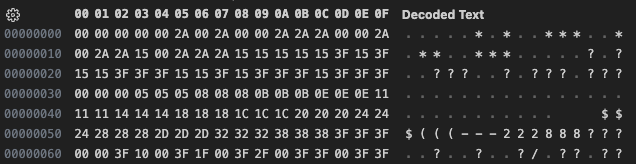
After scanning through all 30 generated palettes, the data all looks to be reasonable. I’m thinking we want to dump the images and see if we can render them, to validate the palettes. I think we have enough of the structure at this point that we can ignore the 19 bytes that remain after the palette data. So let’s add some code to Extract the palette, and the image data as-is. Then we can take a closer look at the image data and see if we can figure it out. If all these images expand out to 320×200 (64,000 bytes), some of those images have very impressive compression ratios. “CARRIERN” has a compressed size of only 860 bytes, “EXPLOSIO” is even smaller at 760 bytes!
The image data
After extracting all the data, we are left with 30 PAL files each 768 bytes containing what should be the image palette data. We also have 30 MPS files containing the 30 compressed images. Now we need to examine the image data to see if we can determine the encoding.

The first thing I noticed is that the data appears to follow a very regular pattern. Despite noticing the pattern, the obvious fact that this is the most basic form of RLE encoding eluded me for longer than I care to admit. With that said, this is indeed very basic RLE encoding, where every entry is 16 bits, the first 8 bits are the count, and the 2nd 8 bits are the value. So all that’s left is to code it up, and render an image.
    uint src_pos = 0;
    uint dst_pos = 0;
    while(src_pos < src_len) {
        uint8_t count = src[src_pos++];
        uint8_t pix = src[src_pos++];

        for(uint i=0; i<count; i++) {
            dst[dst_pos++] = pix;
        }
    }
And that is pretty much it. Lets decompress the image data, and render it using the associated extracted palette.

Looks like we have it. Let’s take a look at some of the other ones. I’m particularily intersted in the images that were very small once compressed, here they are.


That is amazing 760 bytes expanding to 64,000, if only we could get that kind of compression with everything. Finally the candidate image for where we will pull the pallete from for our PIC renderings
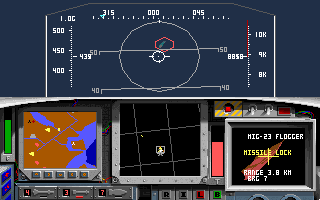
And that’s pretty much it. I may come back to this to try and figure out the other bits, and possibly write an encoder/repacker so that we can make our own slideshows, but for now we have more than we need to wrap up on the PIC rendering.
Now that we have a palette, lets see how our PIC files render with it.


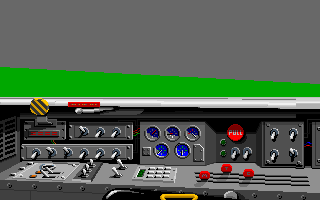
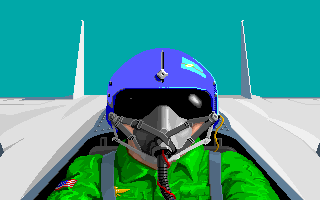
Everything looks as it should now, though I’ll be honest, I liked the olive green on the screens better, it gave it more of a phosphor feel, not that you ever see it in game.

This is the final of the backlogged posts on my efforts with the PIC file format. I largely paused my efforts on the decoding effort to document everything I had done to this point, and in some cases recreating the steps I had taken in order to generate the imagery at some of the mid-steps, but overall is pretty accurate to my progress. Next steps at this point will be to write a PIC88 encoder, and that is where I think we will pick up next time.
This post is part of a series of posts surrounding my reverse engineering efforts of the PIC file format that MicroProse used with their games. Specifically F-15 Strike Eagle II (Though I plan to trace the format through other titles to see if and how it changes). To read my other posts on this topic you can use this link to my archive page for the PIC File Format which will contain all my posts to date on the subject.


 Ouch my eye!
Leave a comment