In my last post we solved the last secret of the PIC file format we have been looking at. But the image itself contains one more secret… the colour palette. Unlike more recent incarnations of the PIC file format, which have a companion PAL file, the PIC88 version used by F19 and F15-SE2 does not. In this post we will endeavour to locate the custom palette utilized by the game.
In reality, the discoveries about the Format Identifier are more recent than my ventures here, in fact that was pretty much a real-time post, and was the first bit of new work I’ve done on the format since I started blogging about it. The work to hunt for “The Palette” took place between May 23, 2024 and May 25, 2024. It was a fun few days and involved reverse engineering yet another MicroProse file format. Enjoy!
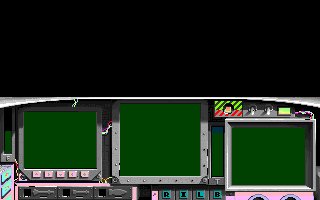
As a reminder this is where we left off with the decoded image, using the default mode13h colour palette.As we can see a number of elements are still off, the most obvious being the large pink area near the bottom of the cockpit view.
Where to look?
So where do we look for the missing palette data? It’s either going to be in a data file, or in the data segment of one of the executable files. We can pretty much rule out the data files, as they mostly appear to be directly related to flight scenarios, and have a “3D*” extension, so appear to be related to the 3D data used for the terrain mapping. The few outliers are easily identifiable as something else from their name. So that leaves us with the executable files, and the game has several of them so we need to narrow things down a bit further. As we are dealing with graphics here, we can easily rule out anything to do with sound. From Neuviemeporte’s journal, we can rule out a few others. SU.EXE as this is the set-up called before the game starts. F15.COM as this is our main entry and simply loads all the other parts, based on the selections made during set-up. DS.EXE as this appears to be for prompting for, or checking if disks need to be swapped when playing from floppy. We can also rule out MISC.EXE, as it is too small, a full palette would be at least 768 bytes. Even if it was only a partial palette, this is likely too small for the palette and data. Both START.EXE and END.EXE can also be removed, as they are not part of the normal gameplay portion, and not using 256 colour assets at those stages. That leaves us with EGAME.EXE the game itself. The palette could be here, but this is also common to any graphics output, so it might be more likely in with the graphics code found in the *GRAPHIC.EXE files. With the GRAPHIC executable files we can eliminate most of those as well. CGRAPHIC.EXE likely for CGA graphics, no palette there, so not applicable. EGRAPHIC.EXE likely for EGA graphics, again no palette so not applicable. TGRAPHIC.EXE likely for Tandy graphics, again no palette so not applicable. That leaves us with MGRAPHIC.EXE likely for MCGA (also VGA) graphics, this is the where the 256 colour mode lives, and our most likely candidate so we will start there.
-rw-r--r--   9252 29 Aug  1989 ASOUND.EXE
-rw-r--r--  15951 12 Jul  1989 CGRAPHIC.EXE
-rw-r--r--   9715 28 Jun  1989 DS.EXE
-rw-r--r--  86963 29 Aug  1989 EGAME.EXE
-rw-r--r--  15881 10 Jul  1989 EGRAPHIC.EXE
-rw-r--r--  29739 18 Aug  1989 END.EXE
-rw-r--r--   8846 12 Mar  1992 F15.COM
-rw-r--r--   2918 29 Aug  1989 ISOUND.EXE
-rw-r--r--  10586 12 Jul  1989 MGRAPHIC.EXE
-rw-r--r--    689 26 Sep  1988 MISC.EXE
-rw-r--r--    635 11 Jul  1989 NSOUND.EXE
-rw-r--r--  35525 29 Aug  1989 START.EXE
-rw-r--r--  15183  4 Nov  1992 SU.EXE
-rw-r--r--  11486 12 Jul  1989 TGRAPHIC.EXE
-rw-r--r--   3264 29 Aug  1989 TSOUND.EXE
Digging into MGRAPHIC.EXE
To look into the files I’m going to switch up and use VS Code and a Hex viewer/editor plugin, instead of my usual command line tools, as this will make scanning through the executable file to find the data segments much faster. It also allows me to introspect on values which can be helpful. Given the palette is likely to be a large block of data, that is not easily calculated algorithmicly, it stands to reason it would exist in the init data portion. So using the hex view I looked at MGRAPHIC.EXE to where the init data appeared to be located, and then looked for patterns in the data that could be palette data. Given how a palette is generally arranged, it should have a fair amount of repeating values, and have a fairly regular pattern to it. This highlighted area caught my eye at first.

However on further inspection and thought, this is not likely it. Firstly as the VGA DAC is 18 bits (6 bits per colour channel) I would expect the values to be limited to the range 0-63 (0x00 to 0x3F), we are clearly exceeding that here. Secondly as we are looking for RGB triplets, and the displayed lines here are 16 bytes, I would expect to see a shift in the pattern from line to line in a helical manner. So I don’t think this is it… but nonetheless is an interesting block. For reference lets look at a PAL file from a later game to see what the data might look like. These particular files are exactly 768 bytes long, so would only contain 256 RGB triplets, even later versions added some header info.
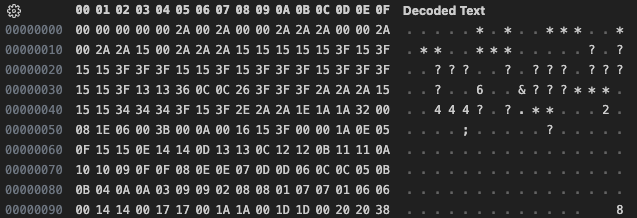
More alignment than I expected here, but that may be just coincidental with how the first 16 colours (typically the CGA/EGA palette) are arranged. But we do have some good visual clues here with the asterisks (0x2A), and question marks(0x3f) in the ASCII portion of the view. I’m not expecting the beginning to look exact, though this does appear to be the standard CGA/EGA colours to start off. Armed with a visual reference now, I took another look at MGRAPHIC.EXE and spotted this, not far from where I was before.
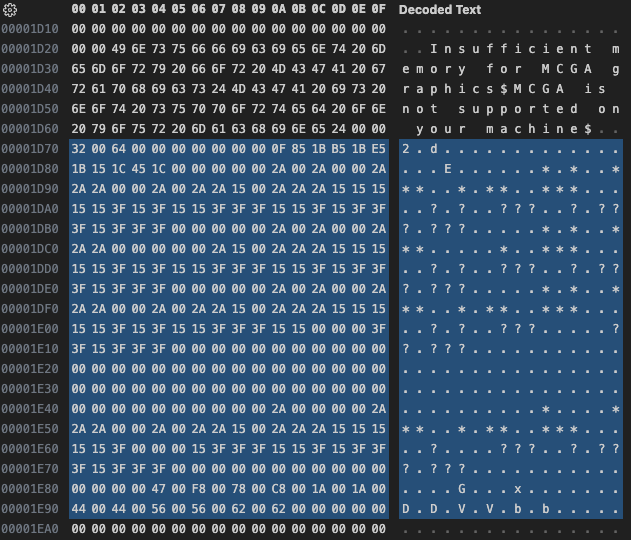
Now this is looking much better, though far too short to be a full 256 colour palette. Then I noticed the value at 1D70

Could this be a start index? 50 is certainly close one of colours I identified in the image that appeared “off”. Looking at the RAW output from our stand-alone programs, I scanned back about 10 bytes from the end of the file and looked at the value, which was 80 (0x50). The value at 1D72 that follows our potential start index seems to support our hypothesis here.

Possibly a count, or end index? 100 certainly seems reasonable, and with some quick math there are 300 valid looking values, so most likely a count. This isn’t a full palette, but perhaps enough to cover the customized portion of the standard palette used by the game, and certainly includes our sampled colour. Now just to extract this, and then somehow apply it to our image rendering code.
So I did just that. I wrote a quick little program to extract the 304 bytes starting at 1D70 and wrote them out as a PAL file. I then updated our PIC rendering program to accept a PAL file as a parameter that consisted of a 16 bit start index, followed by a 16 bit count, followed by count * 3 RGB entries, and then overlay those values onto the default palette starting at the start index. Using the modified palette this is the rendered result.
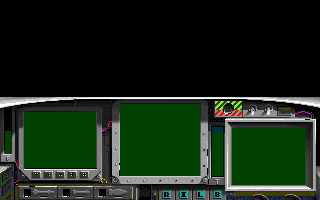
Well that certainly cleaned things up, the pink at the bottom is gone. but the exposed wires and the caution bars are still wrong. Looking around some more, I could see some blocks that looked to be in the correct range, but couldn’t make out any additional delimiters like the start index and length values we had, so I wouldn’t be able to locate them very easily. So perhaps there is palette data in the main game executable after all. let’s take a look at that next.
Digging into EGAME.EXE
The process here is exactly the same as before, to scan through and try and find anything that looks like it may be palette data. I found what looks to be a rather large palette block, in fact it is larger than 768 bytes. Unfortunately I couldn’t locate any obvious boundaries, start indices, counts, or even the typical EGA palette to use as an anchor.
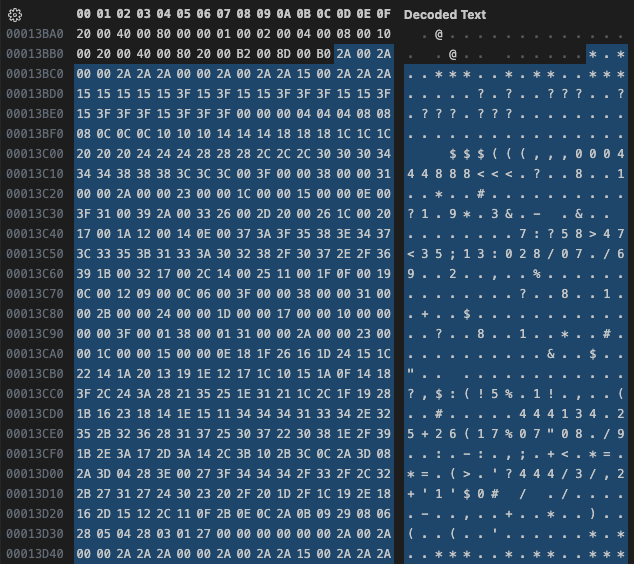

I imagine this is several sub-palettes grouped together, but unfortunately their corresponding insertion indices and counts are decoupled, so not much good here, without actual code analysis, which I”m not prepared to do, I leave that task to Neuviemeporte. So I will have to look elsewhere for the palette. It was actually Neuviemeporte that suggested I look at one of the slideshow demos (F15STORM to be exact, the demo for the Desert Storm scenario pack) for the palette, as they contain a series of screen captures from the game. This could work, as long as the palette hasn’t been manipulated, but that will have to be the topic for my next post, as this is going to be a whole new rabbit-hole.
This post is part of a series of posts surrounding my reverse engineering efforts of the PIC file format that MicroProse used with their games. Specifically F-15 Strike Eagle II (Though I plan to trace the format through other titles to see if and how it changes). To read my other posts on this topic you can use this link to my archive page for the PIC File Format which will contain all my posts to date on the subject.

 Ouch my eye!
Leave a comment